Non-VoIP Number: What It Is and Why Apps Ask for One
A non-VoIP number is issued by a mobile or landline carrier. Learn how apps detect VoIP lines, which services refuse them and how to pick a number that works.
By the DuoTalk team · Published 2026-10-18 · Updated 2026-11-11
A non-VoIP number is a phone number that a mobile or landline carrier issues and runs on its own network, instead of a number created by an internet calling service. If an app has told you "this phone number is not supported" or "please use a mobile number", it has almost certainly looked up your number, seen that it belongs to a VoIP range, and refused to send the code. This guide explains what the label means, how apps tell the two types apart, which services refuse VoIP numbers in 2026, and how to choose a number that has a real chance of being accepted.
The short answer: A non-VoIP number is a phone number that a traditional carrier assigns to a mobile SIM or a landline, so number lookups report it as "mobile" or "landline" instead of "VoIP". Many apps check this line type before they send an SMS code, and some refuse VoIP numbers because those can be created online in bulk. A non-VoIP number raises your chance of acceptance, but no number type is ever guaranteed to work.
What a non-VoIP number is
A non-VoIP number is any phone number whose registered line type is "mobile" or "landline", meaning a licensed carrier assigned it to a SIM card or a fixed telephone line. The opposite, a VoIP number, is a number assigned to an internet calling service (Voice over Internet Protocol) that carries calls and texts as data.
The confusing part is that both kinds look identical. A US number such as +1 555 010 0199 does not tell you by its digits whether it sits on a SIM in someone's phone or in a cloud calling account. The difference lives in telecom databases that record which company holds the number and what type of line it is.
It helps to separate three ideas that people often mix up:
- Line type is the official category of the number (mobile, landline, VoIP and a few others). This is what "non-VoIP" refers to.
- Delivery method is how the message reaches you: a phone with a SIM, a desktop app, a web inbox. A number can be read in a web inbox and still be registered as mobile.
- Ownership is who controls the number over time: you, your employer, a carrier, or a provider that rents it to you.
So "virtual" and "VoIP" are not the same thing. A virtual number is any number you use without it being the SIM in your own phone. Some virtual numbers are VoIP numbers; others are mobile numbers held by a provider and made readable online, the way a private SMS verification service works. When a site says "non-VoIP virtual number", it means the second kind: the line type reads as mobile even though you use it through a website.
The line types you will see in a lookup
Commercial lookup services return a short code for each number. Twilio's Lookup documentation, one of the most widely used, lists these types:
| Line type | What it means | Typical result for SMS codes |
|---|---|---|
| mobile | A number on a mobile network, normally tied to a SIM | Usually accepted |
| landline | A fixed telephone line | Usually cannot receive SMS; some apps offer a voice call instead |
| fixedVoip | A VoIP number tied to a physical device or address, such as home phone service from a cable company | Mixed; refused by stricter apps |
| nonFixedVoip | A VoIP number obtained online with no physical device, such as Google Voice | Most often refused |
| tollFree, premium, sharedCost, uan | Special-rate or routing numbers | Almost always refused |
| personal, voicemail, pager | Rare special categories | Usually refused |
| unknown | A valid number whose type could not be determined | Depends on the app's policy |
The split between fixed and non-fixed VoIP matters. A fixed VoIP line is linked to a street address and usually to a paying customer, so it carries a little more identity. A non-fixed VoIP number can be created in minutes with only an email account, which is exactly why fraud teams treat it with suspicion.
VoIP vs non-VoIP numbers at a glance
The core difference between VoIP and non-VoIP numbers is who issues them and what a lookup reports: carriers issue non-VoIP numbers and lookups show "mobile" or "landline", while internet calling providers issue VoIP numbers and lookups show "VoIP". Everything else, including how apps treat them, follows from that.
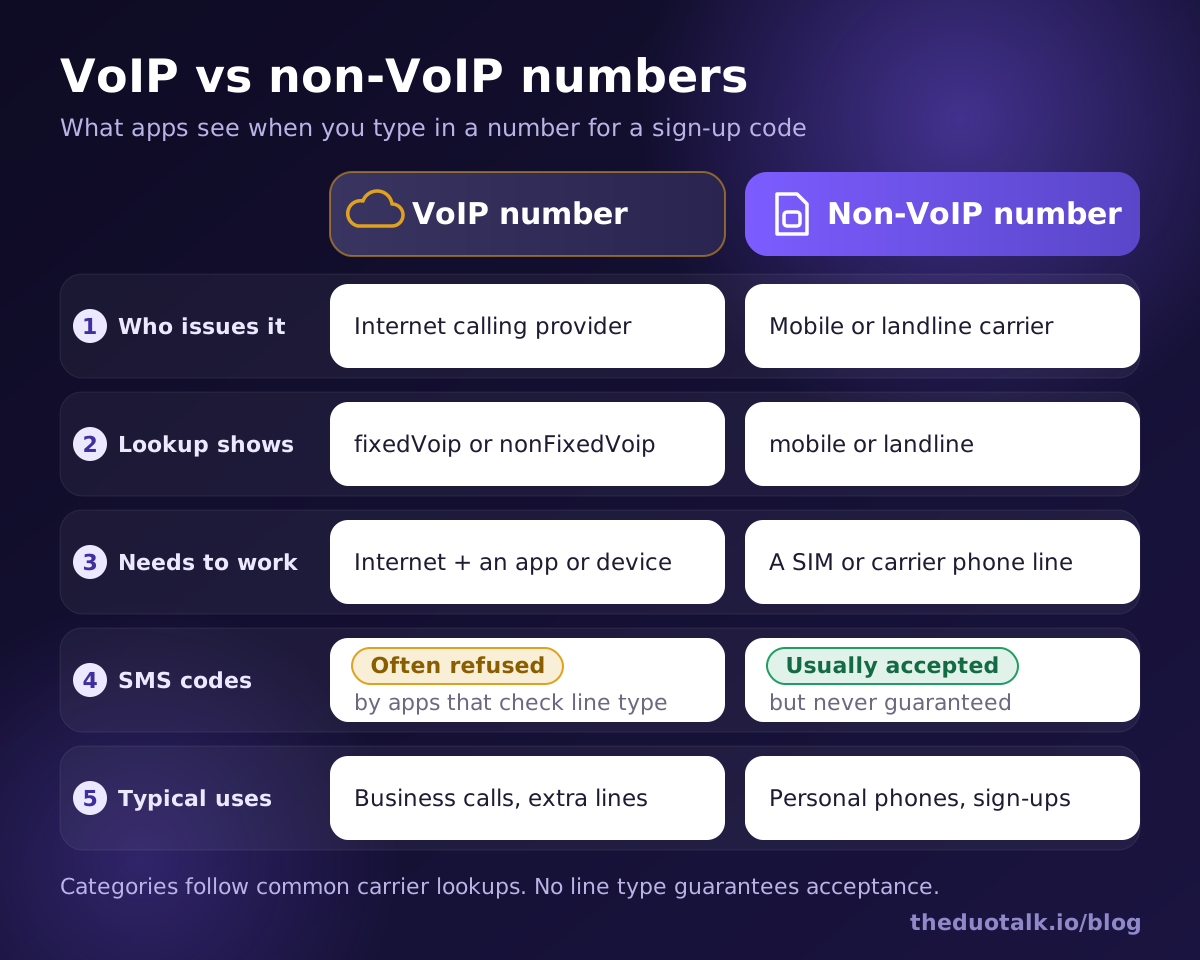
| VoIP number | Non-VoIP number | |
|---|---|---|
| Who issues it | An internet calling or cloud phone provider | A mobile or landline carrier |
| What a line-type lookup shows | fixedVoip or nonFixedVoip | mobile or landline |
| What it needs to work | An internet connection and an app, browser or desk phone | A SIM card or a carrier phone line |
| How fast you can get one | Minutes, often with only an email address | Usually a SIM purchase or contract; identity checks in many countries |
| Treatment by sign-up checks | Often refused for SMS codes | Usually accepted, never guaranteed |
| Typical uses | Business calling, call centres, extra lines on a laptop | Personal phones, banking, account verification |
| Cost pattern | Low monthly cost, easy to add many numbers | Higher, one number per SIM or line |
Neither type is "better" in general. VoIP is excellent for what it was built for: cheap calling, routing calls across a team, and working from any device. It is weaker for one narrow job, which is proving to an app that a real, hard-to-mass-produce phone line stands behind an account.
How apps detect a VoIP number
Apps detect a VoIP number by sending it to a line-type lookup service, which checks carrier and numbering databases and returns the number's type and current carrier within a fraction of a second. The app then applies its own rule, such as "send codes only to mobile numbers".
Here is what happens between the moment you type your number and the moment the code is sent (or refused):
- Format check. The app checks that the number is valid for the country you picked: right length, right prefix. A wrong country code fails here, before any lookup.
- Numbering plan check. Every country's regulator allocates blocks of numbers to companies. The lookup service knows which company originally received the block your number belongs to, and what kind of company it is.
- Portability check. Numbers can move between providers. In the US, the FCC's number portability rules let you move a number between wireless, wireline and interconnected VoIP providers, so the original block owner is not always the current one. Good lookup services query portability data to find the current carrier.
- Line type result. The service returns a type (mobile, landline, fixedVoip, nonFixedVoip and so on) plus the carrier name, and for mobile numbers the mobile country and network codes.
- Risk rules. The app combines the line type with its other signals (see below) and decides to send an SMS, offer a voice call, ask for another number, or block the attempt.
A worked example
Say you try to verify the same app with three numbers:
| Number you enter | Lookup result | Likely outcome at a strict app |
|---|---|---|
| Your own phone's SIM number | mobile, a national mobile operator | Code sent |
| A free calling-app number | nonFixedVoip, a VoIP carrier | "This number is not supported" |
| Your office desk line | landline or fixedVoip | Refused for SMS, or offered a voice call |
Notice that nothing about your device changed. The app never "saw" whether you had a SIM in your hand. It only read a database entry.
What a lookup cannot see
A lookup knows the registered type and carrier. It does not know who is reading the messages, whether the number is shared, or whether the line was ported last week (unless the portability data has caught up). That gap is why apps add other checks on top, and why line type alone never decides the outcome.
One practical consequence: if you port your personal mobile number to a VoIP provider (for example to keep it in a cloud phone service), lookups will usually start reporting it as VoIP. People are often surprised when a number they have had for ten years suddenly fails verification after a port. The number did not change; its registered line type did.
Which services commonly refuse VoIP numbers
Services that refuse VoIP numbers are mostly those where one person creating many accounts causes real harm: AI tools with free usage, messaging apps, chat communities, and financial apps. Their rules change, so always check the service's own help page before you choose a number.
| Service | What the official guidance says (as of October 2026) | What it means for you |
|---|---|---|
| OpenAI (ChatGPT) | Its help center says it does not support landlines, VoIP, Google Voice or premium numbers for phone verification, citing fraud and abuse; SMS to a mobile number works, and WhatsApp delivery is offered in selected regions | Use a number whose line type is mobile |
| Its Help Center lists VoIP numbers, landlines, toll-free, premium-rate, universal access (UAN), shared-cost and personal numbers as types that cannot be registered; landlines work only on the WhatsApp Business app, via a voice call | VoIP numbers fail at registration | |
| Discord | Discord's help guidance and many user reports say VoIP and landline numbers cannot complete phone verification and that a mobile number is required | Expect an "invalid phone number" style error with VoIP |
| Banks, payment and crypto apps | Policies vary by company and country, and usually tie the number to identity checks | Use a number you will keep and follow the app's identity rules |
The pattern is clear: a VoIP number for verification works at some services and fails at the strict ones, while a non-VoIP number for verification passes the line-type check almost everywhere. If you are stuck on a specific service, our guides cover the details: ChatGPT phone verification and Discord phone verification explain each service's rules, error messages and fixes.
Why apps refuse VoIP numbers
Apps refuse VoIP numbers because a phone number is one of the few sign-up signals that costs something to repeat. An email address is free and unlimited. A mobile number normally requires a SIM, and in many countries an identity check to buy one. A non-fixed VoIP number can be created in minutes, in quantity, with no identity check, so it adds little protection against spam accounts, free-trial abuse and fake reviews.
There is also a security angle. For years, the US government's digital identity guideline, NIST SP 800-63B (revision 3, 2017), said that methods which do not prove possession of a specific device, "such as voice-over-IP (VOIP) or email", shall not be used for out-of-band authentication. Many companies built their phone checks around that idea. The current revision, SP 800-63B-4 (finalized in 2025), removed that explicit VoIP prohibition, but it still classes phone-network codes (SMS or voice) as a "restricted" authenticator and tells verifiers to weigh risk signals such as SIM changes and number porting. In short, the official standard softened, but the industry habit of distrusting VoIP numbers has not gone away.
Is a non-VoIP number always accepted?
No. A non-VoIP number passes one check, the line-type check, but apps run several others, and any one of them can refuse the number. Treat "non-VoIP" as necessary for strict apps, not sufficient.
These are the other checks that most often block a mobile number:
| Check | What the app looks at | How it fails |
|---|---|---|
| Prior use | Whether the number is already linked to an account on that service | "This number is already in use" or a silent refusal |
| Reuse history | How many accounts the number has verified recently | Number flagged as high-risk even though it is mobile |
| Country rules | Whether the service operates in, or accepts numbers from, that country | "Unsupported country" or no code sent |
| Attempt limits | How many codes you requested in a short time | "Too many attempts, try again later" |
| Network and device signals | IP address reputation, VPN use, device fingerprint | Extra checks, CAPTCHA, or a block |
| Carrier filtering | Whether the receiving network filters the sender's messages | The code never arrives |
This is why honest number providers say that receiving a code is not the same as being accepted. A number can receive the SMS perfectly and the account can still be reviewed or limited later, because services change their rules and run checks after sign-up too.
A useful rule of thumb: the stricter and more valuable the service (money, identity, AI credits), the more checks it runs, and the more important it is that the number is one you can keep.
How to check whether your own number is VoIP
You can check your number's line type in about a minute with a free carrier lookup tool, or by asking your provider directly. The lookup shows the same kind of result an app sees.
- Write the number in international format, with the plus sign and country code, for example +44 7700 900123.
- Run it through a carrier or line-type lookup. Many free web tools show the carrier name and line type; developer services such as Twilio Lookup return the exact type codes listed earlier.
- Read the result. "Mobile" or "wireless" is non-VoIP. "Landline" is non-VoIP but cannot receive SMS. "VoIP", "fixed VoIP" or "non-fixed VoIP" means strict apps may refuse it.
- Check the carrier name. If the carrier is a cloud calling company rather than a mobile operator, the number is almost certainly VoIP, even if the tool's type field says "unknown".
- If the result surprises you, ask your provider. Ported numbers are the usual cause of surprises. Your provider can tell you whether the number is held on a mobile network or a VoIP platform.
Keep in mind that different lookup databases can disagree for a short time after a port, and that some apps use their own internal lists in addition to commercial lookups.
How to choose a number that is likely to work
To choose a number that is likely to work, match the number to the job: a mobile-type number for apps that refuse VoIP, the right country for the service, a number that has not been used on that service, and a number you can keep if the account matters. Then verify promptly and stop after a couple of failed attempts.
Decision rules
- If the app's help page says "mobile numbers only", use a number whose line type is mobile. A VoIP number will fail regardless of how fast it receives texts.
- If you need the account for months (messaging, work tools, anything with money), use a number you will keep. Services ask for new codes when you log in on a new device or recover the account. Our second phone number guide compares the options for a long-term second line.
- If you only need one code for a quick test or a one-off sign-up, a temporary phone number is enough. The temporary phone number for verification guide explains when that is safe and when it is not.
- If the service involves money or identity checks, follow its identity rules exactly. A different number never replaces the documents a bank or exchange asks for.
- If a number fails twice, switch numbers or wait. Repeated requests trigger attempt limits that block you even with a good number.
A pre-verification checklist
Before you request a code, run through this list:
- The country of the number matches a country the service supports.
- The number is in full international format with the correct country code.
- The service's help page does not exclude the number type you are using.
- You have not already linked this number to an account on the same service.
- You can read the inbox right now, and you will enter the code within a few minutes.
- For an account you will keep, you can still receive codes on this number next month.
- You know what to do if no code arrives (wait for the resend timer, then try once more, then change number).
How this works on DuoTalk
DuoTalk is a web app at theduotalk.io that gives you a virtual phone number to receive SMS online in a private inbox, so you do not have to hand out your personal number. On the Numbers page you pick the service and country, and DuoTalk shows live stock and live prices per service and country, so you only see numbers that are available for that service right now.
Two number types cover the two jobs described above:
| DuoTalk option | How long it works | Best for |
|---|---|---|
| Short-term number | 60 minutes after purchase; once the first code arrives, it stays open 7 more minutes for a second code | One-off sign-ups and tests |
| Monthly number | 30 days, available in some countries | Accounts you will keep and log back into |
If no code arrives on a short-term number, you can extend it once for free for another hour on the same number. If it still fails, you report it, and an approved refund goes back to your DuoTalk balance. To see what happens to a number when your access ends, read the number lifecycle page. Codes usually arrive within seconds on working routes, but, as with any provider, getting a code never guarantees that the service will accept the number, because services change their rules.
Questions people also ask
What is a non-VoIP number?
A non-VoIP number is a phone number that a licensed mobile or landline carrier assigns to a SIM card or fixed line, so carrier lookups report it as "mobile" or "landline". A VoIP number, by contrast, is assigned to an internet calling service. Apps check this line type before sending verification codes, and many accept only mobile numbers, which is why "non-VoIP" matters for sign-ups.
How do I know if my number is VoIP?
Enter your number in international format into a free carrier or line-type lookup tool. If it reports "VoIP", "fixed VoIP" or "non-fixed VoIP", or names a cloud calling company as the carrier, apps will see it as VoIP. If it says "mobile" or "wireless", it is non-VoIP. Numbers ported to an internet phone service usually change to VoIP after the port.
Why do apps not accept VoIP numbers?
Apps refuse VoIP numbers because they can be created online in minutes, in bulk, often with only an email address, so they do little to stop spam accounts, free-trial abuse and fake reviews. A mobile number usually needs a SIM and, in many countries, an identity check. OpenAI, for example, says it blocks VoIP and Google Voice numbers because they are associated with more fraud and abuse.
Is Google Voice a VoIP number?
Yes. Google Voice numbers are VoIP numbers, and lookup services classify them as non-fixed VoIP because they are created online without a physical line. That is the category strict apps refuse most often. OpenAI names Google Voice explicitly in its list of unsupported numbers, and many other services reject Google Voice numbers at sign-up even if they accept them for ordinary calls.
Can a non-VoIP number be virtual?
Yes. "Virtual" describes how you use the number (through a website or app instead of your own SIM), while "non-VoIP" describes its registered line type. A mobile number held by a provider and read through an online inbox can still appear as "mobile" in lookups. Ask the provider what line type its numbers have, and remember that line type is only one of several checks.
Are non-VoIP numbers safer than VoIP numbers?
Not automatically. A non-VoIP number is harder to mass-produce, which is why apps trust it more, but both types can be lost, recycled or taken over. Mobile numbers face SIM-swap attacks; VoIP accounts face password theft. For important accounts, add an authenticator app or passkey where offered, and keep the number you verified with under your control.
Sources
- OpenAI Help Center: Can I use a premium number, landline, Google Voice, or other VoIP phone number?
- WhatsApp Help Center: How to register your phone number
- WhatsApp Help Center: Can't complete registration
- Discord Support: Verification Required FAQ
- Twilio Docs: Lookup Line Type Intelligence
- NIST SP 800-63B (revision 3, 2017): Digital Identity Guidelines, Authentication and Lifecycle Management
- NIST SP 800-63B-4 (2025): Authentication and Authenticator Management
- FCC: Porting, keeping your phone number when you change providers
Last reviewed: October 2026