Temporary Phone Number for Verification: A Safe Guide
How a temporary phone number for verification works, why free inboxes expose your codes, when one-time or monthly fits, and what to do if no SMS arrives.
By the DuoTalk team · Published 2026-10-11 · Updated 2026-11-11
A temporary phone number for verification is a short-lived number that receives a one-time SMS code for you, so you can finish a sign-up without handing out your personal number. You rent it for a limited time, read the code in an online inbox, and stop using it once the account is verified. Used well, it keeps your real number out of marketing lists and data leaks. Used carelessly (on a free public inbox, or for an account you plan to keep for years), it can expose your codes or lock you out later. This guide explains which kind of number to pick, how to get the code step by step, and what to do when nothing arrives.
The short answer: Yes, you can use a temporary phone number for verification on many sites and apps. Choose a private number that only you can read, not a free public inbox, and pick a monthly number instead if you will need codes for the same account again. A code arriving never guarantees the service will accept the number, because each service sets its own rules.
What a temporary phone number for verification is (and is not)
A temporary phone number for verification is a real, dialable number that you use for a short period to receive an SMS verification code (also called an OTP, or one-time password). The number is assigned to you for a set window, messages sent to it appear in an online inbox, and when the window ends you lose access to it.
It helps to be precise about what it is not:
- It is not a second SIM. You read the SMS in a browser or app; nothing changes on your phone.
- It is not a permanent number. A one-time phone number expires. If the service later sends a login code or a password-reset text to that number, you may not be able to read it.
- It is not a way around a service's rules. Phone verification exists so services can limit spam and abuse. A temporary number is a privacy tool for keeping your personal number private, not a way to create accounts in bulk or return after a ban.
- It is not always accepted. Some services check the number type and refuse anything that is not a regular mobile line. We cover this in detail in our guide to non-VoIP numbers.
Why people use one
- Spam and marketing. Once your number is in a company's database, it can be shared with partners or leaked in a breach. A separate number keeps your personal one out of that list.
- Separating identities. Many people want a work identity, a side project or a selling account that is not tied to their family phone. If you want a lasting split, read our comparison of ways to get a second phone number.
- Travel. When your home SIM is off or you are abroad without roaming, a number you can read online lets you finish a sign-up anyway.
- Testing. Developers and QA teams need fresh numbers to test sign-up flows without using staff phones.
How SMS verification works, in one paragraph
When you type a phone number into a sign-up form, the service sends a short code (usually 4 to 8 digits) by SMS. You type the code back to prove you control that number at that moment. The service then links the number to your account and may use it again for login checks, password resets or two-step verification. That is why the choice of number matters. The US standards body NIST classifies codes sent over the phone network as a "restricted" authenticator in its 2025 digital identity guidelines (SP 800-63B-4), which tells you that SMS codes are a convenience, not a strong security factor. Treat a temporary number accordingly.
Free public inboxes vs private numbers: the real risk
Free public inboxes are websites that list a handful of shared phone numbers and display every incoming SMS on an open web page. They cost nothing, but anyone can read the codes, so they are the riskiest way to get a free phone number for verification. A private number, by contrast, is assigned to one customer for a set time, and only that customer sees its messages.
What actually goes wrong with public inboxes
Researchers at the University of Florida studied public SMS gateways in a paper presented at the 2016 IEEE Symposium on Security and Privacy. They collected nearly 400,000 messages from public gateways over 14 months (a later journal version covered more than 900,000 messages over 28 months) and found services sending sensitive information in plain text, plus codes with low randomness. The practical lessons still hold in 2026:
- Your code is visible to everyone. If a stranger enters your code first, they can take over the sign-up you started, or use the number to reset an account already linked to it.
- The number is already used. Shared numbers have usually been registered on popular services many times, so you get "this number is already linked to another account".
- Services block them. Because public numbers are well known, platforms add them to block lists. You type the number, and the code is never sent.
- Your messages stay online. Some public inbox pages are indexed by search engines, so names or order details sent to the number can remain searchable.
- Recovery is impossible. If you ever need that number again, someone else may already control the account linked to it.
Side-by-side comparison
| Factor | Free public inbox | Private one-time number | Private monthly number |
|---|---|---|---|
| Who can read the code | Anyone who opens the page | Only you | Only you |
| Cost | Free | Low, pay per number | Higher, pay per 30 days |
| How long you can use it | No control | A short window (60 minutes on DuoTalk) | 30 days |
| Already used on popular apps | Very likely | Less likely | Less likely |
| Can receive later login or reset codes | No | No, once the window ends | Yes, while you keep it |
| Good for | Nothing sensitive | One-off sign-ups, trials, testing | Accounts you keep |
Decision rule: never use a public inbox for an account that holds money, personal data or anything you want to keep. If the account matters at all, use a private number from an SMS verification service.
One-time numbers vs monthly numbers: which one you need
Use a one-time number when you need one code, once, for an account you will not need to verify again. Use a monthly (dedicated) number when you will log in again, reset a password, or receive security codes for the same account in the future. The question to ask is simple: "Will this service ever text this number again?"
When a one-time number is the right choice
- You are signing up for a free trial, a newsletter gate or a one-off purchase.
- You are testing a sign-up flow and will delete the account afterwards.
- The service lets you add an email address, an authenticator app or passkeys after sign-up, so the phone is not your only recovery path.
- You are travelling and only need to confirm a booking or a Wi-Fi login.
When you need a monthly number
- The account will hold anything you care about: purchase history, messages, contacts, reviews, a store.
- The service uses SMS for logins from new devices or for password resets.
- You manage a work or project account that several people rely on.
- The service is a payment, finance or crypto platform. These platforms require identity checks; follow their rules in full, use your real identity where asked, and use a number you can keep for as long as you keep the account.
Quick decision table
| Your situation | Best choice | Why |
|---|---|---|
| Free trial you will cancel | One-time number | You need one code and never again |
| New social or messaging account you plan to keep | Monthly number | Logins on a new phone often ask for a fresh code |
| Marketplace or classifieds listing | One-time or monthly, depending on how long the listing lives | Buyers' messages do not need your real number |
| Developer test account | One-time number | Fresh number per test run |
| Bank, wallet, exchange, payment app | Your own long-term number, or a monthly number if allowed | Identity rules and account recovery need a number you control |
| Account where SMS is the only recovery option | Monthly number | Losing the number means losing the account |
On DuoTalk, monthly numbers last 30 days and are available in some countries only, so check the Numbers page for the service and country you need before you start.
How to get a verification code on a temporary number, step by step
The process takes a few minutes: pick the service and country, get a private number, enter it on the site, and read the code in your inbox. The steps below use DuoTalk as the example. DuoTalk (theduotalk.io) is a web app that gives you a virtual phone number to receive SMS online in a private inbox, so you do not hand out your personal number. If you want the bigger picture of how it works, see how DuoTalk works, or the homepage if you just want to receive SMS online.
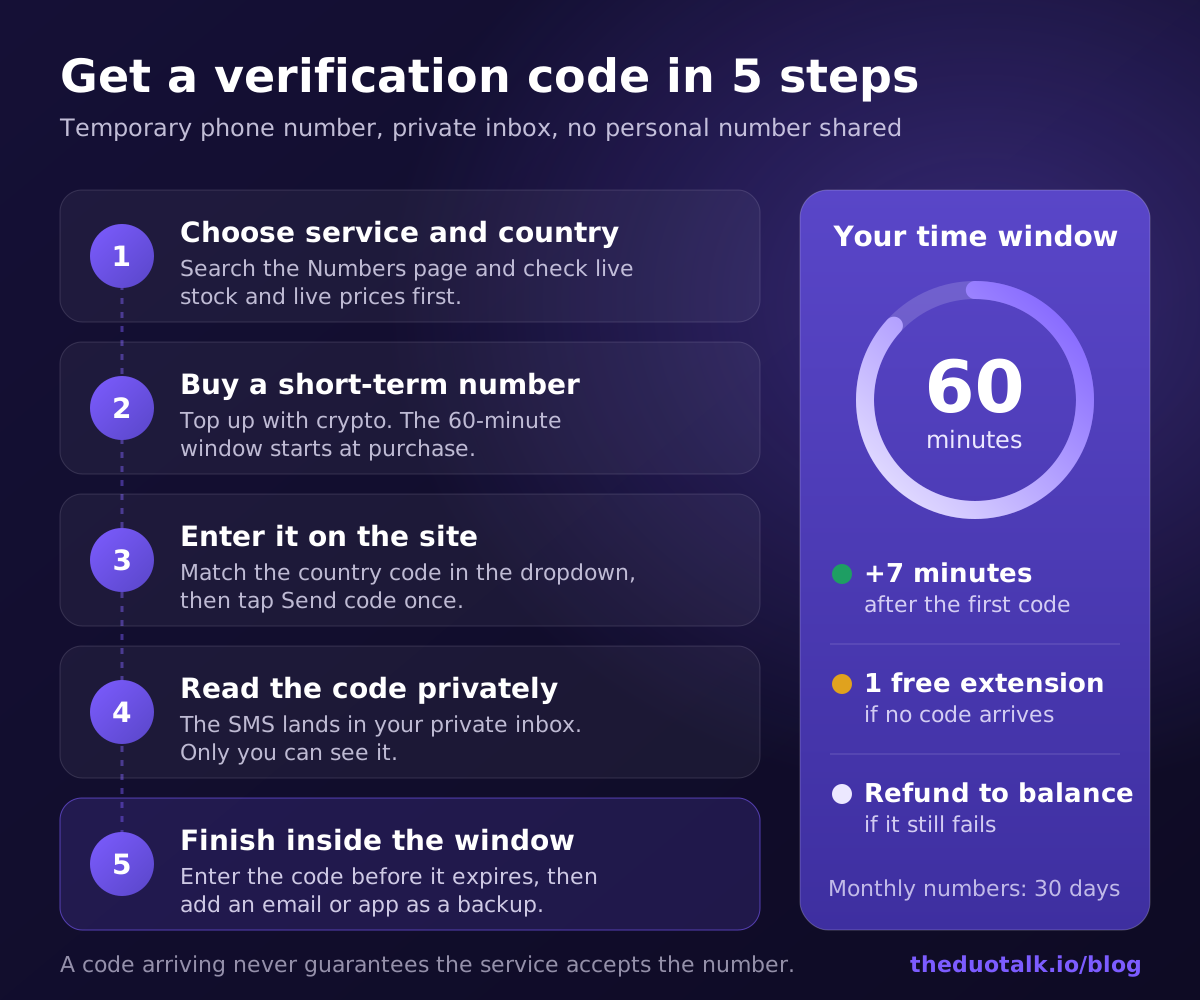
- Choose the service and the country. Open the Numbers page, search for the app or website you are signing up for, and pick a country. The page shows live stock and live prices for each service and country before you sign in. Prefer a country you would normally use the service from.
- Add balance and buy a short-term number. Top-ups are crypto only: USDT (TRC20 or BEP20), TRX, LTC, BTC or ETH. Your balance is added automatically once the network confirms the payment. Then buy a short-term number for the service you chose. The 60-minute window starts at purchase, so have the sign-up form open first.
- Enter the number on the site. Pick the right country in the form's dropdown, paste the number without an extra leading zero, and tap "Send code" once.
- Read the code in your private inbox. On tested routes, codes usually arrive within seconds. The SMS appears in your DuoTalk inbox, visible only to you. Copy the code into the sign-up form before it expires (many services expire codes after a few minutes).
- Finish inside the time window. A short-term number works for 60 minutes after purchase. Once the first code arrives, it stays open 7 more minutes so you can receive a second code if the service sends one. If no code arrives, you can extend once for free for another hour on the same number, and if it still fails, you report it and an approved refund goes back to your DuoTalk balance.
A worked example
Say you want to try a food-delivery app while travelling, without putting your personal number on its marketing list.
- You open the Numbers page, search the app, and pick the country you are in.
- You buy a short-term number. The timer shows 60 minutes.
- In the app, you choose the same country code, paste the number and tap "Send code".
- Twenty seconds later the six-digit code appears in your inbox. You enter it, and the app confirms the number.
- The app asks you to "verify again" on the next screen. Because the number stays open 7 more minutes after the first code, the second code also arrives.
- You add your email address to the account as a recovery method, place your order, and your personal number never touches the app's database.
If the app had refused the number with "this number cannot be used", the problem is the number type or the app's rules, not delivery. In that case, try a different country or route, or consider whether this app needs a number you keep.
Tips that prevent most failures
- Request the code once and wait. Repeated taps on "Resend" trigger rate limits, and only the newest code usually works. Google, for example, states that when you request several codes, only the newest one is valid.
- Match the country in the dropdown to the number. A US number entered under another country's code will never receive anything.
- Add a backup method straight away. Once you are in, add an email, an authenticator app or a passkey so the account does not depend on a number you will lose.
When the code does not arrive: extend, retry, or get your money back
If the code does not arrive, wait a full two minutes, request it once more, and check the number format before you do anything else. On DuoTalk, if nothing arrives you can extend the same number once for free for another hour, and if it still fails you report it. The number is paid from your balance at purchase, and an approved refund for a failed number goes back to your DuoTalk balance.
Work through these checks in order
- Wait. Delivery can take longer at busy times. WhatsApp's help center, for example, says its SMS can take up to 10 minutes before the "Call me" option appears.
- Check the format. Is the country code right? Did the form add a leading zero? Did you pick the correct country in the dropdown?
- Request once more, not ten times. Many services lock the number for hours after repeated requests.
- Read the error message. "Invalid number", "number not supported" or "this number can't be used" means the service refused the number. A delivery delay looks different: the form says the code was sent, but nothing shows up.
- Use the free extension. On DuoTalk, extending gives you another hour on the same number at no cost, which is useful when a service's resend timer is long.
- Report and get your balance back. If the extension also passes without a code, report the number. An approved refund goes back to your DuoTalk balance, and you can try another country or service route.
The full DuoTalk-specific checklist lives in the help article No SMS arrived? What now?. For a general troubleshooting guide that also covers personal SIM cards, carriers and roaming, read not receiving verification codes: 10 fixes.
Why a code can arrive but the account still fails
A delivered code proves the number can receive SMS, not that the service will accept it. Services change their rules often and may re-check the number type or ask for extra verification later. That decision belongs to the service, so treat any temporary number as "likely to work on tested routes", never "guaranteed".
Why some sites reject a temporary number
Sites reject numbers for three main reasons: the number type (VoIP, landline or toll-free), the number's history (already linked to another account or reported as abused), or a mismatch between the number's country and your other signals. Knowing which one applies tells you what to try next.
| Rejection reason | What you see | What to try |
|---|---|---|
| VoIP or landline number | "This number isn't supported" before any code is sent | A number listed for that specific service on the Numbers page |
| Number already in use | "This phone number is already linked to an account" | A different number or country |
| Rate limit | "Too many attempts, try again later" | Stop, wait the time shown, then try once |
| Country mismatch | Code sent but account flagged, or extra checks | A number from the country you normally use the service in |
| Service disallows virtual numbers for your account type | Asked for another number or ID at a later step | Your own long-term number |
Official policies back this up. WhatsApp's help center lists VoIP, landline, toll-free, premium-rate, universal access, shared-cost and personal numbers as types it does not register. OpenAI's help center says it does not support landline, Google Voice or other VoIP numbers for phone verification. Google's Account Help warns that using Google Voice for verification codes could lock you out of your account. Our non-VoIP number guide explains how these checks work and how number type is detected.
Which accounts should never use a temporary number
Never use a temporary number for an account that holds money, proves your identity, or would be painful to lose. The rule is simple: if losing access to the number would mean losing the account, use a number you will keep.
Use your own long-term number (or a monthly number, where allowed) for:
- Banks, payment apps and money transfer services. These are regulated and must know who their customers are. Follow their identity rules in full, and keep a number you control for years.
- Crypto exchanges and wallets. Same rule: complete their identity checks honestly, and use a number you can keep (a monthly number at minimum, never a one-time number).
- Your primary email account. Email is the recovery key for almost everything else. Losing access to it can cascade into many lost accounts.
- Government, tax, health and insurance portals. These often use your number to confirm identity, and support teams cannot easily move an account to a new number.
- Work accounts managed by your employer. Use the method your IT team approves.
- Any account where SMS is the only way back in. If the service does not allow an authenticator app, passkeys or backup codes, the phone number is the account.
Checklist before you use any temporary number
- Stakes: the account is low stakes, or I have a monthly number I will keep.
- Rules: I have read the service's rules on phone numbers.
- Backup: I will add an email, authenticator app or passkey right after sign-up.
- Intent: I am not trying to get around a ban, a limit or an identity check.
- Privacy: I am using a private number, not a public inbox.
If any of these is a no, stop and use a number you keep.
Questions people also ask
Can I use a temporary phone number for verification?
Yes, most sites and apps that send SMS codes will deliver them to a temporary number, but acceptance depends on each service's rules. Services that check number type often refuse VoIP, landline and toll-free numbers before sending anything, and some refuse numbers already linked to another account. Use a private number listed for that specific service, match the country in the sign-up dropdown, and add an email or authenticator app as a backup once you are in.
Is it safe to use a free number to receive SMS online?
No, not for anything you care about. Free public inbox sites publish every incoming SMS on an open web page, so any visitor can read your code, enter it first, or later trigger a password reset to that same number. Academic studies of public SMS gateways have found sensitive data in those messages. A private number assigned to one customer for a fixed window keeps the code visible only to you.
Why does it say "this phone number cannot be used for verification"?
That message means the service refused the number itself, not that delivery failed. Common causes are a number type the service blocks (VoIP, landline, toll-free), a number that has already been used for too many accounts, or too many recent attempts from your device or network. Resending will not help. Wait before trying again, then use a different number listed for that service, ideally from the country you normally use it in.
How long does a temporary phone number last?
It depends on the plan you buy. On DuoTalk, a short-term number works for 60 minutes from purchase; once the first code arrives, it stays open 7 more minutes so a second code can come through. If no code arrives, you can extend once for free for another hour on the same number. Monthly numbers last 30 days and suit accounts that will need codes again later.
What happens if the verification code never arrives?
First wait two full minutes, confirm the country code and that no extra leading zero was added, then request the code once. Many services lock the number for hours after repeated "Resend" taps, and only the newest code is valid. On DuoTalk, if nothing arrives you extend the same number once for free; if it still fails, report it and an approved refund returns to your DuoTalk balance.
Can I use the same temporary number to log in again later?
Only while you still have access to it. A one-time number is gone once its window ends, so any later login code, new-device check or password-reset text goes to a number you cannot read. If the service may text you again, use a monthly number (30 days), or move the account to a number you keep for good. Adding an authenticator app or passkey removes the dependency on SMS.
Get a private number for your next code
If you need a one-off code without exposing your personal number, a private short-term number is the simplest route; if you will need the account again, choose a monthly number. Check the live stock and prices for your service and country on the Numbers page, top up with crypto, and read your code in a private inbox. If no code arrives, the free extension comes first, and an approved refund for a failed number goes back to your DuoTalk balance.
Sources
- NIST SP 800-63B-4: Authentication and Authenticator Management (restricted use of the PSTN)
- Reaves et al., Sending out an SMS: Characterizing the Security of the SMS Ecosystem with Public Gateways (IEEE S&P 2016)
- Reaves et al., Characterizing the Security of the SMS Ecosystem with Public Gateways (ACM TOPS)
- WhatsApp Help Center: Can't register phone number
- WhatsApp Help Center: How to verify your phone number
- OpenAI Help Center: Can I use a premium number, landline, Google Voice or other VoIP phone number?
- Google Account Help: Fix common issues with 2-Step Verification
Last reviewed: October 2026