Second Phone Number for Privacy: 5 Options Compared
Need a second phone number? Compare a second SIM, eSIM, calling apps and receive-only verification numbers on cost, calls, SMS codes and privacy.
By the DuoTalk team · Published 2026-11-01 · Updated 2026-11-11
A second phone number is the simplest way to stop handing your real number to every shop, sign-up form, marketplace buyer and dating match. There are five realistic ways to get one in 2026: a second physical SIM, an eSIM line on the phone you already own, a calling and texting app, a one-time verification number, and a monthly verification number. They are not interchangeable. Some are built for talking to people, others only for receiving SMS codes, and the wrong choice can cost you money or lock you out of an account later.
The short answer: If you need to make and take calls on a separate line, add an eSIM or second SIM from a carrier (roughly $8 to $30 a month in the US). If you only want to keep your real number off sign-up forms, use a receive-only verification number: a one-time number for a single code, or a monthly number for accounts you will keep. Free calling apps are fine for casual calls but are often refused for verification codes.
Why people want a second phone number
People want a second phone number mainly to control who can reach them and to limit how far their real number spreads. Your mobile number has become a login, a recovery key and a marketing ID at the same time, so every place you type it is a small risk.
Here are the most common reasons, in plain terms:
- Spam and sales calls. Retailers, loyalty programmes and "free quote" forms share or sell contact data. A separate number takes the spam instead of your main line.
- Selling online and meeting strangers. Marketplace buyers, dating matches and short-term rental guests do not need your personal number.
- Work and side projects. Freelancers and small sellers often keep a separate line so clients do not call them at midnight on their personal phone.
- Account security. Your phone number is often the recovery route for email, social media and banking. The fewer places it appears, the harder it is for someone to target it. SIM swap fraud, where a criminal convinces a carrier to move your number to their SIM, was serious enough that the US Federal Communications Commission adopted rules in late 2023 requiring carriers to authenticate customers before moving a number and to offer free account locks.
- Leaks. When a company you signed up with is breached, your number ends up on lists. If that number is a second one, the damage stays contained.
A useful way to think about it: your real number should go only to people and services you trust and depend on, such as family, your bank and your doctor. Everything else can get a second number.
Option 1 and 2: a second SIM or an eSIM line
A second SIM or an eSIM line gives you a full mobile number from a carrier, with calls, texts and data, and it works for nearly every service that sends SMS codes. The trade-off is a monthly bill and a line that is registered to you.
An eSIM is a digital SIM built into the phone. Instead of inserting a plastic card, you download a carrier profile by scanning a QR code or using the carrier's app. A physical second SIM is the classic plastic card, either in a dual-SIM phone or in a cheap spare handset.
Which phones support two numbers
Most phones sold in the last few years can run two numbers at once:
- iPhone: Apple says iPhone XS, XS Max, XR and later support Dual SIM. iPhone 13 and later can run two eSIMs at the same time. Both numbers can make and receive calls and send SMS and iMessage, and you choose a default line for people who are not in your contacts. Only one line carries mobile data at a time.
- Google Pixel: Google says Pixel 3a and later can pair a physical SIM with an eSIM (Dual SIM Dual Standby), and Pixel 7 and later can use two eSIMs. Your carrier must support it.
- Other Android phones: many Samsung, Motorola and other models have dual SIM slots or eSIM. Check Settings for "SIM manager" or "SIMs".
How to add an eSIM as a second line
- Check that your phone supports eSIM and is not locked to one carrier (or that your current carrier allows a second line).
- Choose a prepaid or low-cost plan from any carrier that offers eSIM.
- On iPhone, open Settings > Cellular (or Mobile Data) > Add eSIM. On Pixel, open Settings > Network & internet > SIMs > Add SIM > Set up an eSIM.
- Scan the carrier's QR code or follow its app.
- Label the lines (for example "Personal" and "Second") and set which line is used for calls, texts and data.
Cost and trade-offs
In the US, low-cost prepaid plans in October 2026 start around $8 to $10 a month for a small data allowance, and cheap unlimited plans sit around $25 a month. Outside the US, prepaid SIMs are often cheaper, but many countries require you to register a SIM with an ID document.
| Second physical SIM | eSIM line | |
|---|---|---|
| Typical monthly cost (US) | About $8 to $30 | About $8 to $30 |
| Needs a dual-SIM phone | Yes, or a second handset | Needs eSIM support |
| Calls and texts | Yes | Yes |
| Accepted for SMS codes | Very widely | Very widely |
| Linked to your identity | Usually (billing, SIM registration) | Usually (billing, SIM registration) |
| Setup time | Days if shipped, minutes in store | Minutes |
Pros: real mobile number, best acceptance for verification, works for calls and messaging apps, you keep it as long as you pay.
Cons: monthly cost, the line is normally registered in your name, and if you let it lapse the carrier will eventually give the number to someone else.
Use a carrier line if you need a second number that people will call, or a second number for an account that matters for years, such as a business messaging account.
Option 3: calling and texting apps
A calling and texting app gives you a second number that lives inside an app and runs over the internet. It is the cheapest way to get a second line for calls and texts, but these numbers are usually VoIP numbers, and many services refuse VoIP numbers for verification codes.
A VoIP number (Voice over Internet Protocol) is a phone number that is not attached to a SIM card. Calls and texts travel over Wi-Fi or mobile data through the app provider. Apps that check numbers before sending a code can look up the line type and often block VoIP numbers, because they are easy to create in bulk. For the full explanation, see our guide to non-VoIP numbers.
What to expect from a second number app
- Price: many apps have a free tier with ads and limits, and paid plans for removing ads, keeping a number permanently or calling abroad.
- Inactivity rules: free numbers are commonly taken back if you stop using them. Google, for example, says it may reclaim a Google Voice number that has not been used for calls or texts for three months.
- Setup requirements: some apps ask for your existing number to create the account, which links the second number back to your real one inside the provider's records.
- Coverage: most free second-number apps offer US and Canadian numbers. Google Voice for personal accounts works only in the US, and Google asks for an existing US number during setup.
Where calling apps work well, and where they do not
| Task | Calling app works? |
|---|---|
| Calling a marketplace buyer or a landlord | Usually yes |
| Texting a dating match before you share your real number | Usually yes |
| Receiving a code from a small website or newsletter | Often yes |
| Verifying a messaging app, AI tool or social network | Often refused |
| Bank, payment or government identity checks | Usually refused |
Government services are the clearest example. Login.gov, the US government sign-in service, states that it does not accept Google Voice or similar VoIP numbers for identity verification, nor most prepaid numbers. Many large apps follow similar rules for their own sign-ups.
Use a calling app if you want a free or cheap second line mainly for calls and texts with people, and you do not depend on it for important verification codes.
Option 4 and 5: one-time and monthly verification numbers
A verification number is a receive-only virtual number you use to get SMS codes from apps and websites without sharing your real number. A one-time number covers a single sign-up; a monthly number stays yours for 30 days so you can log back in or recover the account.
These numbers are not for calls. That is the point: nobody can ring you on them, and they only exist to receive codes in a private inbox. DuoTalk (theduotalk.io) is a web app that provides exactly this kind of virtual number to receive SMS online for verification codes.
One-time verification number (option 4)
A one-time number is built for a single code. On DuoTalk it works like this:
- Open the Numbers page, pick the service that is asking for a number (for example WhatsApp, Telegram or Google) and a country with stock.
- Buy a short-term number. It works for 60 minutes after purchase.
- Enter it on the sign-up form and wait for the SMS. The code appears in your private DuoTalk inbox, usually within seconds on tested routes.
- After the first code arrives, the number stays open 7 more minutes in case you need a second code.
- If no code arrives, extend once for free for another hour on the same number. If it still fails, report it; an approved refund goes back to your DuoTalk balance.
Best for: trying a new app, one-off sign-ups, forums, coupons, testing, anything you will not need to recover.
Do not use it for: accounts you will log back into later. Once access ends, you cannot receive new codes on that number, and like any phone number, it can later be assigned to someone else.
Monthly verification number (option 5)
A monthly number is a dedicated number that stays with you for 30 days, so codes for re-login or recovery reach you during that period. It is available in some countries only.
Best for: a second messaging account, a marketplace seller account, a work profile, or any account you plan to keep. For payment, crypto or finance apps, follow that service's identity rules and use a number you can keep, never a short-term one.
What a verification number cannot do
- It cannot make or take voice calls.
- It cannot guarantee that a service will accept it. Codes usually arrive quickly, but services change their rules, and getting a code never guarantees the number will be accepted.
- It is not a way around identity checks. If a service requires a number in your own name (banks and government services often do), use your own carrier number.
If you want the full walkthrough of the one-time route, read our guide to using a temporary phone number for verification.
A word on "burner numbers" and free public inboxes
"Burner number" is an informal term for any number you can throw away after use. It can mean a cheap prepaid SIM, a disposable number in a calling app, or a short-term verification number. The idea is the same: a number that is not your real one and that you can drop.
Free public SMS inbox websites are different, and they are not a safe second number. Every code sent to them is visible to anyone who opens the page, so anyone can request a login code for "your" account and read it. Treat any number you do not control as public.
Second phone number options compared
The right second phone number depends on whether you need calls or codes, and whether the account is short-lived or long-term. This chart puts all five options side by side.
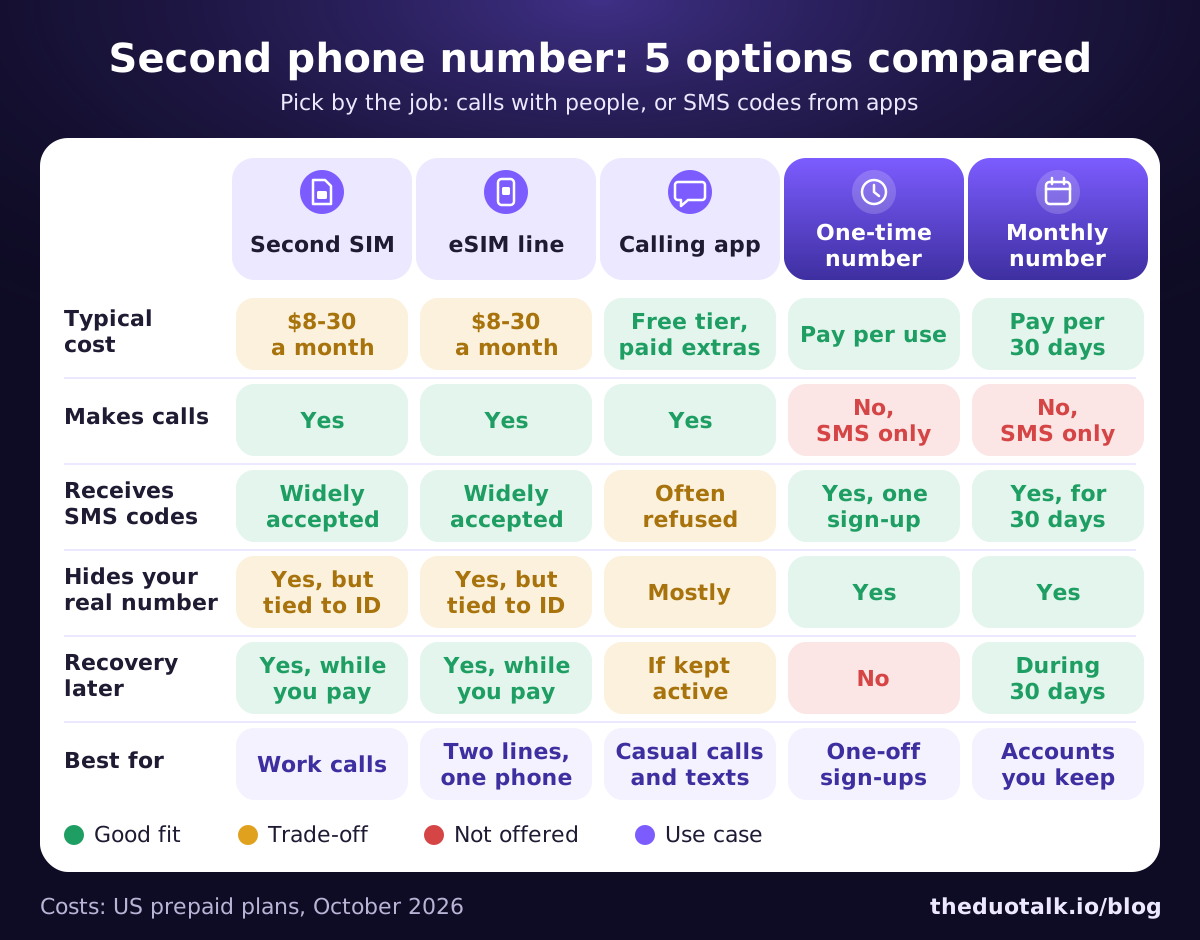
The same comparison in table form, with a little more detail:
| Second SIM | eSIM line | Calling app | One-time number | Monthly number | |
|---|---|---|---|---|---|
| Typical cost | About $8-30 a month (US) | About $8-30 a month (US) | Free tier, paid upgrades | Pay per use, low | Pay per 30 days |
| Makes calls | Yes | Yes | Yes | No (SMS only) | No (SMS only) |
| Receives SMS codes | Very widely accepted | Very widely accepted | Often refused (VoIP) | Yes, for one sign-up | Yes, for 30 days |
| Keeps real number private | Yes, but tied to your ID | Yes, but tied to your ID | Mostly, some apps need your number | Yes | Yes |
| Account recovery later | Yes, while you pay | Yes, while you pay | Only while the number stays active | No | Yes, during the 30 days |
| Needs new hardware | Dual-SIM phone or spare phone | eSIM-capable phone | No | No | No |
| Best for | Work calls, a separate public line | Two lines on one phone | Casual calls and texts | One-off sign-ups, tests | Accounts you keep |
Three patterns stand out:
- Only carrier lines do everything, and they are the only option tied firmly to your identity.
- Calling apps are the free option for voice, but they are the weakest for verification codes.
- Verification numbers are the cheapest way to keep your real number off sign-up forms, and the only option that cannot be used to call or harass you.
Which one fits your situation
Pick the option by the job, not by the price. Start with the question "Will a person call me on this number, or will an app send me a code?" and then ask how long you need it.
Quick decision rules
- You want a business or side-project line that clients call: eSIM line (or a second SIM if your phone has no eSIM).
- You want to talk to marketplace buyers or dating matches without revealing your real number: a calling app, or an eSIM if you want better reliability.
- You want to sign up for an app, newsletter, coupon or trial once: a one-time verification number, also called a temporary phone number.
- You want a separate account on a messaging app or social network that you will keep: a monthly verification number, or an eSIM if you also need calls. Our guides on a virtual number for WhatsApp and Telegram without a phone number cover the app-specific details.
- You need to verify a bank, payment or government account: use your own carrier number in your own name. Do not use a calling app, a short-term number or a public inbox.
Worked examples
Maya sells furniture online twice a year. She wants buyers to text and call her, but only for a few weeks. A free calling app number covers it. She uses it only for the listings, and when the furniture is sold she stops sharing it.
Daniel is a freelance designer. Clients call him and he wants weekends free. He adds an eSIM line to his iPhone for about the price of a lunch each month, labels it "Work" and sets Focus mode to silence it on weekends. Because it is a real mobile line, it also works for the business tools that send him codes.
Priya wants to try a new AI tool and a shopping app. She does not want more marketing texts. She buys a one-time number for each sign-up, receives the codes in her DuoTalk inbox and moves on. She adds an authenticator app or passkey to anything she decides to keep, and changes the phone number on that account to one she controls long term.
Leo runs a second Telegram account for a community he moderates. He needs to log in again on a new laptop next month, so a one-time number is the wrong tool. He uses a monthly number and, before the 30 days end, moves the account to a permanent number he controls.
A one-minute checklist
Before you choose, answer these:
- Do I need to make or receive voice calls on this number?
- Will I need to log back in or recover this account in the future?
- Does the service need a number in my own name (bank, government, some payment apps)?
- Am I comfortable with a monthly bill, or do I want to pay only when I use it?
- Does my phone support eSIM or a second SIM?
If you answered yes to calls, go carrier line or calling app. If you answered yes to recovery, avoid one-time numbers. If you answered yes to "my own name", use your real carrier number.
Habits that keep your real number private
A second phone number only works if your real number stays out of circulation. These habits close the most common leaks.
- Sort your contacts into two groups. Real number: family, close friends, your bank, healthcare, employer. Second number: everyone and everything else.
- Lock your main line with your carrier. In the US, carriers must offer a free option to lock your account against SIM changes and number transfers under the FCC's SIM swap rules. Ask your carrier for a port-out PIN or number lock.
- Move important accounts off SMS codes where you can. Use an authenticator app, passkeys or hardware keys for email, banking and social accounts. SMS codes are convenient, but they are only as safe as your number.
- Keep backup codes. When you turn on two-step verification, save the backup codes somewhere safe. They are your way back in if you lose the number.
- Change the phone number on accounts before you drop a number. A Princeton University study of 259 recycled US mobile numbers found that 171 (66%) were still linked to previous owners' online accounts. When you retire any number, carrier or virtual, update every account first.
- Never use a public SMS inbox for anything you care about. Anyone can read codes sent there.
- Check app privacy settings. Messaging apps let you hide your number from people who are not contacts. WhatsApp and Telegram both offer settings for who can see your number.
- Remove your number from people-search sites. Many of them offer an opt-out page. Removing your number reduces cold calls and targeted scams.
- Think twice before you post a number in public. Listings, bios and comments get scraped. If a number must be public, make it your second one.
On DuoTalk, both kinds of number come with live stock and live prices shown on the Numbers page, so you can check what is available for a service and country before you buy a virtual phone number. Top-ups are in crypto (USDT on TRC20 or BEP20, TRX, LTC, BTC or ETH), and your balance updates once the network confirms.
Questions people also ask
How can I get a second phone number for free?
The usual free route is a calling and texting app that gives you a number with a free, ad-supported tier. In the US, Google Voice is free for personal accounts but requires an existing US number to set up. Free numbers are commonly reclaimed after a period of inactivity (Google cites three months for Voice), and many apps refuse them for verification codes because they are VoIP numbers. Budget a few dollars if you need reliable codes.
Can I have two phone numbers on one phone?
Yes, if your phone supports Dual SIM. iPhone XS, XR and later handle two lines, and iPhone 13 and later can run two eSIMs at once. Google Pixel 3a and later pair a physical SIM with an eSIM, and Pixel 7 and later support two eSIMs. You can also add a second number through an app or a receive-only virtual number without any SIM at all.
Is a second phone number good for privacy?
Yes, as long as you use it for the right things. A second number keeps your real number off marketing lists, marketplace chats and breached databases, and limits how many people could attempt a SIM swap on your main line. It does not encrypt your messages or hide your IP address, and a carrier line is still registered to you. Keep your real number for banks, family and recovery.
Can a second number receive verification codes?
It depends on the type. Second SIM and eSIM lines are real mobile numbers and are accepted almost everywhere. Calling-app numbers are VoIP and are often refused by messaging apps, AI tools, banks and government services such as Login.gov. Receive-only verification numbers are built for codes, but no number can guarantee acceptance, because each service sets and changes its own rules.
What is the difference between a burner number and a virtual number?
A burner number is any number you plan to throw away after a short time, whether it is a cheap prepaid SIM, a disposable app number or a short-term verification number. A virtual number is defined by how it works: it is not tied to a SIM in your phone and you use it through an app or website. Many burner numbers are virtual, but a burner can also be a physical SIM.
Can a second phone number be traced back to me?
Usually, yes, by the provider and by authorities with legal process. Carrier lines are linked to billing and, in many countries, to ID-based SIM registration. Apps keep account and payment records. A second number protects you from the public, sellers, spammers and data leaks, not from lawful investigations. Use it for privacy and boundaries, and follow each service's terms.
Sources
- Apple Support: Use Dual SIM on iPhone
- Google Pixel Help: How to use dual SIMs on your Google Pixel phone
- Google Voice on the App Store (personal accounts available in the US)
- Google Voice Help: setting up Google Voice
- Google Voice Help: numbers reclaimed for inactivity
- Login.gov Help: phone numbers accepted for identity verification
- Federal Register: FCC rules on SIM swap and port-out fraud (December 8, 2023)
- Princeton University, Lee and Narayanan: Security and Privacy Risks of Number Recycling at Mobile Carriers in the United States (2021)
- US Mobile: Cheap phone plans in 2026, carriers ranked by price (October 2026)
- WhatsApp Blog: Multiple accounts coming to WhatsApp
Last reviewed: October 2026