SMS Verification Service with Virtual Phone Numbers
DuoTalk is an SMS verification service that gives you a private virtual phone number to receive one-time codes from apps and websites. Choose a country and a service, read the code in your own inbox, and keep your personal number away from sign-up forms, spam lists and data leaks.
Live prices and stock
Prices and stock on DuoTalk are live. They change during the day by country and service, so the number picker on this page loads the current price and the numbers in stock when the page opens in your browser. Choose the country and the service, check the live price, then press Get SMS Verification Number.
The short answer: An SMS verification service gives you a phone number that can receive the one-time code an app sends when you sign up or log in, so you never type your personal number into the form. On DuoTalk you pick a country and a service in the live picker at the top of this page, get a private number, and read the code in your own inbox, usually within seconds. If no code arrives on a short-term number, extend once for free, then report it for a refund to your balance after review.
Get a Phone Number for SMS Verification
You buy an SMS verification number by choosing the app and the country in the live picker at the top of this page and pressing "Get Number". The number appears in your DuoTalk inbox straight away, ready to paste into the sign-up form.
DuoTalk is a web app at theduotalk.io that sells private virtual phone numbers for receiving SMS verification codes. It is built for one job: getting the code to you and to nobody else. Think of it as an online phone verification service and an online OTP receiver in one: you do SMS verification online, from any browser, without a personal number. That makes it different from a calling app, a business texting tool or a free public inbox site.
Here is what you need before you start:
- A DuoTalk account and a balance. Top-ups are crypto only: USDT (TRC20 or BEP20), TRX, LTC, BTC or ETH, with a minimum top-up of $15. The balance is added automatically once the network confirms the payment.
- The exact service name. Pick the service that will send the code (for example WhatsApp, Telegram or Google). A short-term number receives SMS only from the service you choose. If you need SMS verification for multiple apps on one number, take a monthly number instead.
- The right country. Some apps only accept numbers from certain countries, and some ask for a number that matches where you live or where your card is issued.
- The right number type. Short-term for a one-time code, monthly for an account you will log back into later. The next sections explain how to choose.
Numbers receive texts only: they cannot send messages or take calls. There are no fees or tax added at checkout. The price you see in the picker is the price taken from your balance.
How Online SMS Verification Works
Online SMS verification works in three moves: the app sends a short code to the phone number you entered, the carrier network delivers that text to the number, and you type the code back into the app to prove you control the number. With a virtual number, the last hop ends in a web inbox instead of a SIM card in your pocket.
In one line, SMS verification is a check that a person can receive text messages at a given phone number. Apps use it to slow down automated sign-ups, to give each account a recovery channel, and as a second factor at login. The code is a one-time password (OTP), usually 4 to 8 digits, and it expires after a few minutes. For the background on what these codes are, read our guide on the meaning of OTP.
The route of one verification code
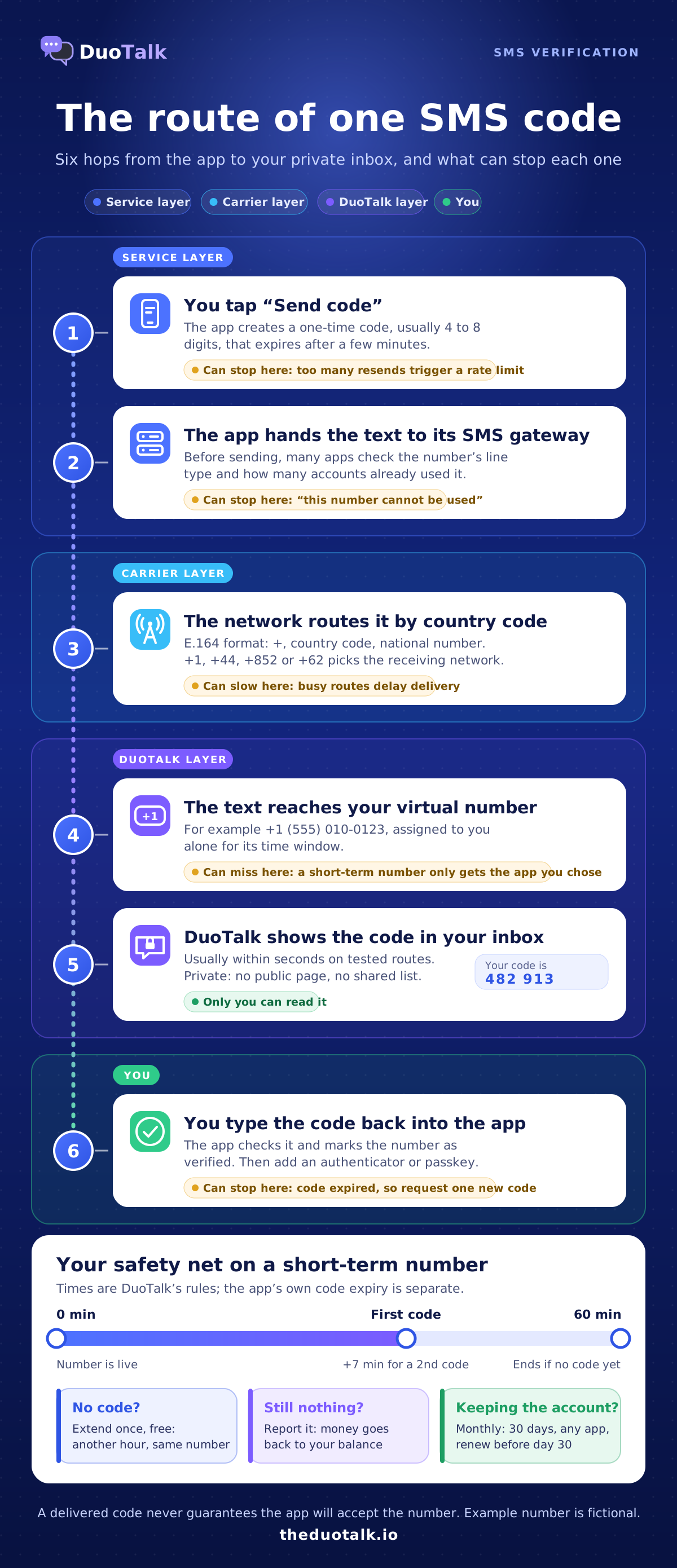
- You request the code. You enter the DuoTalk number in the app and tap "Send code" (wording varies by app).
- The app's messaging system sends it. Most apps hand the text to an SMS gateway, which passes it to mobile networks.
- The network routes it by country code. Every phone number follows the international E.164 format: a plus sign, a country code and the national number, up to 15 digits in total. The country code decides which network receives the text.
- The number receives it. The text arrives on the virtual number you bought.
- DuoTalk shows it in your inbox. The code appears in your private DuoTalk inbox, usually within seconds on tested routes.
- You confirm. You type the code into the app before it expires, and the app marks the number as verified.
What each step can get wrong
Most failed verifications are not lost texts. They are checks the app runs before it even sends the code.
| Step | What can go wrong | What to do |
|---|---|---|
| App checks the number | Some apps look up the line type and refuse numbers they classify as virtual or VoIP | Try another country or the monthly type, or use a different number |
| App checks history | A number already linked to many accounts may be refused | Get a fresh number instead of retrying the same one |
| Rate limits | Too many "Resend" taps can lock code requests for a while | Wait for the timer, then request once |
| Country rules | The app may expect a number from your region | Pick the country that matches your account |
| Delivery | A route can be slow at busy times | Use the free one-hour extension on short-term numbers |
| Call instead of text | Some apps offer a voice call as the fallback, as WhatsApp's help centre describes | Choose the SMS option; DuoTalk numbers cannot take calls |
Getting a code never guarantees that a service will accept the number. Services change their rules without notice, and an app can still refuse a number after it has sent the code. Google, for example, says it limits how many accounts each phone number can create and how many times a number can be used for verification, and shows messages such as "This phone number cannot be used for verification" when a limit applies. When that happens, the fix is a different number, not another retry.
Why SMS codes are a check, not a lock
SMS codes are useful but not the strongest kind of protection. The US National Institute of Standards and Technology lists SMS one-time codes as a "restricted" authenticator in its digital identity guidelines, because text messages can be redirected through SIM swaps or number porting. In the US, the FCC adopted rules in 2023 that require carriers to protect customers against SIM swap and port-out fraud. CISA's mobile guidance gives the same advice from the other side: move important accounts from SMS codes to phishing-resistant methods such as passkeys or authenticator apps. The practical lesson: use a verification number to sign up privately, then add an authenticator app or passkey to any account that matters.
Choose a Country for SMS Verification
An international SMS verification number works the same way in every country, but the app decides which countries it accepts. Choose the country that the app expects for your account: usually the country you live in, the country of your payment card, or the country the app is available in. If the app has no country rule, choose by live stock and price in the picker.
Every country has its own number format and its own rules for mobile lines. The table below covers the five most requested countries. Live stock changes during the day, so always check the picker before you decide.
| Country | Code | Example format | Good to know | Page |
|---|---|---|---|---|
| United States | +1 | +1 (555) 010-0123 | 10-digit numbers; many US apps ask for a US number | USA virtual phone number |
| United Kingdom | +44 | 07700 900123 (+44 7700 900123) | UK mobile numbers start with 07; drop the 0 after +44 | UK virtual phone number |
| Canada | +1 | +1 (555) 010-0145 | Shares +1 with the US; area codes tell them apart | Canada virtual phone number |
| Hong Kong | +852 | +852 6••• ••23 | 8-digit numbers; SIM cards are under real-name registration | Hong Kong virtual phone number |
| Indonesia | +62 | +62 8•• •••• ••41 | Mobile numbers start with 8 after +62; prepaid SIMs are registered with a national ID | Indonesia virtual phone number |
(The example numbers are fictional.)
Decision rules for picking a country
- If the app is region-locked, use a number from that region. A US streaming or shopping app usually wants an SMS verification phone number in the USA (+1); a UK delivery or marketplace app usually wants an SMS verification phone number in the UK (+44).
- If you are travelling, keep the account's original country. Switching the country later can trigger extra checks.
- If the app has no country rule, compare live stock and price for that service in the picker and pick the cheapest country that has stock.
- If the code fails twice in one country, try a second country before you try a third number in the first one.
All countries are listed with live stock on the Numbers page.
Supported Apps and Verification Services
DuoTalk supports the apps people verify most: messengers, email, social networks, marketplaces, ride and travel apps, AI tools and more. Each service has its own price and stock per country, shown in the live picker.
Services with their own listing include Google and Gmail, WhatsApp, Telegram, Microsoft, Discord, Signal, Amazon, Uber, Lyft, Airbnb, LinkedIn, TikTok, Instagram, Facebook, Snapchat, X (Twitter), Apple, Steam, Netflix, Yahoo, YouTube, Viber, WeChat, LINE, imo, ChatGPT and OpenAI, Perplexity, PayPal, Wise, Binance, Temu, Walmart, Polymarket and dating apps.
Which number type fits which app
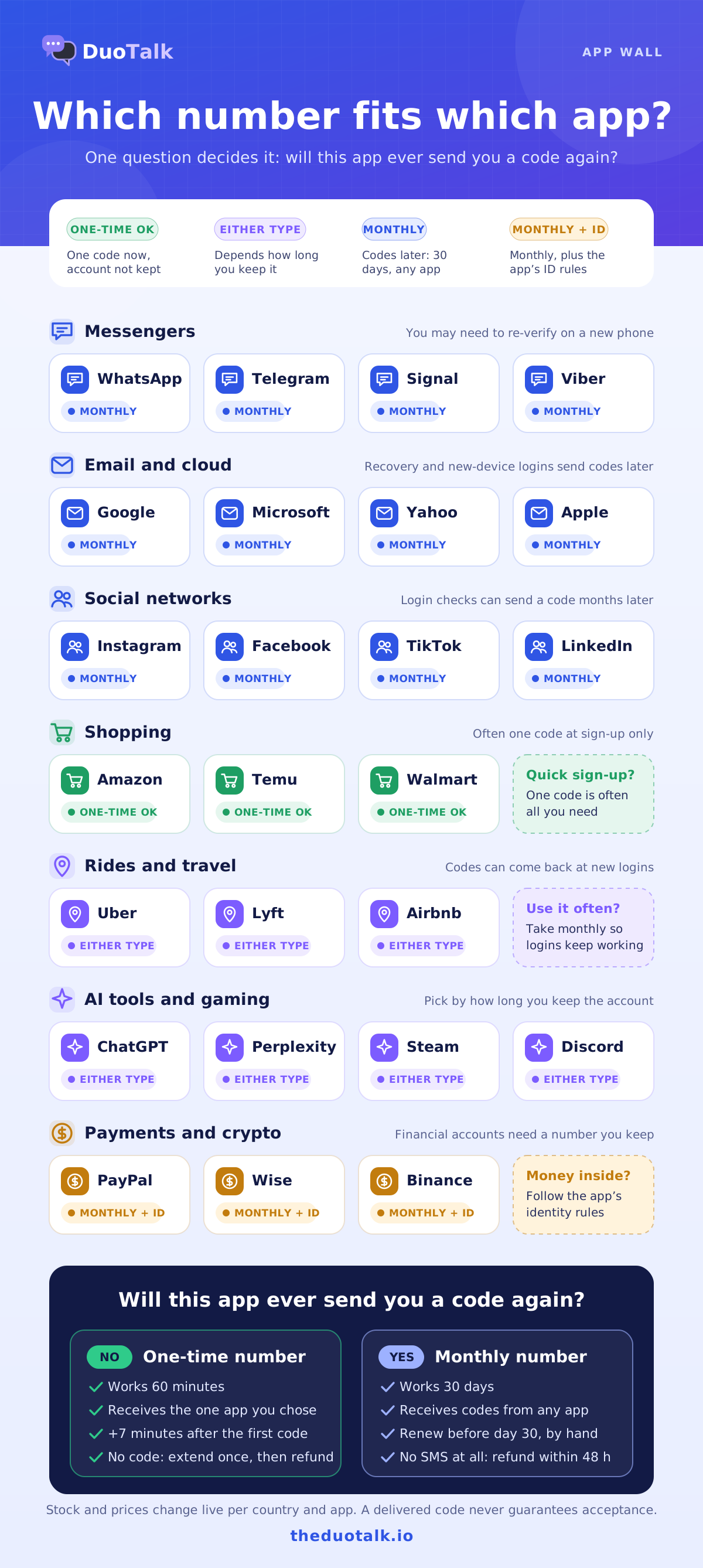
The right type depends on whether you will need a code from that app again.
| App group | Examples | Best fit | Why |
|---|---|---|---|
| Messengers | WhatsApp, Telegram, Signal, Viber | Monthly | You may need to re-verify on a new phone |
| Email and cloud | Google, Microsoft, Yahoo, Apple | Monthly | Recovery and new-device logins send codes later |
| Social | Instagram, Facebook, TikTok, X, LinkedIn | Monthly for accounts you keep | Login checks can send a code months later |
| Shopping and marketplaces | Amazon, Temu, Walmart | One-time for a quick sign-up | Often one code at sign-up only |
| Rides and travel | Uber, Lyft, Airbnb | Monthly if you use it often | Codes can come back at new logins |
| AI tools and gaming | ChatGPT, Perplexity, Steam, Discord | One-time or monthly | Depends on how long you keep the account |
| Payments and crypto | PayPal, Wise, Binance | Monthly, and follow the service's identity rules | Financial accounts need a number you can keep |
For the most requested apps, see the dedicated pages: virtual number for WhatsApp, virtual number for Telegram, virtual number for Facebook verification, Instagram verification phone number and virtual number for TikTok.
What DuoTalk is not for
A verification number is for privacy, for keeping work and personal identities apart, for travel and for testing. It is not a way to dodge a ban, to run fake accounts at scale or to get around identity (KYC) checks. Banks, payment apps and crypto exchanges have identity rules for a reason; follow them, and use a number you can keep.
One-Time SMS Verification vs Number Rental
Use a one-time (short-term) number when you need a single code now and will not log in from a new device later. Use a rental (monthly) number when the account matters and you will need codes again for logins, recovery or re-verification.
| Feature | Short-term (one-time) | Monthly (rental) |
|---|---|---|
| How long it works | 60 minutes from purchase | 30 days |
| After the first code | Stays open 7 more minutes for a second code | Keeps receiving for the whole 30 days |
| Which apps can text it | Only the service you chose at purchase | Any service |
| If no code arrives | Extend once for free (another hour, same number), then report it for a refund to your balance | Refund on request within 48 hours if it never receives an SMS |
| Renewal | Paid renewal for another hour on the same number, until its end date | Renew from your numbers list before day 30; nothing renews automatically |
| Countries | Many countries | Some countries only |
| Best for | Quick sign-ups, tests, one-off codes | Messengers, email, social and any account you keep |
When one-time SMS verification is enough
One time SMS verification suits a quick sign-up, a one-off code for a shop or a test account. Think of it as a disposable SMS verification number: you use it for one code and let it go. It is a temporary SMS verification service, not a long-term line.
When to rent an SMS verification number
SMS verification number rental suits any account you will log back into. A rented number lets you receive OTP SMS online for 30 days from any app, which makes it a good mobile number for OTP verification on messengers, email and social accounts. It also works as a virtual number for 2FA codes while you hold it, though an authenticator app is the safer long-term second factor.
A simple decision rule
Ask one question: "Will this app ever send me a code again?"
- No, or I do not care if I lose the account: one-time SMS verification. It is the cheapest way to get a single code.
- Yes, at the next login, on a new phone or for a password reset: rent an SMS verification number for 30 days and renew it while you use the account. It becomes your private number for OTP verification on that account.
- Not sure: take the monthly number for accounts with your photos, messages, money or work in them. Losing access later costs far more than the rental.
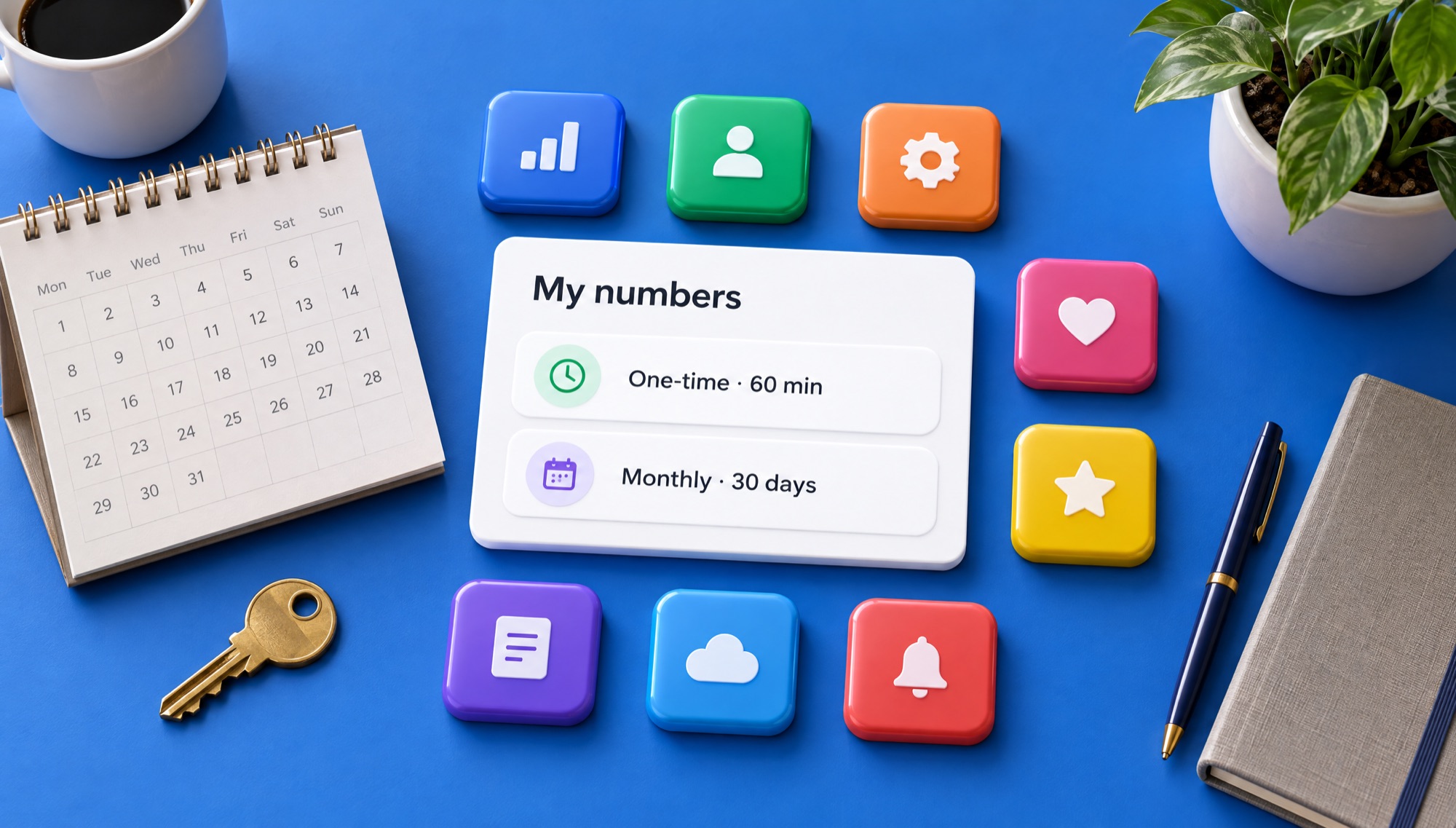
After a short-term number ends, it may later be given to someone else after a quiet period. That is normal for a temporary number for verification code use, and it is why a short-term number is the wrong home for an account you plan to keep. Our one-time vs monthly virtual number guide walks through worked examples, and the temporary phone number page covers short-term numbers in more depth.
Private Numbers for OTP Verification
A private number for OTP verification, sometimes called a virtual SMS verification service, is a number assigned to you alone for a set time, with an inbox only you can open. Free "receive SMS" websites are the opposite: they post every incoming code on a public page that anyone can read.
That difference matters more than price. On a public inbox, a stranger can see your code, use it first, or later use the same number to reset your account. Public numbers are also reused by many people, so many apps already block them. Our guide to the private SMS verification number covers the safety side in depth.
| Question | Free public inbox | DuoTalk private number |
|---|---|---|
| Who can read the code? | Anyone who opens the page | Only you, in your DuoTalk inbox |
| Is the number fresh? | Usually used by many people before you | Assigned to you for your time window |
| Will the app accept it? | Often refused | Better odds, never guaranteed |
| Can you get a code later? | No control | Yes, with a monthly number you renew |
| If no code arrives? | Nothing to refund | Refund to your DuoTalk balance |
How DuoTalk keeps your codes private
- Your inbox is yours. Codes are shown in your account, not on a public list.
- One number, one holder at a time. A short-term number is yours for its 60 minutes; a monthly number is yours for its 30 days.
- No personal number needed. Codes go to the DuoTalk number, not to your own SIM. You can receive a verification code without SIM card hardware in your phone at all, which is what SMS verification without a personal number really means.
- Install it like an app. You can download the DuoTalk app to your phone and check codes on the go.
Private does not mean anonymous to the app you are verifying with. The app still sees the number, your device and your network. A private number keeps your personal number out of that app's database and out of future data leaks. For a full privacy walkthrough, read how to receive verification codes online without sharing your number.
SMS Verification Service Pricing
SMS verification pricing on DuoTalk depends on the country, the service and the number type, and it changes with live stock. See the live price in the picker at the top of this page before you buy; that is the exact amount taken from your balance.
We do not print fixed prices on this page because they move with demand. What you can rely on is how the price is built and what happens to your money.
What moves the price
| Factor | Effect on price |
|---|---|
| Country | Some countries cost more to supply than others |
| Service | Popular or strict apps can cost more than relaxed ones |
| Number type | Monthly numbers tend to cost more than one-time numbers because you hold them for 30 days |
| Live stock | When stock for a service runs low, the price can rise |
What happens to your money
- Short-term number, code arrives: you paid for a working number and got your code.
- Short-term number, no code: extend once for free. If it still fails, report it; DuoTalk reviews every report and refunds the price to your balance when the number was at fault.
- Monthly number that never receives an SMS: ask for a refund within 48 hours.
- Service refuses the number after sending a code: once a code has arrived, the price is final unless DuoTalk finds a fault on its side (see the refund policy). Try a different country or type next time.
- Fees: none added at checkout.
A good SMS OTP receiving service is judged by what happens when things go wrong, not by the lowest sticker price. A paid SMS verification service can work out cheaper than a free one once you count lost accounts. Our guide to SMS verification cost explains the trade-offs, and how to buy a virtual phone number covers the buying steps in detail. If you want to compare all number options side by side, see the buy virtual phone number page.
How to buy a virtual number for OTP in five steps
- Top up your DuoTalk balance with crypto.
- In the live picker at the top of this page, choose the service, then the country.
- Choose one-time or monthly, check the live price and stock, and press "Get Number".
- Paste the number into the app and request the code once.
- Copy the code from your DuoTalk inbox and enter it before it expires.
If the code is slow, wait for the app's resend timer rather than tapping "Resend" repeatedly. The help article on codes that do not arrive gives the DuoTalk steps, and our troubleshooting guide for not receiving verification codes covers every common cause.
Popular countries and services
- Countries: USA, UK, Canada, Hong Kong, Indonesia, or all countries.
- Services: WhatsApp, Telegram, Facebook, Instagram, TikTok.
- Want the full overview of ways to get texts on the web? Start at receive SMS online, or read the step-by-step guide on how to receive SMS online.
Sources
- NIST SP 800-63B-4: Digital Identity Guidelines, Authentication and Authenticator Management
- ITU-T Recommendation E.164: The international public telecommunication numbering plan
- Federal Register: FCC rules to protect consumers from SIM swap and port-out fraud (December 8, 2023)
- Google Account Help: Verify your account
- WhatsApp Help Center: I'm traveling and I can't get my WhatsApp code
- CISA: Mobile Communications Best Practice Guidance (December 2024, PDF)
Last reviewed: November 2026
Frequently asked questions
What is an SMS verification service?
An SMS verification service gives you a phone number that can receive the one-time code an app sends during sign-up or login. You enter that number instead of your personal one, read the code in the service's inbox, and type it back into the app. DuoTalk is an SMS verification service with private virtual numbers: you choose the country and the app, the code arrives in your own inbox, and a short-term number that gets no code can be reported for a refund to your balance.
Is it legal to use a virtual number for SMS verification?
In most countries, using a virtual number to receive your own verification codes is legal, in the same way that using a second SIM is legal. What matters is how you use it. Each app has its own terms, and some do not allow virtual numbers. Using any number to commit fraud, dodge a ban or get around identity checks breaks those terms and can break the law. Use verification numbers for privacy, travel, testing and keeping work and personal life apart.
Why does an app say "this phone number cannot be used for verification"?
That message usually means the app has refused the number before sending a code. Common reasons are that the number has been used for too many accounts, that the app classifies its line type as virtual or VoIP, or that the country does not match the account. Google says it limits how many accounts one number can create and how often it can be used for verification. The fix is a fresh number, a different country or a monthly number, not repeated retries on the same one.
Do I need a SIM card for SMS verification?
No. A virtual number receives SMS on a network line, and DuoTalk shows the text in a web inbox, so you can receive an OTP on a laptop, tablet or phone without inserting any SIM card. You only need an internet connection and a DuoTalk account. Keep in mind that DuoTalk numbers receive texts only: they cannot send replies or take voice calls, so choose the SMS option if an app offers a call instead.
What is the best SMS verification service?
The best SMS verification service is the one that keeps your code private, shows live stock and prices before you pay, and gives your money back if no code arrives. Check four things: a private inbox instead of a public page, a choice between one-time and monthly numbers, clear refund rules, and honest wording that acceptance is never guaranteed. Avoid free public inbox sites for any account you want to keep, because anyone can read the codes.
Can I use the same verification number again later?
Only if you rented it. A short-term number works for 60 minutes for one service; you can pay to renew it for another hour until its end date, but after that it expires and may later go to someone else. A monthly number stays yours for 30 days, receives codes from any service, and can be renewed from your numbers list before it ends. If you will need codes for logins or password resets later, choose monthly and renew it while you use the account.
What happens if the SMS verification code never arrives?
On a short-term DuoTalk number, you can extend once for free, which gives you another hour on the same number. If the code still does not come, report the number; DuoTalk reviews it and refunds your balance when the number was at fault. For a monthly number that never receives an SMS, you can ask for a refund within 48 hours. Before you retry, check the country, wait for the app's resend timer and request the code only once.