Receive SMS Online with Temporary & Private Phone Numbers
Receive SMS online on a private virtual number that only you can read. Pick a country and a service in the live picker, see the live price and stock, and read your verification code in your DuoTalk inbox, usually within seconds, with no SIM card and no personal number involved.
Live prices and stock
Prices and stock on DuoTalk are live. They change during the day by country and service, so the number picker on this page loads the current price and the numbers in stock when the page opens in your browser. Choose the country and the service, check the live price, then press Get a Private SMS Number.
The short answer: To receive SMS online, you rent a real phone number whose texts appear in a web inbox instead of on a SIM card. On DuoTalk you pick a country and service in the live picker, enter the number on the app or website, and read the code in a private inbox that only you can see. A short-term number works for 60 minutes for one service; a monthly number works for 30 days for any service.
Receive SMS Online in Minutes
You can receive SMS online in about two minutes: top up your balance, choose a country and a service, copy the number, and wait for the code to appear in your DuoTalk inbox. Codes usually arrive within seconds on tested routes, and if nothing arrives you can extend once for free, then report the number for a refund to your balance after review.
DuoTalk (theduotalk.io) is a web app that gives you private virtual phone numbers for receiving SMS verification codes, so you never have to hand your personal number to a website or app. "Receive SMS online" means a text message sent to a real, dialable phone number is delivered to an inbox you open in a browser or app, on any device, with no physical SIM on your side. The number is a normal number in the international format defined by the ITU's E.164 plan (a country code followed by up to 15 digits in total); only the place where you read it changes.
Here is the whole flow at a glance:
| Step | What you do | Time it takes |
|---|---|---|
| 1. Top up | Add balance with USDT (TRC20 or BEP20), TRX, LTC, BTC or ETH (minimum top-up $15) | Until the network confirms |
| 2. Pick | Choose country, service and number type in the live picker at the top of this page | Under a minute |
| 3. Paste | Enter the number on the site or app that wants to verify you | Seconds |
| 4. Read | Open your DuoTalk inbox and copy the code | Usually seconds on tested routes |
| 5. Finish | Enter the code before it expires, then secure the account | A minute |
Who receives SMS online, and why
People receive text messages online for privacy (the personal number stays out of another database), separation (a work or marketplace profile gets its own number), travel (a code from a country you are not in) and testing (developers checking their own SMS flow; DuoTalk also offers API access).
One honest limit: receiving a code never guarantees that the service will accept the number. Apps change their rules, and some refuse numbers they classify as virtual.
Choose a Temporary or Private Phone Number
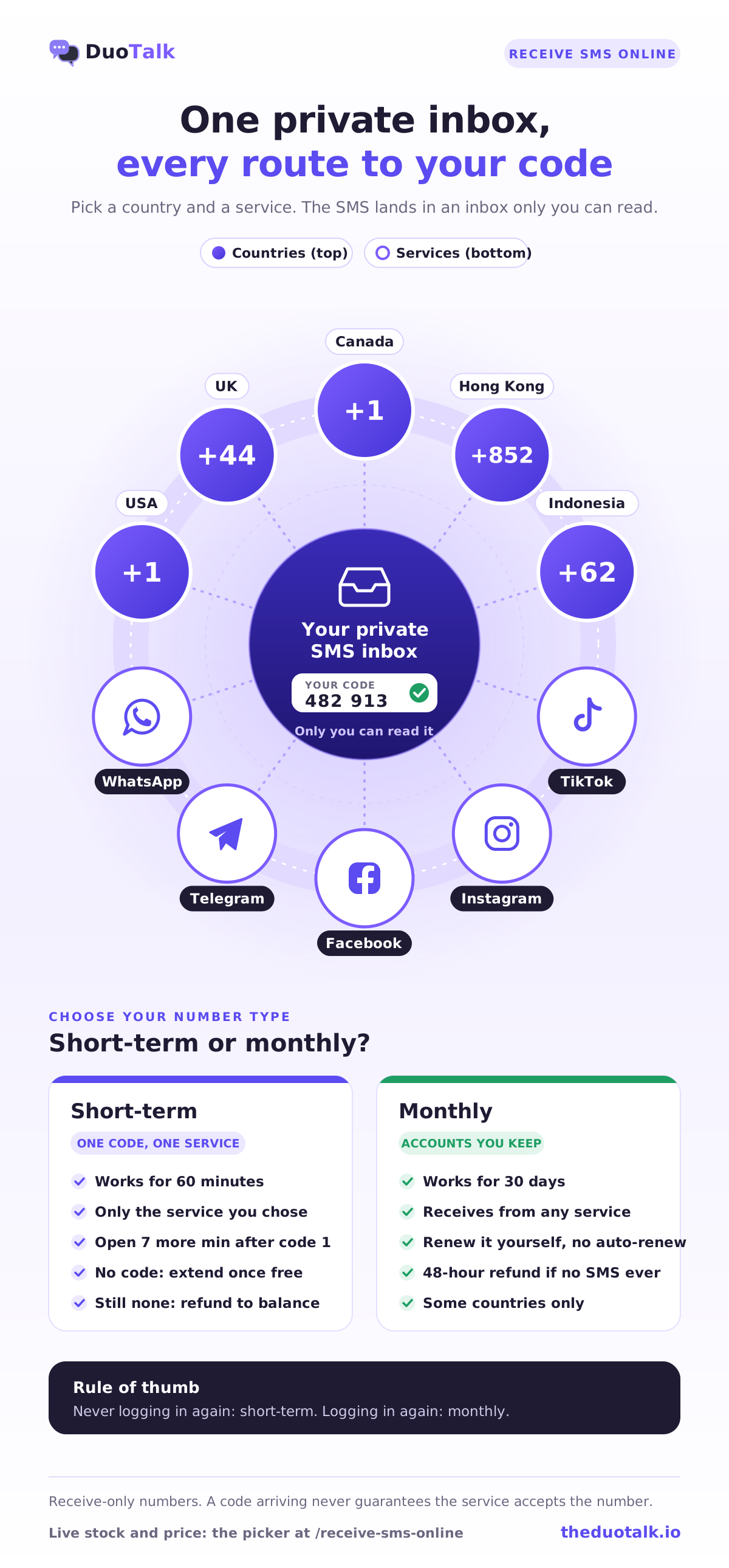
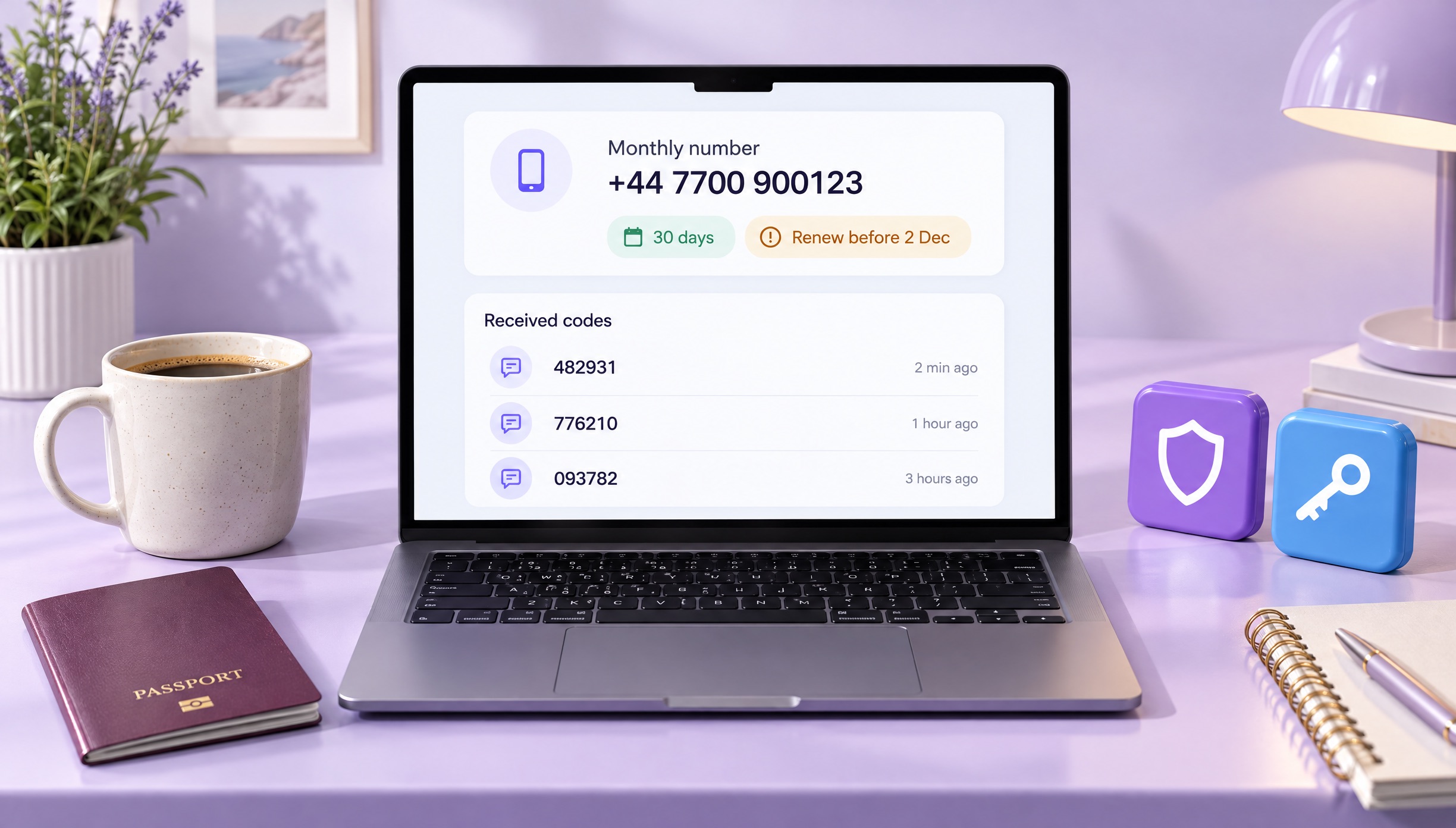
Choose a temporary (short-term) number if you only need one code for one sign-up, and choose a monthly number if you will log in again, reset a password or recover the account later. Both are private: the SMS appears only in your own DuoTalk inbox, never on a public page.
| Feature | Short-term (one-time) number | Monthly (dedicated) number |
|---|---|---|
| How long it works | 60 minutes after purchase | 30 days |
| After the first code | Stays open 7 more minutes for a second code | Keeps receiving for the full 30 days |
| Which senders | Only the one service you chose at purchase | Any service |
| If no code arrives | Extend once for free (another hour), then report for a refund to balance | Refund on request within 48 hours if it never receives an SMS |
| Renewal | Paid renewal for another hour on the same number, until its end date | Manual: renew from your numbers list before day 30 (nothing renews automatically) |
| Availability | Many countries and services | Some countries only |
| Best for | One-off sign-ups, trials, testing | Accounts you keep, re-logins, recovery codes |
A simple decision rule
- Use a short-term number if you will never need another code on this account, for example a free trial, a one-time download or a test of your own app.
- Use a monthly number if the service may ask for a code again: new device logins, password resets, two-step verification, or a profile you plan to keep for months.
- Use your own SIM if the account is tied to your legal identity: banking, payments, tax, government portals or anything with identity checks (KYC). Follow that service's identity rules.
If you want the full guide on short-lived numbers, see our temporary phone number page. To compare buying options, durations and filters, see buy virtual phone number.
What "private" means on DuoTalk
A private SMS receiver online is a number rented to one customer at a time, with messages shown only after you log in. On a free public SMS website, by contrast, every message appears on an open web page. Private means nobody else can read your code, and DuoTalk never assigns the number to another customer while your access is active.
Short-term numbers only receive SMS from the one service you picked, which keeps your inbox clean. Monthly numbers receive SMS from any service. Neither type can send messages or take calls: DuoTalk numbers are receive-only by design.
Receive SMS without a SIM card
You can receive SMS without a SIM card because the number lives with the provider, not in your phone. The text travels over the normal mobile network to that number and DuoTalk shows it in your browser or the installed app, so a laptop, a tablet or a phone with a foreign SIM all work. For the full explanation of how this works, and when it does not, read our guide to receive OTP without a SIM card.
How to Receive SMS Verification Codes Online
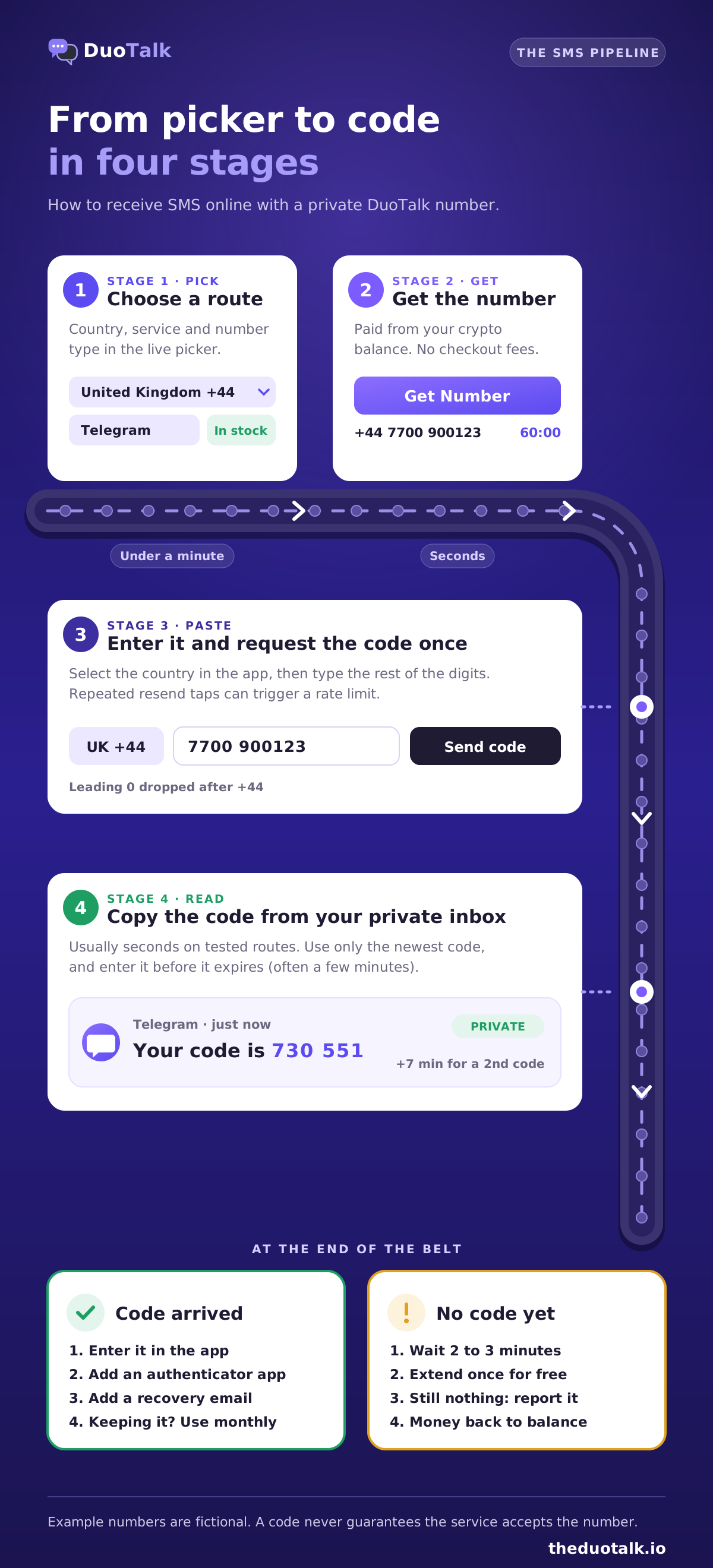
To receive an SMS verification code online, buy a number for the exact service and country you need, paste it into that service's phone field, request the code once, and copy it from your DuoTalk inbox. The whole process takes a few minutes, and most failures come from a wrong country format or from requesting the code too many times.
Step by step
- Top up your balance. Send crypto (USDT on TRC20 or BEP20, TRX, LTC, BTC or ETH); the minimum top-up is $15. The balance is added automatically once the network confirms. No fees or tax are added at checkout.
- Open the live picker at the top of this page. Choose the country first, then the service (for example WhatsApp, Telegram or Google). The picker shows the live price and how many numbers are in stock right now.
- Choose the number type. Short-term for a single code, monthly for an account you will keep.
- Click "Get Number". The number appears in your DuoTalk inbox with a countdown.
- Enter the number correctly. Pick the right country in the app's dropdown, then type the remaining digits without repeating the country code. A US number shown as +1 201-555-0142 is entered as country "United States (+1)" and then "2015550142".
- Request the code once. Tapping "resend" many times can trigger a rate limit on the service's side.
- Read the code in your inbox. It usually appears within seconds. Copy it and enter it before it expires; most codes are valid for only a few minutes.
- Secure the account. Add an authenticator app or passkey and a recovery email so you do not depend on SMS for every future login.
If the code does not arrive
Wait a couple of minutes first. Then extend a short-term number once for free (another hour on the same number); if it still fails, report it. DuoTalk reviews every report and refunds the price to your balance when the number was at fault. For the DuoTalk steps, read the help article on codes that do not arrive and our refund rules; for causes across all apps, see the guide to not receiving verification codes.
| Symptom | Most likely cause | What to do |
|---|---|---|
| Nothing arrives after 2-3 minutes | Route is slow or the service did not send | Extend once free, then report for a refund to balance |
| App says "invalid number" | Country code entered twice or wrong country selected | Re-enter with the right country in the dropdown |
| App says the number cannot be used | The service refuses this number type | Try another country or a monthly number for that service |
| "Too many attempts" | Repeated resend requests | Wait, then request once |
| Code arrives but is rejected | Code expired or an older code was used | Request a fresh code and use only the newest one |
The deeper, how-to version of this process, including every alternative way to get texts on a computer, is in our guide on how to receive SMS online. For the verification side specifically, see the SMS verification service page.
Receive OTP online safely
A one-time password (OTP) is a short code, usually 4 to 8 digits, that proves you control a phone number at that moment. Treat it like a key. The US Federal Trade Commission's advice is short: "Never give your verification code to someone else." That is exactly why the inbox matters. On a public page, anyone could read and use your code; in a private inbox, only you can.
Available Countries for Online SMS Reception
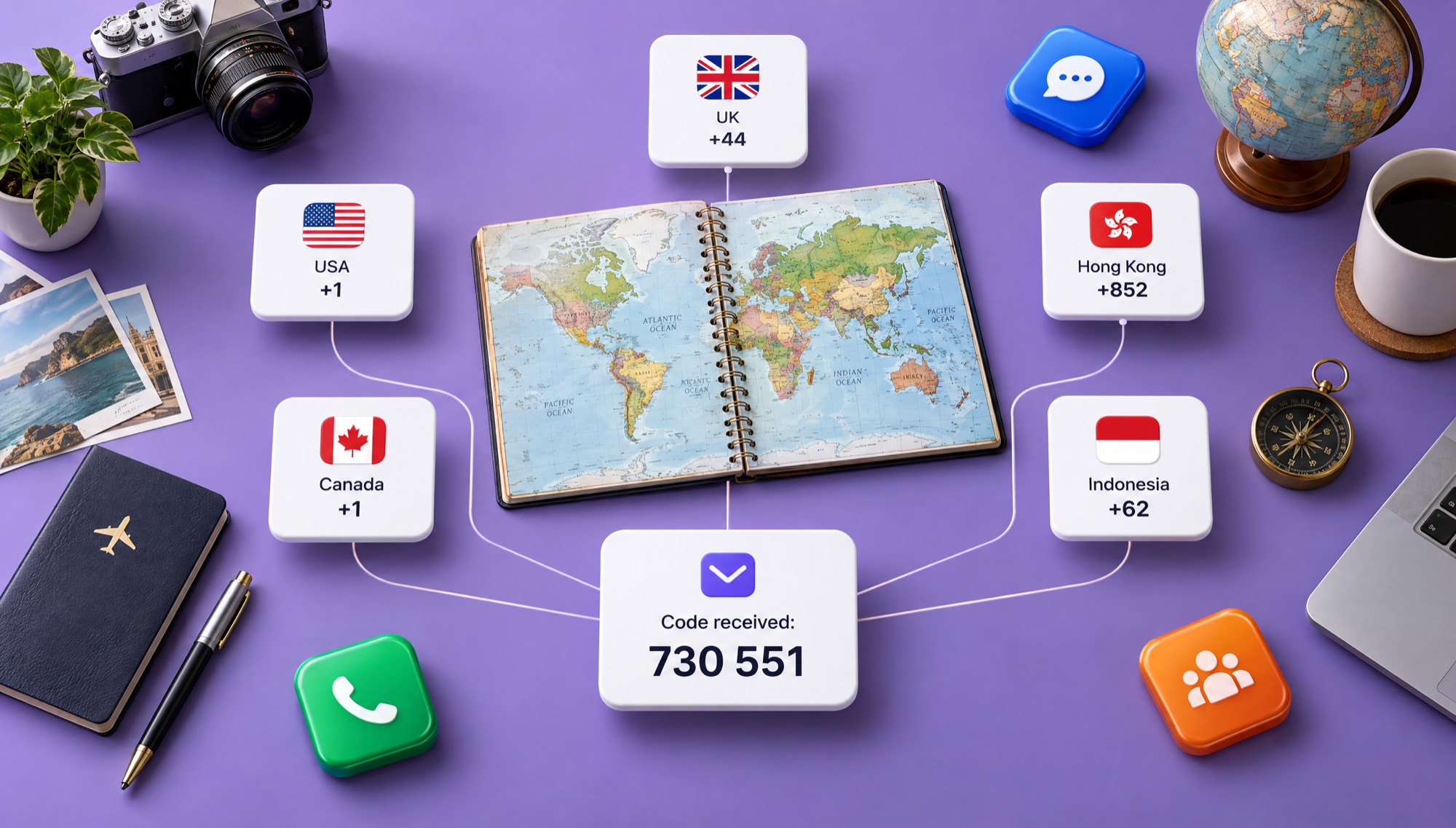
DuoTalk offers numbers in many countries, including the United States, United Kingdom and Canada, and the list changes with live stock. The picker at the top of this page always shows which countries have numbers for your chosen service right now, with the live price for each.
Pick the country the service expects. Many apps compare the number's country with your app region, location or sign-up country, and a mismatch is a common reason a code is refused.
Popular countries
| Country | Code | Number format (national) | Good to know | Page |
|---|---|---|---|---|
| United States | +1 | 10 digits: 3-digit area code + 7 digits | Same +1 code as Canada; many US apps expect a US number | Receive SMS online USA |
| United Kingdom | +44 | Mobiles start with 07, 11 digits including the 0 | Drop the leading 0 after +44 | Receive SMS online UK |
| Canada | +1 | 10 digits, Canadian area codes | Shares +1 with the US; area code tells them apart | Receive SMS online Canada |
| Hong Kong | +852 | 8 digits, no area codes | SIM cards are under a real-name registration rule | Receive SMS online Hong Kong |
| Indonesia | +62 | Mobiles start with 08 nationally (+62 8...) | Drop the leading 0 after +62 | Receive SMS online Indonesia |
Example numbers on this page are fictional: US and Canadian examples use the 555-01xx range, and UK examples use the 07700 900xxx range that Ofcom reserves for drama and examples.
How to pick the right country
- Match the service's home market when it is strict about region, such as a US-only app.
- Match where your account already lives. A profile created with a UK number should keep a UK number for recovery.
- When the service accepts anywhere, start with the country that has the most live stock in the picker.
Popular services
These service pages explain how verification works for each app, which countries tend to suit it, and what to do after the code:
- Virtual number for WhatsApp
- Virtual number for Telegram
- Virtual number for Facebook verification
- Instagram verification phone number
- Virtual number for TikTok
Every service and country combination available today is listed on the Numbers page, with live stock and price.
Free vs Paid SMS Numbers: What's the Difference?
The difference is who can read your code. Free SMS websites show every incoming message on a public page that anyone can open, while a paid number shows the message only in your private inbox. Free numbers suit throwaway tests; paid private numbers suit any account you want to keep.
Free "receive SMS online without registration" sites post shared numbers and show incoming texts on a public page. That model has three problems:
- Everyone sees the code. Researchers at the University of Florida and partners studied nearly 400,000 text messages sent to public SMS gateways over 14 months (Reaves et al., IEEE Symposium on Security and Privacy, 2016) and found services sending sensitive data in plain text to these open pages.
- The number is already used. A shared number may already have been registered on popular apps many times, so you see errors like "this number is already in use" or the code goes to an account that is not yours.
- Services block them. Because public numbers are so widely reused, many apps flag them, and the code never comes.
| Factor | Free public inbox | Paid private number (DuoTalk) |
|---|---|---|
| Who can read the code | Anyone who opens the page | Only you, after login |
| Acceptance by apps | Often flagged | Often better, never guaranteed |
| If no code arrives | Nothing you can do | Extend once free, then report for a reviewed refund to balance |
When free is fine, and when it is not
Free is fine for a test of your own SMS flow or a forum you will never revisit. It is not fine for email, messaging apps, marketplaces or anything you would hate to lose, because whoever reads the code on that public page can take the account over. The full comparison, with examples and research, is in our guide to free vs paid SMS verification.
Non-VoIP and virtual numbers
Some services check the line type before they send a code, and numbers from free texting apps are often classed as VoIP and refused. If you keep seeing "this number cannot be used", the explainer on non-VoIP numbers covers how line-type checks work.
Why Choose DuoTalk for Online SMS?
DuoTalk is built for one job: giving you a private number that receives SMS verification codes, with clear rules for what happens when a code does not arrive. You see live stock and price before you pay, your codes are private, and failed short-term numbers go back to your balance.
| What you get | How it works | Why it matters |
|---|---|---|
| Private inbox | Codes appear only in your logged-in DuoTalk inbox | No stranger can read or reuse your code |
| Live stock and price | The picker shows numbers in stock per country and service | You choose routes that work right now |
| Two number types | 60-minute short-term or 30-day monthly | Pay for one code, or keep a number for recovery |
| Clear no-code rules | Free extension once, then refund to balance; 48-hour refund on monthly numbers that never receive | You do not lose money on a dead route |
| No SIM card | Works in any browser; the app can be installed on your phone | Receive SMS without a SIM card or a second phone |
| Crypto top-ups | USDT (TRC20, BEP20), TRX, LTC, BTC, ETH | No card details shared; balance added on confirmation |
| No checkout extras | No fees or tax added at checkout | The price you see is what leaves your balance |
| Developer access | API access for testing your own SMS flows | Automate QA without personal phones |
Use it responsibly
A private number protects your privacy; it is not a tool for getting around rules. Use one number per real account you own, follow each service's terms, and never use virtual numbers to create fake accounts at scale, to come back after a ban, or to skip identity checks. For banking, payments and crypto exchanges, use a number you can keep long term and follow the service's identity rules. US regulators have tightened carrier rules against SIM-swap and port-out fraud (FCC rules published in the Federal Register on 8 December 2023), which is one more reason to keep high-value accounts on a number you control for the long term.
Keep the account after the code
SMS is a weak second factor on its own. NIST's digital identity guidelines (SP 800-63B, the 800-63-4 revision) list one-time codes sent over the phone network as a "restricted" authenticator because of risks such as SIM changes and number porting. After you verify:
- Turn on an authenticator app or a passkey where the service offers it.
- Add a recovery email you control.
- Save backup codes offline.
- If you used a short-term number, change the account's phone number to one you keep, or switch to a monthly number before you need another code.
For WhatsApp specifically, its help centre explains how registration by SMS or voice call works; after registering, set a two-step verification PIN. The WhatsApp number page walks through it.
SMS Number Pricing and Availability
Prices depend on the country, the service and the number type, and they change with live stock, so DuoTalk shows the current price in the picker instead of a fixed price list. To see what a number costs right now, choose a country and service in the live picker at the top of this page.
A monthly number covers 30 days and any service, so expect it to be priced above a single short-term number. The exact figures are always the live prices in the picker above.
What moves the price
| Factor | Effect on price | Why |
|---|---|---|
| Country | Varies widely | Local carrier costs and demand differ by country |
| Service | Popular, strict apps can cost more | Fewer numbers work for them, so stock is tighter |
| Number type | Monthly tends to cost more than short-term | You keep the number for 30 days and any service can text it |
| Live stock | Low stock can raise the price | Supply changes through the day |
How payment works
- Top up once with crypto; the balance arrives after network confirmation.
- Each number is paid from that balance when you click "Get Number".
- No fees or tax are added at checkout.
- If a short-term number never receives a code, extend once free; if it still fails, report it. After review, the price returns to your balance when the number was at fault.
- Monthly numbers do not renew automatically. Renew from your numbers list before day 30 if you still need the number. If a monthly number never receives any SMS, you can request a refund within 48 hours.
Rent a number to receive SMS: which costs less over time?
For a single code, a short-term number is cheaper. For an account you will keep, weigh a monthly number against the cost of losing the account: once a short-term number expires, any later login code goes to a number you no longer have. The buy virtual phone number page explains rental durations and filters.
Sources
- ITU-T, Recommendation E.164: The international public telecommunication numbering plan
- US Federal Trade Commission, What's a verification code and why would someone ask me for it? (7 March 2024)
- Reaves et al., Sending out an SMS: Characterizing the Security of the SMS Ecosystem with Public Gateways, IEEE Symposium on Security and Privacy 2016
- NIST, SP 800-63B Digital Identity Guidelines: Authentication and Authenticator Management
- Federal Register, Protecting Consumers From SIM-Swap and Port-Out Fraud (8 December 2023)
- Ofcom, Telephone numbers for use in TV and radio drama
- WhatsApp Help Center, How to register your phone number
Last reviewed: November 2026
Frequently asked questions
How can I receive SMS online without a phone?
You can receive SMS online without a phone by renting a virtual number and reading its texts in a web inbox. On DuoTalk you pick a country and service, paste the number into the app that wants to verify you, and the code appears in your browser, usually within seconds. You do not need a SIM card, a second handset or a phone plan, and the inbox works on any computer or tablet. If you prefer a phone, the DuoTalk app can be installed too.
Is it safe to receive SMS online?
It is safe to receive SMS online when the number is private and only you can see the messages. Free public SMS websites are not safe for real accounts, because anyone who opens the page can read and use your code, and the number has usually been used by many people already. A private paid number keeps the code in your own logged-in inbox. After verifying, add an authenticator app or passkey so the account does not depend on SMS alone.
Can I receive SMS online for free?
Yes, free public SMS websites let you receive SMS online for free, but every message is visible to anyone, and popular apps often block those shared numbers. They work for quick tests and throwaway sign-ups. For email, messaging, marketplaces or any account you want to keep, a paid private number is the safer choice, because nobody else can read the code and a short-term number that never gets a code can be reported for a refund to balance.
Can I receive text messages online on my PC?
Yes. With a virtual number you receive text messages online on a PC, Mac or tablet, because the messages appear in a web inbox instead of on a handset. On DuoTalk you buy the number in the browser, paste it into the app or website that wants to verify you, and keep the inbox tab open; new codes appear by themselves. Numbers are receive-only, so you can read texts but not reply to them.
Which country number is best to receive SMS online?
The best country is the one the service expects for your account. US apps often want a +1 US number, UK services prefer a +44 number, and many global apps accept a wide range of countries. Check that the country matches your app region or account history, then choose the option with the most live stock in the picker. If one country fails, report the number for a refund to balance and try another.
Why am I not receiving SMS on my virtual number?
The most common reasons are a wrong country code in the app's phone field, too many resend requests, a service that refuses that number type, or a route that is slow at that moment. Wait two or three minutes, check the number format, and request the code only once. On a DuoTalk short-term number, extend once for free; if nothing arrives, report it for a reviewed refund to your balance.
Can I use the same online number again later?
Only if it is a monthly number you still hold. A short-term number works for 60 minutes; you can pay to renew it for another hour while it is still available, but after its end date it expires and may later go to someone else. A login or reset code sent weeks later would reach a number you no longer have. For accounts you plan to keep, choose a monthly number, renew it before day 30, and add a recovery email and an authenticator app.