How to Buy a Temporary Phone Number Online: Complete Guide
How to buy a temporary phone number online: top up with crypto, choose the service and country, use the 60-minute window, free extension and refunds.
By the DuoTalk team · Published 2026-11-12 · Updated 2026-11-12
To buy a temporary phone number online, you add balance to an account, pick the service and country you need a code for, press buy, and read the SMS in a private inbox while the number is active. On DuoTalk the whole purchase takes a few minutes once your balance is in place, and the number then works for 60 minutes. Below: the crypto top-up coin by coin, network confirmations, choosing the service and country, the timer minute by minute, and the free extension and refunds.
The short answer: You buy a temporary phone number online by topping up a balance, choosing the service and country, and pressing buy; the number then receives SMS for a fixed window. On DuoTalk a short-term number lasts 60 minutes, stays open 7 more minutes after the first code, can be extended once for free if no code arrives, and can be reported for a refund to your balance if it still fails.
What you get when you buy a temporary phone number online
A temporary phone number is a real mobile-format number that you rent for a short, fixed window to receive one or two SMS verification codes, which you read on a web page or app instead of on your own SIM. When you buy one, you are buying time-limited access to a number and its private inbox, not the number itself.
You do not own the number, and once the window ends it can, after a quiet period, be given to another customer. What you do get is a private inbox only your account can read while access lasts.
DuoTalk (theduotalk.io) is a web app that sells private virtual phone numbers to receive SMS online, in two forms: short-term numbers for a single sign-up and monthly numbers for accounts you keep. This guide is about the short-term purchase. If you are still comparing the two, our guide on one-time vs monthly virtual numbers walks through that decision, and the broader guide to buying a virtual phone number covers monthly numbers in depth.
The attributes of a short-term number
| Attribute | Short-term number on DuoTalk | What it means for you |
|---|---|---|
| Access window | 60 minutes from purchase | Buy only when you are ready to request the code |
| After the first code | 7 more minutes from that moment | Time for a second code, such as a resend or a 2-step check |
| Which senders | Only the one service you chose at purchase | A Telegram number will not show a code from WhatsApp |
| Direction | Receive SMS only | It cannot send texts or take voice calls |
| Who can read it | Only your account | No public inbox, no shared feed |
| No code arrived | Extend once for free (another hour) | Same number, no extra charge |
| Still failed | Report it; refund goes to your balance | Money comes back as balance, ready to reuse |
| After it ends | Cannot be renewed once expired | Do not use it for accounts you must recover later |
Two rows cause most confusion. A short-term number receives only from the service you picked, so a number bought for Google will not show another app's code (monthly numbers receive from any service). And these numbers are receive-only, so a voice-call code or a "send us a text" check will not work.
When a short-term number is the right purchase
Buy a short-term number when you need one code for an account you are unlikely to verify again: a trial, a marketplace you will use once, a newsletter or forum that insists on a phone number, a test sign-up, or a travel booking while your home SIM is off.
Do not buy one for an account where the phone number becomes a long-term login or recovery factor, such as email, everyday messaging apps or anything with SMS two-factor codes. Those belong on a monthly number: it lasts 30 days, receives SMS from any service, and nothing renews automatically (you renew from your numbers list before day 30; if it never receives an SMS, you can request a refund within 48 hours). For banks, payment apps, crypto exchanges and government services, follow their identity rules and use your own long-term number. Our guide to SMS verification cost explains why the two types are priced so differently.
Before you buy: three checks that decide whether the code arrives
Most failed purchases fail before the number is even bought. Check the service, the country and the account type first, and the rest of the process is mechanical.
- Pick the exact service. Search the Numbers page by service name and choose the entry that matches the app you are signing up for. The number will only receive from that service, so "close enough" is not good enough.
- Pick a country the service accepts. Many apps tie the number's country to the region of your account or to the country code they expect. A US app may want +1; a UK government or retail service may expect +44. If you have no preference, pick the country with healthy stock for that service.
- Decide whether you will need this number again. If the account will ever send you a login code, a password reset or a two-factor code by SMS, a short-term number is the wrong tool. Buy a virtual phone number on a monthly plan instead.
On the Numbers page you can search by service, by country, or by country code such as +1, +44 or +852, and every option shows its live price and stock. You do not need an account to look, so check live stock and prices for your service before you top up.
Card types and area codes
On DuoTalk, "First" cards are the standard stock for new sign-ups, and that is what most buyers want. Restart and Renew cards are other stock types with their own price and availability. When you press Get Number you can choose an area code (for example 201 in the US) or Any; leave it on Any unless you really need one, because a narrow choice means less stock.
Stock changes during the day. If your service shows Sold out in one country, try another country or come back later rather than buying a number for a different service.
How to pay: topping up your balance with crypto
You pay for a temporary number from your DuoTalk balance, and you add to that balance with cryptocurrency. Top-ups are crypto only (USDT on TRC20 or BEP20, TRX, LTC, BTC or ETH), there are no fees or tax added at checkout, and your balance is added automatically once the network confirms the payment.
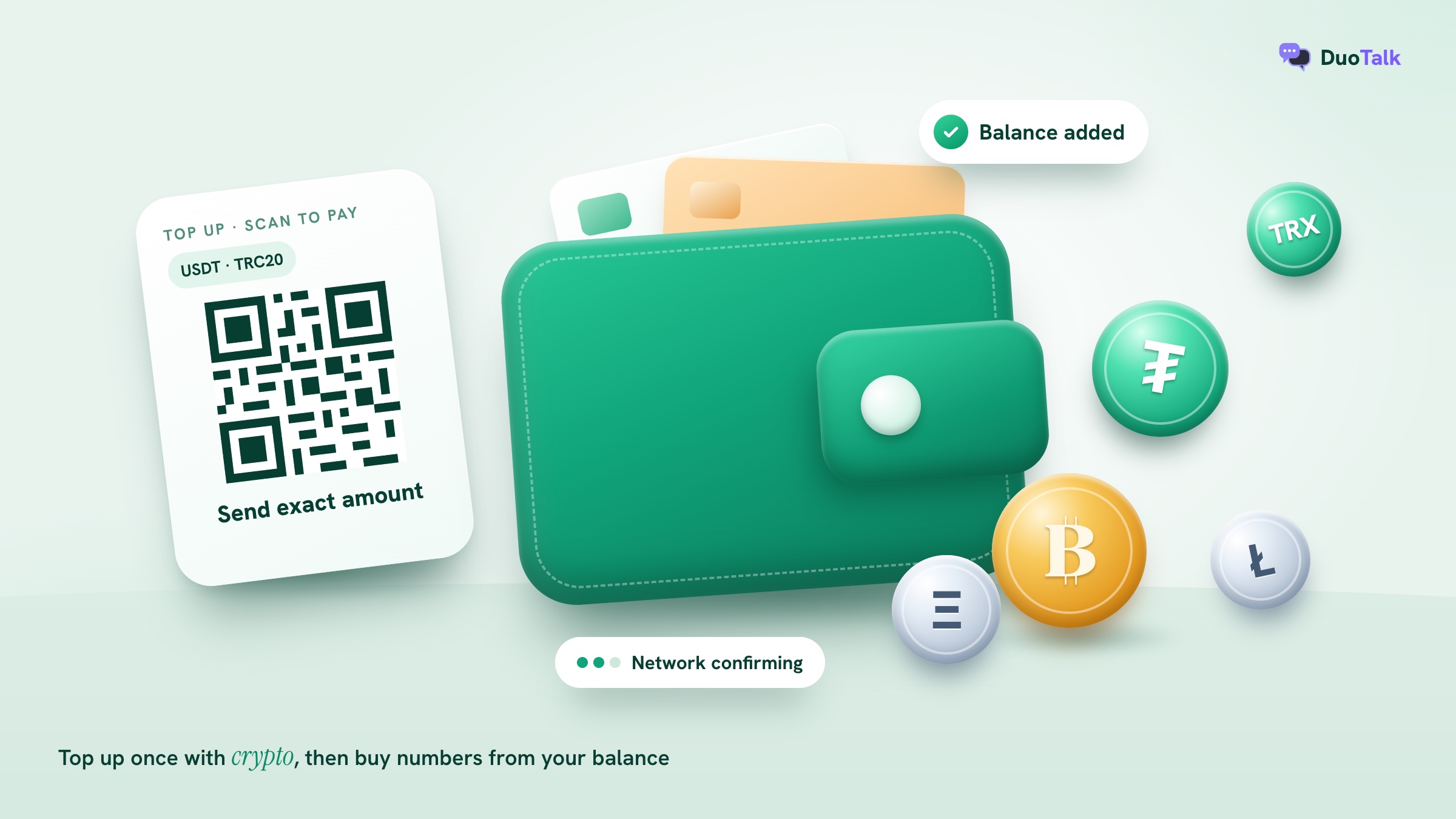
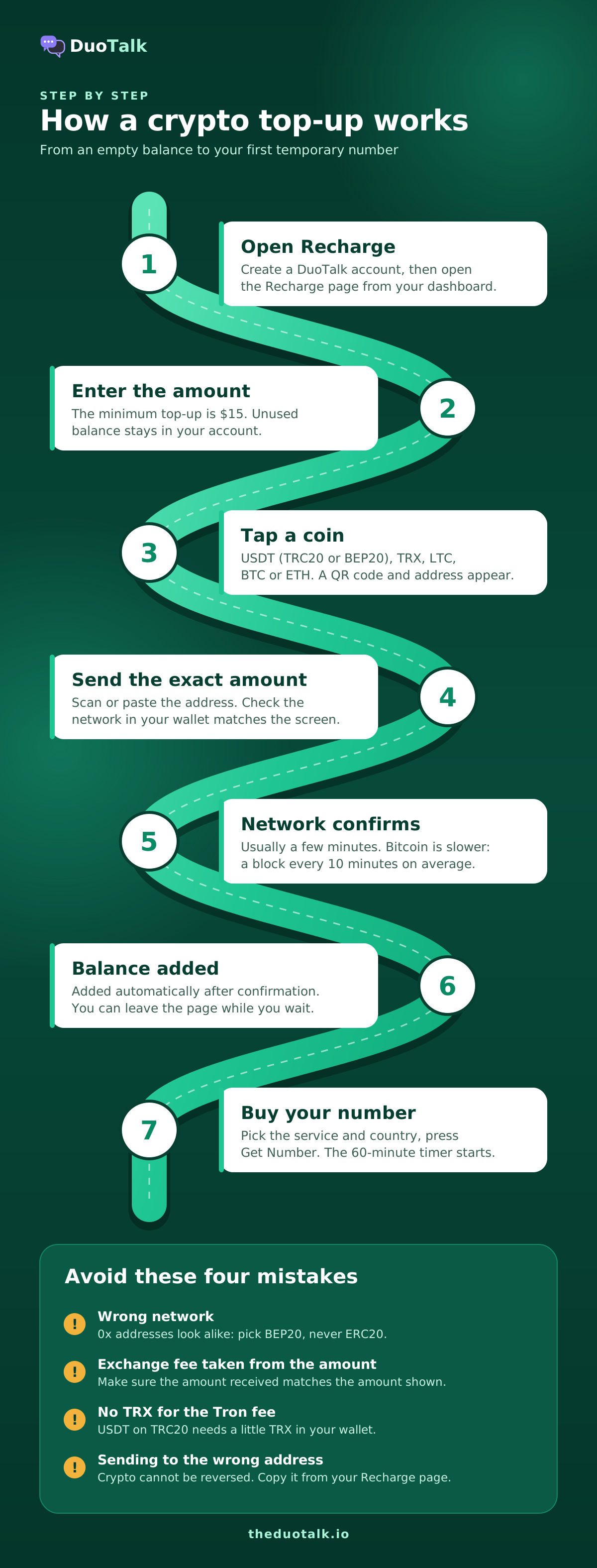
Top-up steps, in order
- Create an account and open Recharge. Sign up on DuoTalk, then open the Recharge page from your dashboard.
- Enter the amount. The minimum top-up is $15. Think about how you will use the balance: one top-up usually covers several short-term numbers, and leftover balance stays in your account.
- Tap a coin. Choose USDT (TRC20 or BEP20), TRX, LTC, BTC or ETH. A QR code and a deposit address appear straight away, together with the exact amount to send.
- Send the exact amount on the network shown. Scan the QR code with your wallet, or copy the address and paste it. Check the network name in your wallet matches the one on screen before you confirm.
- Wait for the network to confirm. Your balance is added automatically once the network confirms, usually within a few minutes. You can leave the page; you do not need to keep it open.
- Check your balance, then buy. When the balance shows the new amount, go back to the Numbers page and buy your number.
The full help article is adding balance with crypto if you want the official wording beside you while you pay.
Which coin and network to choose
Each coin moves on its own blockchain, with its own speed and its own fee rules. The table below is a practical guide, not a guarantee: network speed and fees change with traffic.
| Option on Recharge | Network | Typical speed | What pays the network fee | Common mistake |
|---|---|---|---|---|
| USDT (TRC20) | Tron | Usually fast, often a minute or two | TRX in your sending wallet (Tron charges for energy and bandwidth) | Sending from a wallet with no TRX, so the transfer cannot go out |
| USDT (BEP20) | BNB Smart Chain | Usually fast | BNB in your sending wallet | Withdrawing as ERC20 on Ethereum because the address looks the same |
| TRX | Tron | Usually fast | TRX | Sending your whole TRX balance and leaving nothing for the fee |
| LTC | Litecoin | Blocks about every 2.5 minutes | LTC | Choosing a wrapped "LTC" on another chain at an exchange |
| BTC | Bitcoin | Slowest: a block every 10 minutes on average | BTC, priced by transaction size and demand | Setting a very low fee, so the transfer waits for a long time |
| ETH | Ethereum | Usually a few minutes | ETH (gas) | Underestimating the fee at busy times |
A few points from that table deserve more detail:
- USDT exists on many chains, and they are not interchangeable. Tether lists USDT on more than a dozen blockchains, from Tron and Ethereum to Solana and TON. DuoTalk accepts USDT on TRC20 and BEP20 only. USDT sent on Ethereum, Solana or any other chain to a TRC20 or BEP20 address will not reach your balance.
- BEP20 and Ethereum addresses look identical. Both start with "0x". An exchange will happily send ERC20 USDT to a BEP20 address, and the money then sits on the wrong chain. Always pick "BNB Smart Chain (BEP20)" as the network in your exchange's withdrawal screen.
- TRC20 addresses start with "T". If your wallet shows an address starting with "0x" for a TRC20 deposit, you are on the wrong network.
- On Tron, you need TRX to move USDT. Tron's documentation explains that smart-contract calls (which USDT transfers are) consume energy, and when you have none, TRX is burned to pay. Keep a little TRX in a self-custody wallet before sending USDT on TRC20.
Network confirmations: what you are waiting for
A confirmation is a new block added to the blockchain after the block that contains your payment. Each confirmation makes the payment harder to reverse, which is why payment systems wait for some number of them before crediting your balance. Bitcoin's own guide says new blocks arrive about every 10 minutes on average, and that block timing is random, so any single confirmation can come much sooner or later.
In practice, this means:
- Tron, BNB Smart Chain, Litecoin and Ethereum payments usually show in your balance within a few minutes.
- Bitcoin can take longer, especially when the network is busy or the fee you set is low. If you are in a hurry to buy a number, a fast network is the easier choice.
- You do not need to do anything while confirmations happen. Leave the page, and come back to check your balance.
To watch progress, paste your transaction ID into a public block explorer for that chain. If it shows confirmed and your balance has not changed after a reasonable wait, open a support ticket with the transaction ID.
Exact amounts, exchange fees and underpayments
Send the exact amount shown on screen. If you send less, the top-up cannot finish by itself, and you will need to open a support ticket so it can be sorted out by hand.
The most common way people underpay is by withdrawing from an exchange. Many exchanges subtract their withdrawal fee from the amount you type, so you type the right number but a smaller number arrives. Check whether your exchange shows "amount received" separately from "amount", and make sure the amount received matches what DuoTalk asked for.
Two more rules protect you:
- Crypto payments cannot be reversed. Bitcoin's guide puts it plainly: a transaction can only be refunded by the person receiving the funds. The US Federal Trade Commission also warns that cryptocurrency payments do not come with the legal protections that card payments have. Check the address and network before you press send.
- Network fees depend on the coin you pick. DuoTalk adds no fee or tax at checkout, but the blockchain itself charges a fee to move coins, paid from your wallet.
How to buy a temporary phone number online, step by step
With balance in your account, buying a short-term number takes under a minute. The timer starts at purchase, so open the sign-up page of the app you are verifying first and have it ready at the phone number step.
- Open the app or website you are signing up for and go to the step where it asks for a phone number. Do not request a code yet.
- Open the Numbers page on DuoTalk and search for the exact service by name.
- Choose the country. Pick the country the service expects, or one with good stock if any country will do. Check the live price and stock on the entry.
- Press Get Number. Choose an area code or leave it on Any, then confirm. The price is taken from your balance. If a number cannot be reserved, the full amount returns to your balance immediately.
- Copy the number. Open My numbers and copy the number exactly, including the country code. Watch the format the app wants: some have a separate country code box, so you type only the national part of the number.
- Request the code in the app. Paste the number and ask for the SMS.
- Read the code. Keep My numbers open. New codes appear by themselves, with the code pulled out ready to copy; you do not need to refresh.
- Enter the code in the app and finish the sign-up. The number now stays open 7 more minutes, in case the service sends a second code.
A worked example
Say you want to try a new design tool that asks for a US mobile number at sign-up, and you will never need to verify that account by phone again.
- You open the tool's sign-up page and stop at the phone field.
- On DuoTalk you search the tool's name, pick United States, and see the live price and stock.
- You press Get Number, leave the area code on Any, and confirm. A number in the fictional format +1 (213) 555-0142 appears with a 60:00 timer.
- The sign-up form has a country selector already set to +1, so you paste only 213 555 0142.
- You press Send code. About fifteen seconds later the inbox shows "Your verification code is 482 913", and the timer switches to 7 minutes.
- You type 482913 into the tool, and the account is verified.
Total time on the timer: under two minutes. If the code had not arrived, you would move to the troubleshooting steps below instead of buying a second number straight away.
The 60 minutes: what happens on the timer
A short-term number on DuoTalk works for 60 minutes from purchase, and when the first SMS arrives it stays open for 7 more minutes from that moment. Every number shows a clear timer on its card, so you always know how long you have.
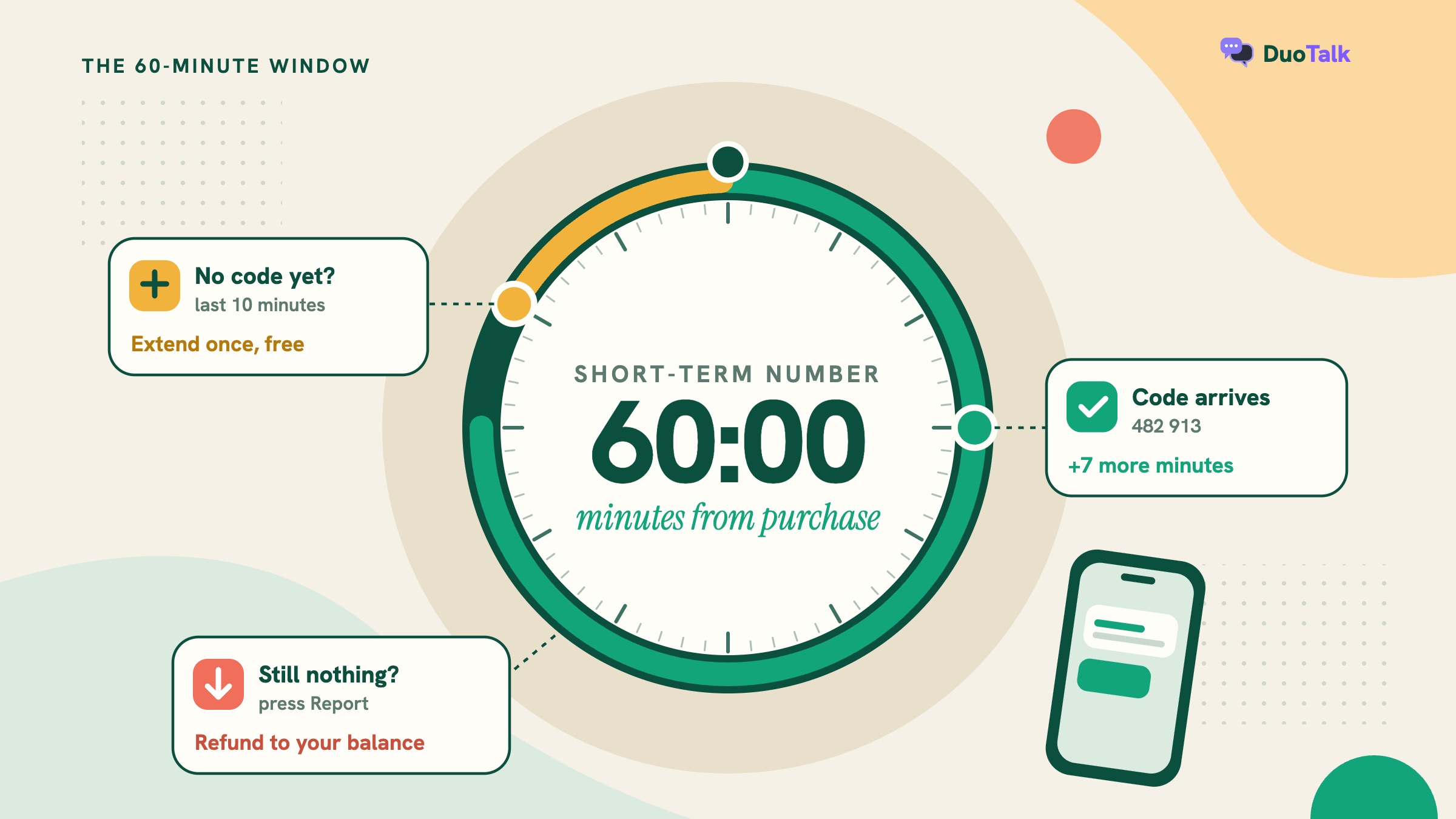
The timer is simple once you see the full set of events in one place:
| Moment | What happens | What you can do |
|---|---|---|
| Minute 0 | You buy the number; the 60-minute timer starts | Request the code in the app right away |
| First code arrives | The window changes to 7 more minutes from that moment | Enter the code; wait if a second code is due |
| Last 10 minutes (no code yet) | The Extend free button appears | Extend once for another hour on the same number |
| Number closes with no code | Extend free is still available after closing | Extend, or report the number for a refund |
| Second hour also fails | No more free extensions | Report it; a refund goes to your balance when the number was at fault |
| After a code, or after the hour | Renew becomes possible for a price shown on the button | Pay to reopen the same number for another hour, if it has not expired |
| After the end date | The number shows as expired | It cannot be renewed; codes already received stay in your history |
Why the 7-minute rule exists
Many services send two messages during one sign-up: a code and then a login check, or a resend when the first was slow. The 7 extra minutes let you catch that second message without paying for a new number.
Extend versus renew
These two are easy to mix up:
- Extend free is for numbers that have not received any code. You can use it once per number, and it adds another hour at no cost. The button appears in the last 10 minutes of the hour, or after the number closes.
- Renew is a paid action. Once a code has arrived or the hour is over, you can pay the renewal price (shown on the button before you pay) to open the same number for another hour. A renewal starts straight away and only counts new messages.
Once a short-term number's end date has passed, it cannot be renewed, so if you may need it again in a few days, buy a monthly number. The help article on free extension and renewal has the exact wording.
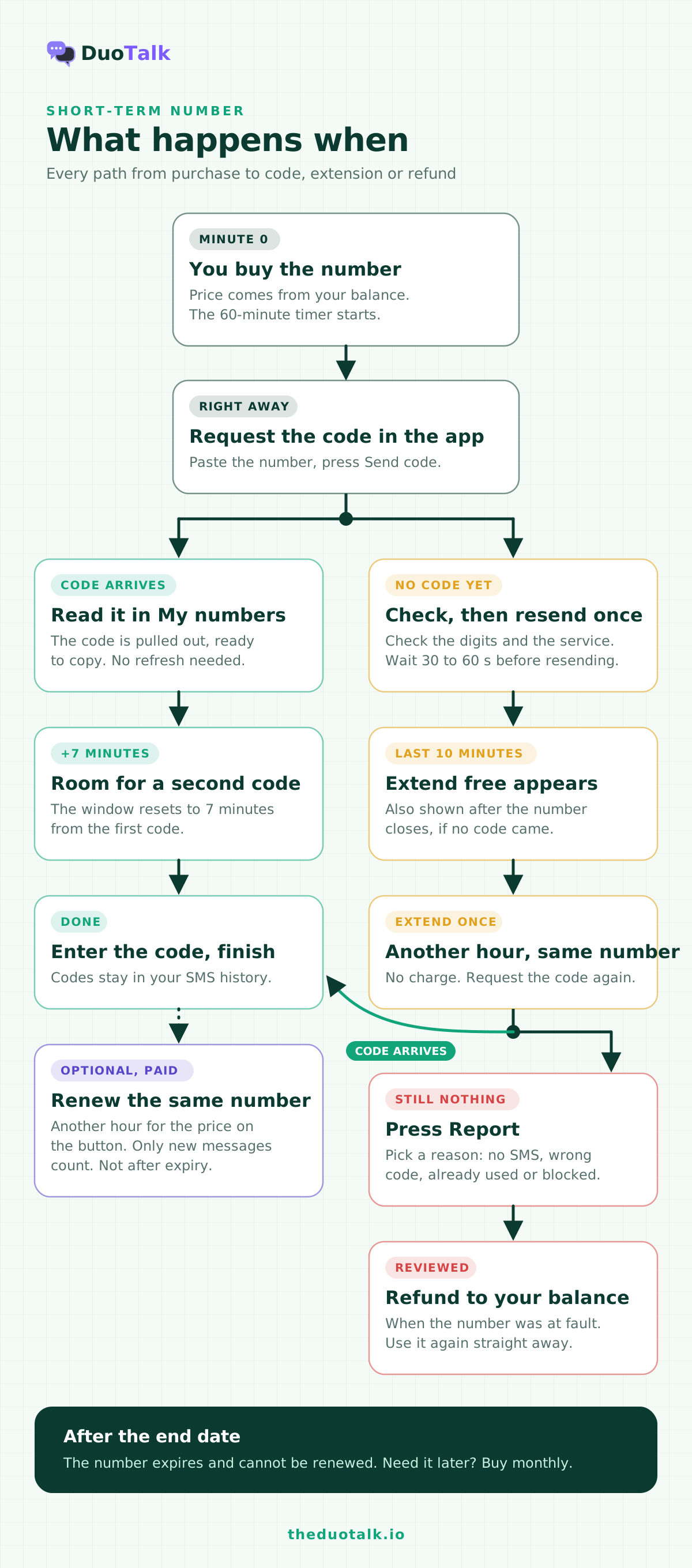
When no code arrives: extend, retry, report
Most missing codes are delayed or blocked on the sending side, not lost on the number. Work through the checks below before you spend more, because the free extension and the refund only help if you use them in the right order.
- Check the number you typed. Open My numbers and compare digit by digit, including the country code. A wrong digit or a doubled country code (+1 1 213...) is the most common cause.
- Check you bought the right service. The number only receives from the service chosen at purchase. A code from a different app will not appear.
- Request a new code. Many services make you wait 30 to 60 seconds before you can resend. Use the resend button once, not five times; repeated requests can trigger a service's rate limits.
- Keep the inbox open. New codes appear by themselves. Refreshing does not speed anything up.
- Extend for free near the end of the hour. If nothing has arrived, press Extend free to get another hour on the same number, and try requesting the code again.
- Report the number if it still fails. Press Report and choose the reason: no SMS, wrong code, number already used, or blocked by the service. Every report is reviewed, and when the number was at fault, the price is refunded to your DuoTalk balance.
Our guide to verification codes not arriving goes further into delivery problems by app, including the causes that have nothing to do with the number.
What is refundable and what is not
| Situation | Refund to balance? |
|---|---|
| The number could not be reserved at purchase | Yes, immediately and automatically |
| No SMS arrived, even after the free extension, and you reported it | Yes, when the review finds the number was at fault |
| Wrong code, number already used, or blocked by the service, reported | Yes, when the number was at fault |
| A code arrived and you used it | No, the price is final unless there was a fault on DuoTalk's side |
| A free extension you used | Nothing to refund (it cost nothing) |
| A paid renewal that you used | No |
Refunds land in your DuoTalk balance, not back on the blockchain, so you can buy another number with them straight away. The full policy is in reporting a number and refunds.
When the code arrives but the app still refuses
Getting a code and being accepted are two separate things. A service can still refuse a number after it has sent a code, for example at a later check on the number type. When that happens:
- Try a different country for the same service, if the service allows it.
- Try again later rather than buying several numbers in a row.
- If the account is one you plan to keep, switch to a monthly number or your own SIM.
We cover rejection messages and their causes in the guide on why apps reject virtual numbers.
How to keep the cost of a short-term number low
The price of each short-term number depends on the service, the country and the stock, and DuoTalk shows it live on the Numbers page. You cannot change the price, but you can avoid paying twice.
- Buy only when the sign-up form is open. The 60 minutes start at purchase, and a number bought too early can run out before you get to the code step.
- Match the service exactly. A number bought for the wrong service will never receive the code you need, and picking the wrong service is your choice, not a fault in the number.
- Use the free extension before buying again. A second number costs money; an extension on the first one does not.
- Size your top-up sensibly. The minimum is $15, which usually covers several short-term numbers, and unused balance stays in your account.
- Pick a fast, cheap network. Network fees are paid from your wallet and vary by coin and by traffic. For small top-ups, a network with low transfer fees keeps more of your money for numbers.
Prices change during the day as stock moves, so check live prices on the Numbers page rather than relying on any figure you read elsewhere.
Is it safe to buy a temporary number online?
Buying a private temporary number with your own inbox is a reasonable privacy step for low-stakes sign-ups. The risks come from shared public inboxes, the wrong account type, and payment mistakes.
Private versus public inboxes. Free "receive SMS" websites show every message on an open page, so anyone can read your code, and many services block those numbers. A paid short-term number on DuoTalk belongs to your account alone during access, and a later holder of that number never sees your messages. Our comparison of free vs paid SMS verification covers that trade-off in full.
The account type matters more than the number. After a short-term number ends, it may later be given to someone else, who could receive messages a service sends to it. Ordinary mobile numbers are recycled too: US carriers must age a disconnected number for at least 45 days before reassigning it. Keep accounts you care about on a number you control, and add a stronger second factor; NIST's guidelines (SP 800-63B-4) class phone-network codes as a "restricted" authenticator.
Payment safety. Only send crypto to the address shown in your own DuoTalk account, on the network shown, in the amount shown. No genuine support agent will ask you to send crypto to a different address over chat or email. If anyone does, treat it as a scam.
Stay within each service's rules. Use a temporary number for privacy, separating identities, travel or testing, never to create accounts in bulk, get around a ban, or avoid identity checks.
If you want the wider picture of private codes, from public inboxes to eSIMs, our pillar guide on how to receive SMS online compares every option.
Questions people also ask
Can I buy a temporary phone number online?
Yes. You can buy a temporary phone number online from a provider that rents numbers for SMS verification. On DuoTalk you top up your balance with crypto, choose the service and country, and press Get Number. The number then receives SMS from that service for 60 minutes, plus 7 more minutes after the first code. It is receive-only, private to your account, and suited to sign-ups you will not need to verify again by phone.
How much does a temporary phone number cost?
It depends on the service, the country and current stock. Short-term numbers are priced per number, and on DuoTalk many start from well under $1, but prices change during the day, so check live prices on the Numbers page before you buy. There are no fees or tax added at checkout. Your only extra cost is the blockchain network fee when you top up, which depends on the coin you send.
How long does a temporary phone number last?
A short-term DuoTalk number lasts 60 minutes from purchase. When the first code arrives, it stays open 7 more minutes for a second code. If no code arrives, you can extend once for free for another hour. After the end date passes, the number expires and cannot be renewed. For an account you keep, buy a monthly number instead, which lasts 30 days and can be renewed before it ends.
How long does a crypto top-up take to show in my balance?
Usually a few minutes. Your balance is added automatically once the network confirms the payment, and you can leave the page while you wait. Tron, BNB Smart Chain, Litecoin and Ethereum payments are typically quick. Bitcoin is slower because a new block arrives about every 10 minutes on average. If a block explorer shows your payment confirmed but your balance has not changed, open a support ticket with the transaction ID.
What happens if the verification code never arrives?
In most cases you do not lose your money. First check the number and request a new code once. If nothing arrives near the end of the hour, press Extend free for another hour on the same number. If the number still fails, press Report and choose the reason. Every report is reviewed, and when the number was at fault, the price goes back to your DuoTalk balance, ready to use straight away.
Can a temporary phone number receive calls or send texts?
No. DuoTalk numbers receive SMS only: they cannot send messages or take voice calls. A short-term number also receives only from the one service you chose when you bought it. If the app you are signing up for offers only a voice-call code, or asks you to send a text, choose its SMS option if it has one, or use your own phone number for that account.
Is it legal to buy a temporary phone number?
Buying a temporary number to protect your privacy is legal in most countries, much like buying a prepaid SIM. What matters is how you use it. Using one for fraud, harassment, impersonation, ban evasion or to get around identity checks can break the law and the service's terms. Use it to keep your personal number private, and follow each service's rules about who may register.
Buy your temporary number on DuoTalk
When you know the service and country, the purchase itself is quick: top up once with USDT, TRX, LTC, BTC or ETH, open the sign-up form, buy the number, request the code and read it in your private inbox. If nothing arrives, use the free extension, then report it for a refund to your balance. You can see live short-term numbers by service and country on the Numbers page, and keep monthly numbers for the accounts you plan to keep.
Sources
- Bitcoin.org: Some things you need to know (confirmations, block times, irreversibility)
- Tether: Supported protocols for USDT
- TRON Developer Hub: Resource model (bandwidth and energy)
- ethereum.org: Transactions and gas
- FTC Consumer Advice: What to know about cryptocurrency and scams
- NIST SP 800-63B-4: Digital Identity Guidelines, Authentication and Authenticator Management
- 47 CFR 52.15: Aging of disconnected numbers, eCFR
Last reviewed: November 2026