How to Receive SMS Online Privately in 2026: Complete Guide
How to receive SMS online privately in 2026: public inboxes, private virtual numbers and eSIM compared on privacy, with steps and a troubleshooting table.
By the DuoTalk team · Published 2026-11-03 · Updated 2026-11-11
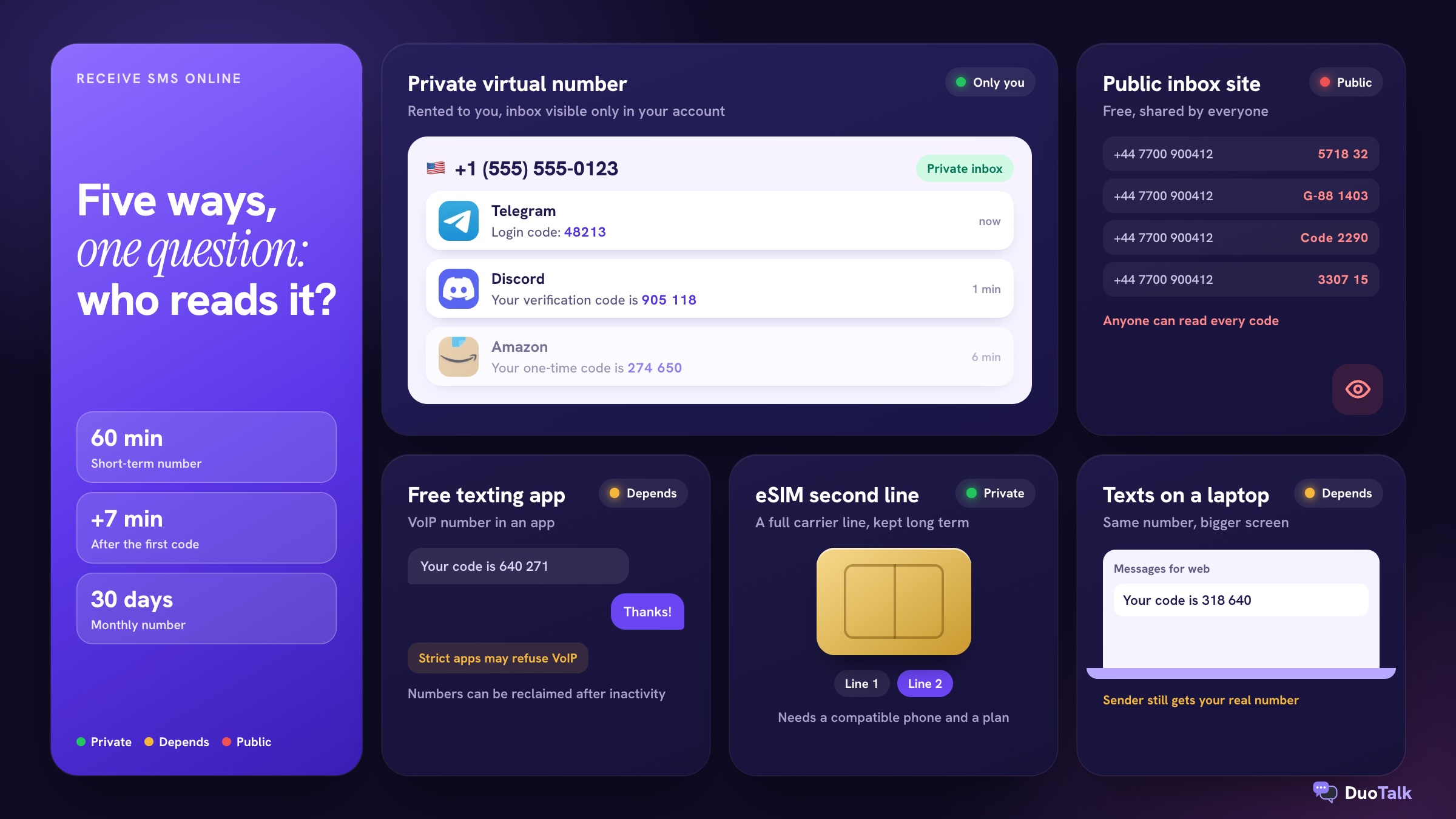
Here is how to receive SMS online without giving away your own number. To receive SMS online, you need a real phone number whose incoming texts are shown in a browser or app instead of on a SIM in your pocket. In 2026 there are five practical ways to do it: free public inbox websites, free texting apps, paid private virtual numbers, a second line on an eSIM, and reading your own phone's texts on a computer. They differ most on one point that many guides skip: who else can read the code.
The short answer: You can receive SMS online with a public inbox site (free, but anyone can read your code), a free texting app (often refused by strict services), or a private virtual number that shows texts only to you. For verification codes you care about, use a private number in the country the service expects, and keep it for 30 days or more if you will log in again.
This guide is the complete map. It explains how each method works, the privacy risk of each, how to choose, the step-by-step process, and what to do when a code does not show up. Where a topic needs more depth, you will find a link to a dedicated guide.
What does it mean to receive SMS online?
Receiving SMS online means a text message sent to a phone number is delivered to a web or app inbox you can open on any device, with no physical SIM involved on your side. The number is still a real, dialable number with a country code; only the place where you read the messages changes.
People mostly do this for one reason: a website or app asks for a phone number to send a one-time password (OTP), and they do not want to hand over their personal number. If you are not sure what an OTP is or why services send them, the guide to OTP meaning covers the basics.
How a text reaches an online inbox
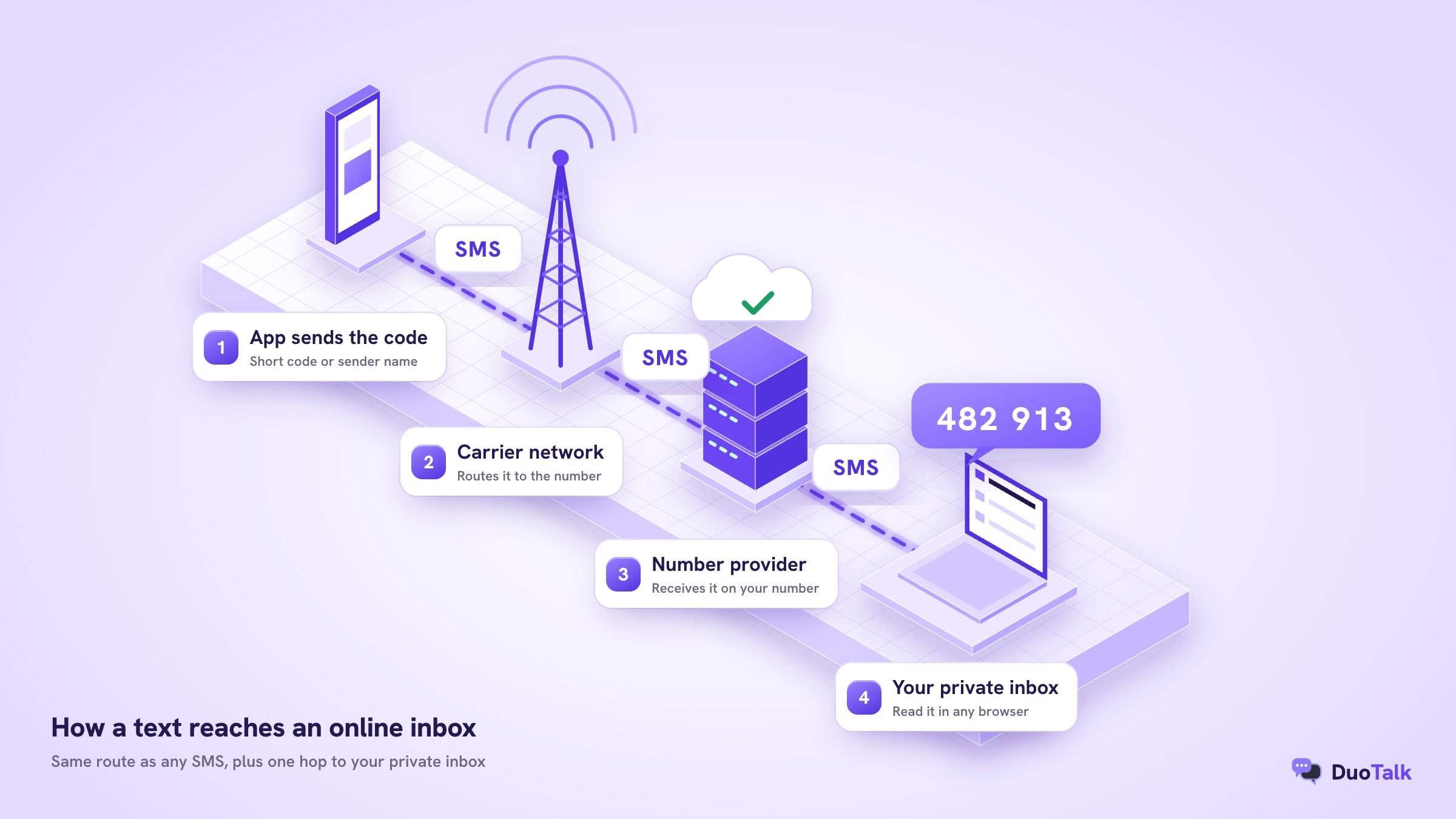
The route is almost the same as a text to your own phone, with one extra step at the end:
- The service sends the code. You tap "Send code" and the app hands your number to its SMS gateway, which sends from a short code, a long number or a sender name.
- Carrier networks route it. The message crosses one or more networks until it reaches the operator that holds the number.
- The provider receives it. Instead of a handset, the provider's platform is attached to that number and accepts the message.
- You read it in the inbox. The text appears in your browser or app, usually within seconds on a working route.
Each hop can fail, which is why "the code never came" has several possible causes. The deeper technical walk-through, including sender IDs and number pools, is in how temporary SMS numbers work.
Online number vs fake or generated number
An online number for SMS code delivery must exist on a real network. A "fake number" made by a random number generator is only a string of digits: it is not connected to any inbox, so a code sent to it goes nowhere or to a stranger. International numbers follow the ITU's E.164 numbering plan, which caps a full number at 15 digits including the country code, and every working online number fits that format.
| Term | What it is | Can it receive a code? |
|---|---|---|
| Generated or fake number | Random digits that look like a phone number | No |
| Public inbox number | Real number whose texts are posted on an open web page | Yes, and so can everyone else |
| VoIP app number | Number assigned by a calling or texting app | Often, but many services refuse VoIP |
| Private virtual number | Number rented to you, texts shown only in your account | Yes |
| eSIM line | A full carrier line stored digitally in your phone | Yes |
5 ways to receive SMS online in 2026
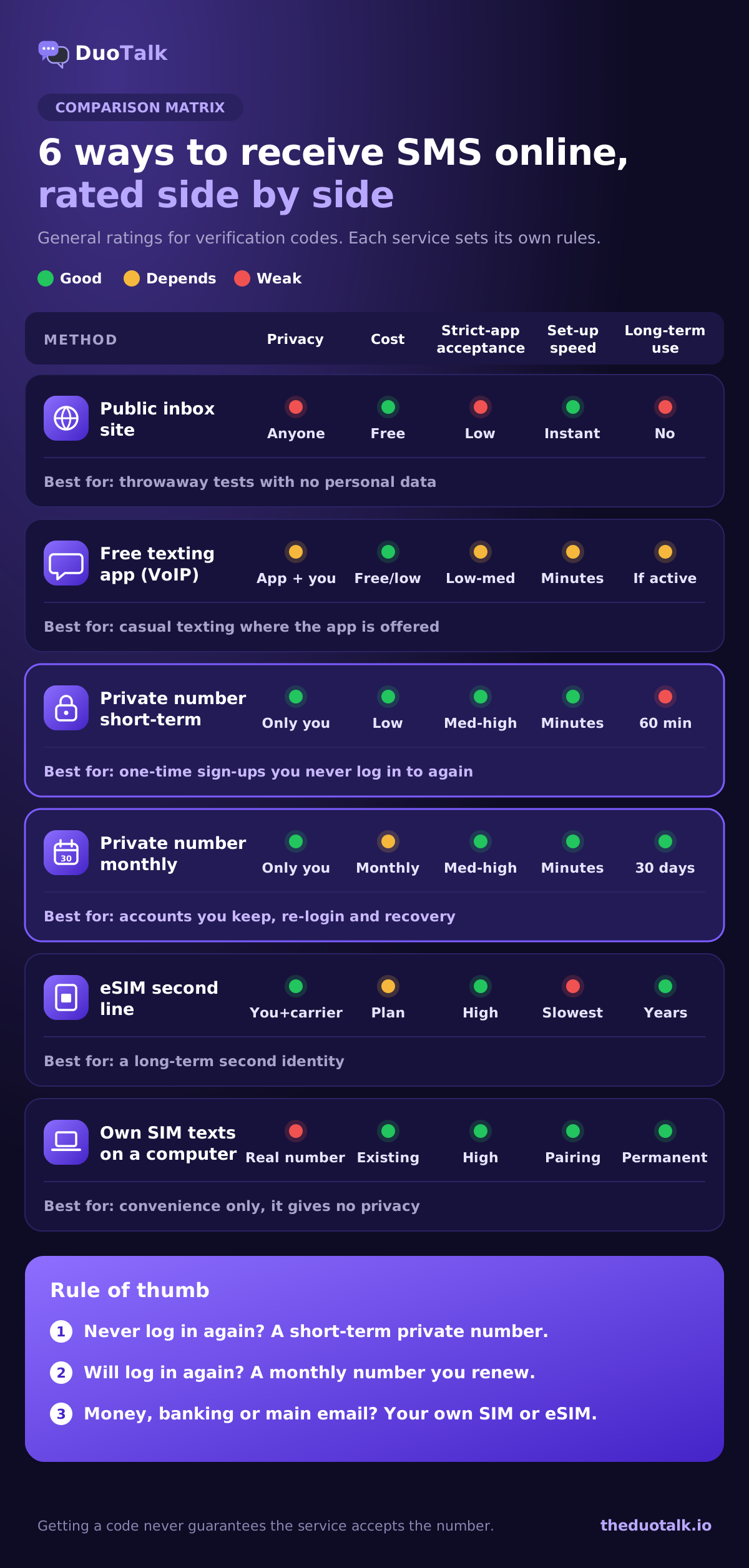
There are five realistic methods, and each suits a different job. The table below summarises them, then each one gets its own short section.
| Method | Cost | Who can read your texts | Typical acceptance by strict apps | How long you keep it | Best for |
|---|---|---|---|---|---|
| Free public inbox site | Free | Anyone on the internet | Low (numbers are overused) | Until the site drops it | Throwaway tests where nothing is at stake |
| Free texting app (VoIP) | Free or low monthly | You and the app provider | Low to medium | While you stay active | Casual texting in the countries the app serves |
| Private virtual number | Pay per number | Only you | Medium to high, varies by service | 60 minutes or 30 days, by type | Sign-ups and accounts you want to keep private |
| eSIM second line | Carrier plan pricing | You and your carrier | High (it is a mobile line) | As long as you pay | A long-term second identity |
| Your own SIM's texts on a computer | Your existing plan | You (and anyone with access to your devices) | Same as your normal number | Permanent | Reading your normal texts on a laptop |
1. Free public inbox websites
A public inbox site lists a handful of phone numbers and posts every text those numbers receive on an open web page. You copy a number, request a code, then refresh the page and look for your message among everybody else's.
What goes wrong is predictable. The same few numbers are used by thousands of visitors, so popular services have usually seen them before and refuse them as "already in use" or block them outright. Codes arrive late or not at all. Most importantly, your code, the service name and sometimes your username sit on a public page that search engines and bots can crawl. Anyone who reads it can request a password reset to the same number later. Use these sites only when the account is truly disposable and never holds personal data. The longer risk comparison is in free vs paid SMS verification.
2. Free texting apps with a VoIP number
Texting apps give you a number that lives on the internet rather than on a SIM, and you read messages inside the app. Google Voice is the best known; Google's help centre says that if you are in the US you can choose your own number by city or area code, and the personal product is aimed at US users.
These numbers are usually labelled as VoIP in the phone-number databases that services check before sending a code. Many banks, messengers and marketplaces refuse VoIP lines, so you may see "this phone number cannot be used for verification" before any code is sent. Some apps also reclaim numbers after a period of inactivity, which can cut you off from an account you set up months ago. The difference between VoIP and mobile-type lines is explained in the guide to non-VoIP numbers.
3. Paid private virtual numbers
A private virtual number is rented to you alone: texts appear only in your account, nobody else sees the inbox, and the number is usually a mobile-type line in a specific country. This is the method most people mean when they search "receive OTP online privately".
There are two shapes:
- Short-term (one-time) numbers last long enough to receive one or two codes. On DuoTalk, a short-term number works for 60 minutes after purchase, stays open 7 more minutes after the first code so a second one can arrive, and receives SMS only from the one service you chose when buying.
- Monthly (dedicated) numbers last 30 days and receive SMS from any service, so they suit accounts you will log in to again. They are available in some countries only.
Neither type can send texts or take calls; they receive SMS only. If you want the full buying walk-through, see how to buy a virtual phone number, and for the short-term purchase in detail, how to buy a temporary phone number online. When you are ready, you can buy a virtual phone number with live stock shown by country.
4. An eSIM or second carrier line
An eSIM is a digital SIM built into the phone. Apple describes it as "an industry-standard digital SIM" and notes that recent iPhones can store eight or more eSIMs. A second eSIM line from a carrier gives you a full mobile number that services treat like any other personal number.
The downside is commitment. You usually need a compatible phone, a plan, sometimes identity checks depending on the country, and you read texts on that phone rather than in a browser. It is the right answer for a long-term second identity, and too heavy for a one-off sign-up. The comparison of eSIM, VoIP apps and virtual numbers is covered in virtual phone number without a SIM card.
5. Reading your own phone's texts on a computer
If you only want to read your normal texts on a laptop, you do not need a new number at all. Google Messages lets you check your messages on your computer by pairing a browser with your Android phone, and Apple devices can show iPhone texts on a Mac.
This is "receiving SMS online" in the literal sense, but it gives no privacy: the sender still gets your real number. It solves convenience, not exposure.
How private is each way to receive SMS online?
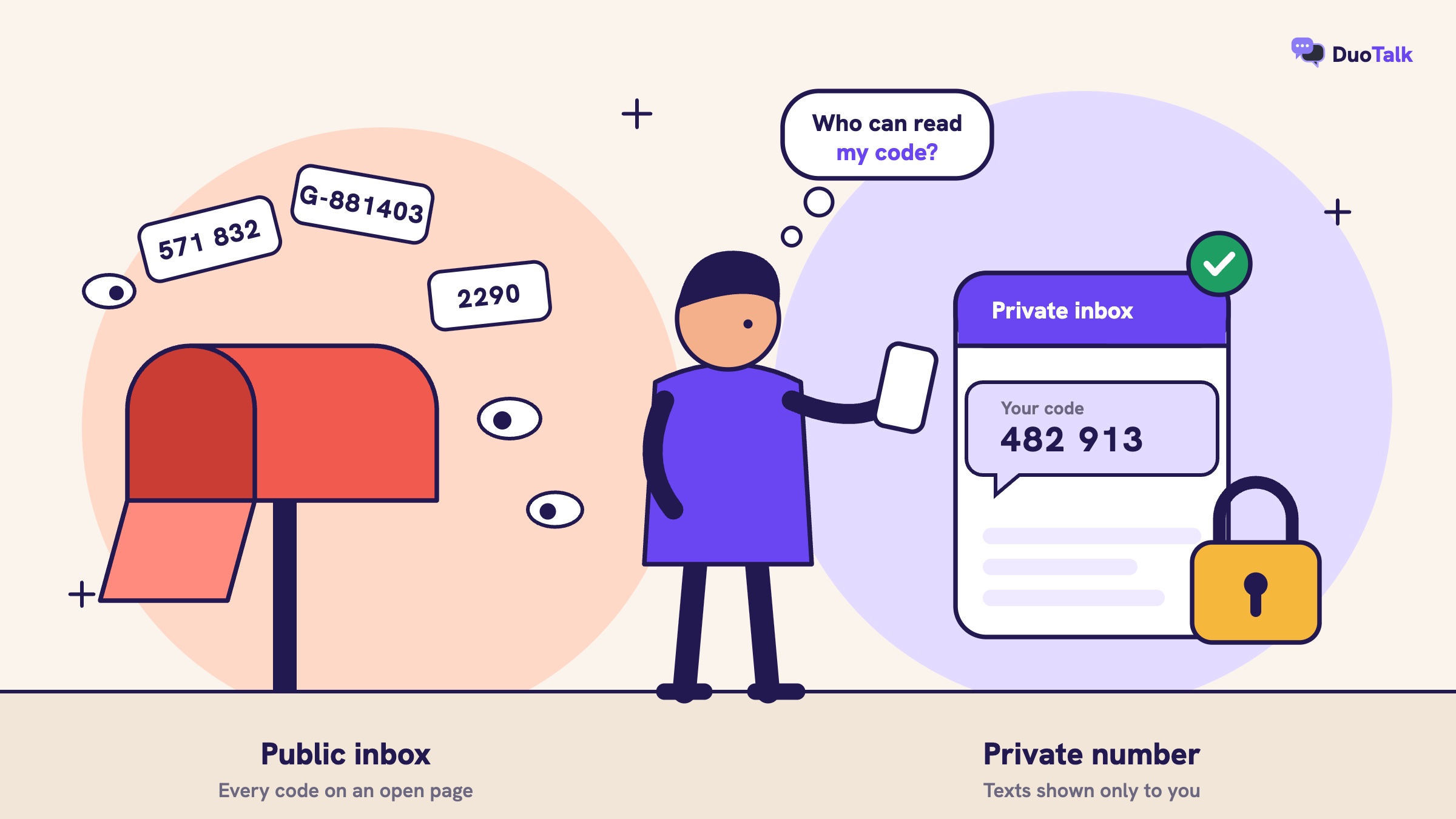
Privacy depends on two questions: who can read the message, and who could get the same number after you. Public inboxes fail both; private numbers pass the first and, if you keep them long enough, the second.
Public inbox: anyone can read your code
Every message on a public inbox page is visible to every visitor. That includes the code, the service that sent it and any personal detail inside the text. Because the number is shared, a stranger can also use "Forgot password" later and receive the reset code on the same page. Treat anything you verify there as owned by the internet.
Free apps: the provider holds your data and can reclaim the number
A texting app knows your number, your contacts if you allow it, and the content of your messages. Read its privacy policy before relying on it. The bigger practical risk is losing the number through inactivity, because account recovery then goes to whoever gets it next.
Paid private numbers: private while you hold them
A private number keeps the inbox to you, which removes the main risk of public sites. The remaining risk is time. A short-term number goes back to the pool after the session, so it is the wrong choice for an account you will need to recover. That is the whole logic behind disposable vs dedicated phone numbers: use the disposable kind only where you will never need a code again.
Your real number: the exposure you are trying to avoid
Your personal number is tied to your name, often appears in data breaches, and attracts spam once shared. It is also the target of SIM-swap fraud, where a criminal persuades a carrier to move your number to a SIM they control. The US FCC adopted rules in November 2023 requiring carriers to authenticate customers before SIM changes and port-outs, and the FTC advises using an authenticator app or security key for sensitive accounts because text codes can be intercepted after a SIM swap. Giving your number to fewer sites reduces how much of this risk you carry. The full privacy angle is in how to receive verification codes online without sharing your number.
Which way should you choose?
Choose by what happens to the account after today. If you will never log in again, a short-term private number is enough. If you will log in again, need recovery, or the account holds money, use a number you keep.
Decision rules that hold in most cases:
- Use a public inbox only for a throwaway test with no personal data and no value.
- Use a free texting app when you live in a country the app serves and the service accepts VoIP numbers.
- Use a short-term private number for a one-time sign-up you want to keep separate from your real identity, such as a trial, a forum or a shopping app you will rarely use.
- Use a monthly private number for an account you will log in to over the coming weeks and want to keep away from your personal number.
- Use your own SIM or an eSIM line for banking, payments, crypto exchanges, government services and your main email. Follow each service's identity rules.
| Account type | Suggested number | Why |
|---|---|---|
| Free trial, newsletter, one-off forum | Short-term private number | Single code, no recovery needed |
| Social or messaging account you keep | Monthly private number or your own line | You will see re-login and recovery codes |
| Dating app | Monthly private number | Keeps your real number away from matches, and you can log back in |
| Marketplace selling account | Monthly number or eSIM line | Repeat logins and buyer trust |
| Bank, payment app, exchange | Your own SIM or eSIM | Identity rules and long-term recovery |
| Developer testing a sign-up flow | Short-term numbers | Disposable by design |
The trade-off between paying per code and paying for a month is worked through with examples in one-time vs monthly virtual numbers. If you want a ranked view of every option type, see the best temporary phone number services and the best virtual phone number for SMS verification for each job. For privacy-first picks by account type, read how to choose a private SMS verification number.
Receive SMS online by country: USA, UK, Canada and more
The country of the number matters because many services expect a number from the country you sign up in, or only send codes to certain countries. Pick the country first, then check whether that country has stock for your service.
| Country | Code | Example format (fictional) | Notes |
|---|---|---|---|
| United States | +1 | +1 (555) 555-0123 | 10 digits after +1: 3-digit area code and 7-digit number |
| Canada | +1 | +1 (604) 555-0147 | Same +1 format as the US; the area code tells them apart |
| United Kingdom | +44 | +44 7700 900123 (07700 900123 locally) | UK mobiles start with 07, written as +44 7 internationally |
| Hong Kong | +852 | +852 5XXX XXXX | 8-digit numbers, no area codes |
| Indonesia | +62 | +62 8XX XXXX XXXX | Local mobiles start 08; the leading 0 drops after +62 |
Receive SMS online USA
Searches for "receive SMS online USA" are the most common because many American apps only accept +1 numbers, so a USA virtual phone number is the usual starting point. For a one-time code, a temporary US phone number is enough; for anything you keep, read the full US number guide. Canada shares +1, so a service may accept or refuse a Canadian number depending on its rules. The details are in how to get a Canadian phone number for OTP.
UK and other countries
UK services often expect a +44 mobile, which a UK virtual phone number can provide. See how to receive SMS online in the UK for the practical steps, and the UK virtual number guide for how UK number ranges work. For Asia, there are guides to a Hong Kong virtual number and an Indonesian virtual number for SMS, both of which cover local SIM registration rules. You can see live numbers by country and service at any time; stock changes through the day.
How to receive SMS online privately: step by step
The process is the same whichever service you verify: pick the service and country, get a private number, request the code once, read it in your inbox, and enter it before it expires. Here it is in full, using a private short-term number as the example.
- Write down what you are verifying. Note the service, the country you are signing up from and whether you will need this account again. That last answer decides short-term or monthly.
- Open the service's sign-up or phone screen. Get to the point where it asks for a number, but do not request a code yet.
- Choose the number. On a private number service, pick the same service and a country it accepts. On DuoTalk, the Numbers page shows live stock and live prices for each service and country.
- Pay for the number. On DuoTalk, payment comes from your balance, which you top up in crypto (USDT on TRC20 or BEP20, TRX, LTC, BTC or ETH). The balance updates once the network confirms the payment. Top-up steps are in how to top up.
- Copy the number in the right format. Select the country code in the service's dropdown and paste the remaining digits, or paste the full international number if the field allows it. A doubled country code is a common reason for "invalid number".
- Request the code once. Tap "Send code" a single time and wait. Repeated taps can trigger a rate limit.
- Read the code in your inbox. Codes usually arrive within seconds on tested routes. On DuoTalk the number stays open 7 more minutes after the first code, in case the service sends a second one.
- Enter the code quickly. Most codes expire within minutes, and only the newest code usually works.
- Finish setup and add a backup. Before you leave, add an authenticator app or a recovery email you control, so you never depend on that number again.
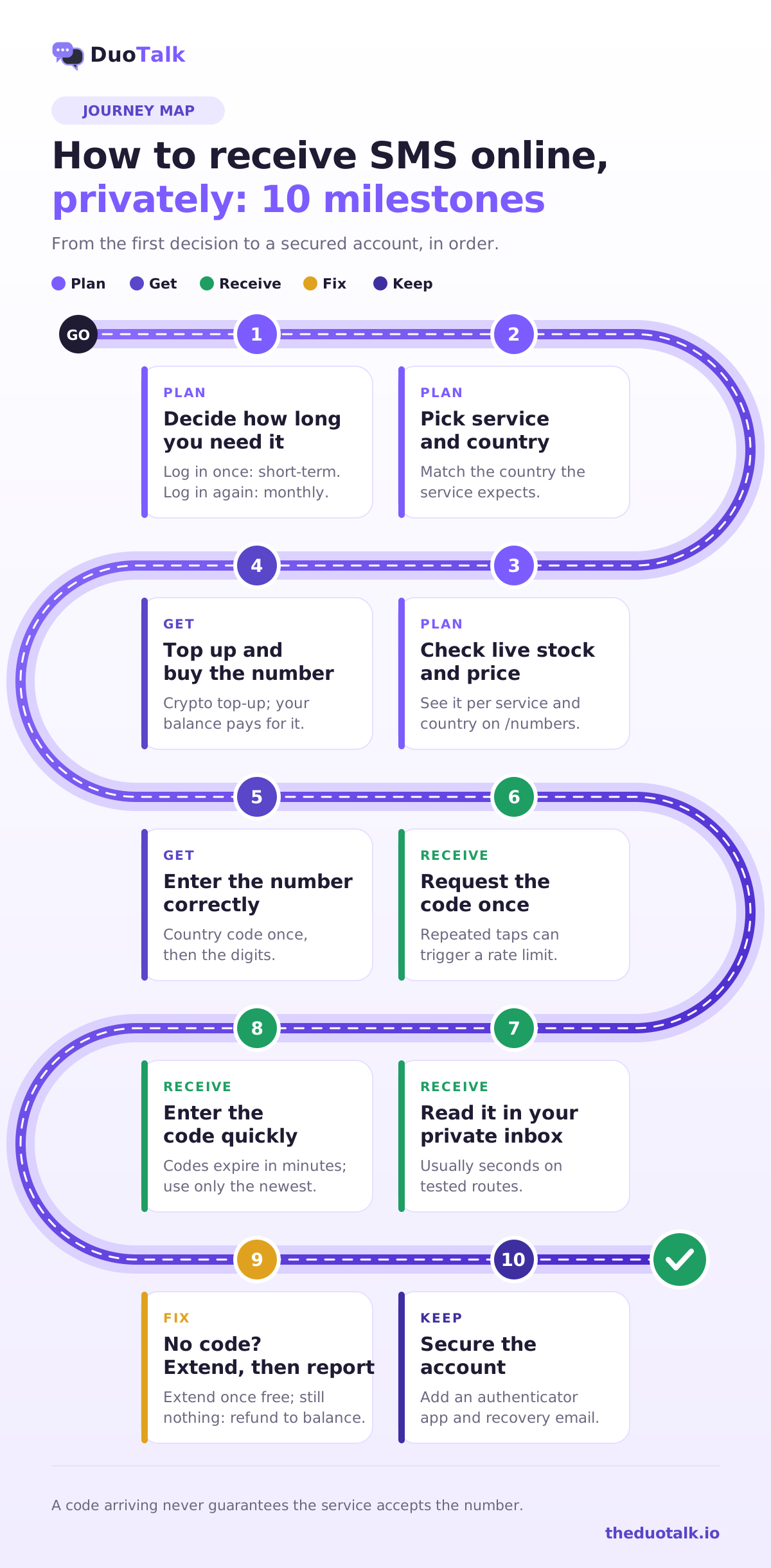
A step-by-step guide focused on the no-SIM case is in how to receive OTP without a SIM card, and the general safe process is in the temporary phone number for verification guide.
Worked example 1: a one-off sign-up
You want a free trial of a design tool you will probably cancel in a week. You choose a short-term private number for that service in your country, request the code once, receive it in the inbox about 20 seconds later, and enter it. You then add your email as the login method. When the 60 minutes end, the number is gone, which is fine because you will never need another code from it.
Worked example 2: an account you will keep for a year
You are creating a second messaging account for a side business. A short-term number would work today, but the app will ask for a code again when you log in on a new device. You buy a monthly number instead, verify the account, then set a PIN or passkey inside the app. Monthly numbers do not renew automatically, so you renew from your numbers list before the 30 days end, for as long as you need that number to be reachable.
What it costs
Prices depend on the country, the service, the number type and stock. Short-term numbers in many countries start well under $1, and monthly numbers cost more because you hold them longer. Check live prices on the Numbers page rather than relying on any figure in an article. What drives these prices is explained in how much SMS verification costs.
Troubleshooting: when the code does not arrive or is refused
Most failures come from four places: the service never sent an SMS, the service refused the number, the code went to the wrong format, or a rate limit kicked in. Work through them in that order before buying another number.
| Symptom | Likely cause | What to do |
|---|---|---|
| "This phone number cannot be used for verification" (wording varies) | Line type refused, or the number was used before | Try a different number or country; for strict apps choose a mobile-type number |
| "Invalid phone number" | Country code entered twice or wrong format | Select the country in the dropdown and paste only the national digits |
| Screen says "We sent a code to your other device" | The service sent the code in-app or by email, not SMS | Choose "Send SMS" or "Try another way" if offered |
| No code after 2-3 minutes | Route delay, or the service did not send | Wait, then resend once; on DuoTalk, extend once for free if nothing arrives |
| "Too many attempts, try again later" | Rate limit on the service's side | Stop requesting; wait the stated time before trying again |
| Code arrives but is rejected | Old code entered, or it expired | Use only the newest code, and enter it promptly |
| Account asks for a code weeks later | The short-term number has expired | Use your backup method, and next time choose a monthly number |
On DuoTalk specifically: if a short-term number receives no code, you can extend it once for free for another hour on the same number. If it still fails, report it and the money goes back to your DuoTalk balance. The steps are in what to do if no SMS arrives and how to report and get a refund. For a monthly number that never receives any SMS, you can request a refund within 48 hours.
Remember the honest limit: receiving a code does not guarantee that the service will accept the number. Services change their rules, and a service can still refuse a number after sending it a code. The causes and fixes for refusals are in why apps reject virtual phone numbers, and phone-side problems with your own SIM are covered in not receiving verification codes.
After you get the code: keep the account safe
The code gets you in; your next five minutes decide whether you stay in. Add a second sign-in method that does not depend on a phone number you might lose.
- Add an authenticator app or passkey. The US cybersecurity agency CISA recommends turning on multifactor authentication and lists authenticator apps, which generate a new code every 30 seconds, as one of the options. An app code does not depend on any phone number.
- Set a recovery email you control. It should be a mailbox you will still use next year.
- Save backup codes. Many services offer printable one-time codes; keep them in a password manager.
- Know why SMS is a weaker factor. NIST's SP 800-63B treats SMS and voice codes as a "restricted" authenticator because of SIM-swap and interception risks, so serious services add other checks.
- Keep the number if recovery depends on it. If a service will only recover the account by SMS, use a monthly number and renew it, or use your own line.
Questions people also ask
How can I receive SMS online without a phone?
You can receive SMS online without a phone by using a virtual phone number whose texts appear in a web inbox. Choose a private number for the service and country you need, enter it on the sign-up screen, and read the code in your browser. Public inbox sites also work without a phone, but anyone can read the messages, so keep them for throwaway tests only. Strict services may refuse some virtual numbers.
Is it safe to receive SMS online?
It is safe when the inbox is private and the account is low risk. Public inbox sites are not safe because every code is visible to strangers, who can later reset your password to the same number. A private paid number shows texts only to you. For banking, payments, government services and your main email, use your own SIM or an eSIM line, and add an authenticator app after sign-up.
Can I receive OTP online for free?
Yes, but free options come with trade-offs. Public inbox websites cost nothing and are readable by anyone, and their numbers are often blocked as overused. Free texting apps give you a VoIP number that many apps refuse. If the OTP protects an account you want to keep, a low-cost private number is the more reliable choice, and you can check live prices before paying anything.
What is the best online number for SMS codes?
The best online number for SMS codes is a private, mobile-type number in the country the service expects, held for as long as you need the account. For a single sign-up, a short-term number is enough. For an account you will log in to again, choose a monthly number. Avoid shared public numbers for anything tied to your identity or money.
Can I receive SMS online with a USA number?
Yes. Many private number services offer +1 United States numbers for receiving SMS online, and US texting apps can issue numbers to US residents. Enter the 10 digits after +1 and select United States in the country field. Some US services check whether a number is VoIP and refuse it, so a mobile-type number gives better odds. Stock for each service changes during the day.
Why am I not receiving SMS on my virtual number?
Usually the service did not send an SMS, refused the number type, hit a rate limit, or the number was entered in the wrong format. Check that the service did not send the code in-app or by email, confirm the country code is not entered twice, and resend only once. If nothing arrives on DuoTalk, extend once for free, then report the number for a refund to your balance.
Can I reuse a temporary number to log in later?
Usually not. A short-term number is yours only for its session, about an hour on DuoTalk, and after that you cannot receive new codes on it. If the service asks for a code at your next login or during recovery, you will need a backup method you set up earlier. For accounts you want to keep, use a monthly number and renew it before the 30 days end.
Receive your next code on DuoTalk
DuoTalk (theduotalk.io) is a web app that gives you a private virtual phone number to receive SMS online for verification codes, so you do not have to hand out your personal number. Short-term numbers cover one verification in a 60-minute window; monthly numbers cover 30 days for accounts you keep. Codes appear in your private inbox, and if a short-term number gets no code, you can extend once for free and then report it for a refund to your balance.
Open the Numbers page, pick your service and country, and check live stock and prices. New to it? How DuoTalk works explains each step, the number lifecycle shows what happens before and after the timer, and the help centre answers the rest. You can also install the app from the download page to check your inbox from your phone.
Sources
- ITU-T, Recommendation E.164: The international public telecommunication numbering plan
- Google Voice Help, Choose a Google Voice number
- Google Messages Help, Check your messages on your computer or Android tablet
- Apple Support, About eSIM on iPhone
- Federal Register, Protecting Consumers From SIM-Swap and Port-Out Fraud (December 8, 2023)
- US Federal Trade Commission, Use two-factor authentication to protect your accounts
- CISA, Turn on multifactor authentication
- NIST, SP 800-63B Digital Identity Guidelines: Authentication and Authenticator Management
Last reviewed: November 2026