Free vs Paid SMS Verification Numbers: Which Is Safer?
Free vs paid SMS verification compared: who can read your code, account takeover, acceptance and recycling, with clear rules for when free is fine.
By the DuoTalk team · Published 2026-11-06 · Updated 2026-11-11
Free vs paid SMS verification comes down to one question: who else can read your code? A free public inbox shows every verification code to anyone who opens the page, so a stranger can use it before you do, while a paid private number shows the code only to the person who bought it. Free options are fine for throwaway tests. For any account you want to keep, a paid private number (or your own SIM) is the safer choice.
This guide compares the three options people actually use, which are free public inbox sites, free number apps and paid private numbers, on privacy, account takeover risk, acceptance and number recycling. It walks through real risk scenarios, says honestly where paid numbers still fall short, and gives you simple rules for when free is good enough.
The short answer: Paid private SMS verification numbers are safer than free ones because only you can see the codes, the number is not shared with thousands of strangers, and you can choose how long you keep it. Free public inboxes publish every code on an open web page, which makes account takeover easy. Use free numbers only for tests and accounts you will never need again.
Free vs paid SMS verification: the three options compared
There are three common ways to receive a verification code without your personal number: a free public inbox site, a free number app, and a paid private number from an SMS verification service. They differ most in who can read the messages and how long the number stays yours. If you want the full map of every method, including eSIMs and second SIMs, see our guide on how to receive SMS online privately.
Free public inbox sites
A free public inbox site is a web page that lists a few dozen shared phone numbers and displays every SMS they receive, to every visitor, in real time. You pick a number, type it into a sign-up form and refresh the page until your code appears. There is no account, no login and no ownership. The same number is used by thousands of people for the same popular services, often within the same hour.
Free number apps
A free number app gives you a number of your own inside an app, usually funded by ads or upsells. Google Voice is the best-known example, and it is available in the US only and needs an existing US number to set up. Messages are private to your app account, which is a real improvement over a public inbox. The catches are line type and lifespan: these numbers are almost always classed as VoIP, many services refuse VoIP lines for verification, and free numbers can be reclaimed if you stop using them (each app sets its own inactivity rule).
Paid private numbers
A paid private number is assigned to one customer for a set time and its messages are visible only in that customer's inbox. Two lengths are common:
- One-time (short-term) numbers for a single sign-up. On DuoTalk a short-term number works for 60 minutes and receives codes only from the one service you chose when buying it.
- Monthly (dedicated) numbers for accounts you will log in to again. On DuoTalk these last 30 days and receive codes from any service.
Side-by-side summary
| Factor | Free public inbox | Free number app | Paid one-time number | Paid monthly number |
|---|---|---|---|---|
| Who can read your code | Anyone who opens the page | Only you | Only you | Only you |
| Shared with other users at the same time | Yes, thousands | No | No | No |
| Typical line type | Mixed, often flagged | Usually VoIP | Varies by provider and country | Varies by provider and country |
| Acceptance on popular apps | Low, numbers widely blocked | Mixed, VoIP often refused | Higher on mobile-type numbers | Higher on mobile-type numbers |
| How long it is yours | Never yours | While you stay active | One window (60 minutes on DuoTalk) | 30 days, renewable |
| Later login or reset codes | Go to a public page | Yes, while active | No, once the window ends | Yes, while you renew |
| Cost | Free | Free, with ads or limits | Pay per number | Pay per 30 days |
| Safe for accounts you keep | No | Sometimes | No | Yes |
The table already shows the pattern. The more an account matters, the further right you should be.
Are free SMS verification numbers safe? What the research shows
Free public SMS inboxes are not safe for any account you care about, and this is not just a marketing claim from paid providers: security researchers have measured the problem for a decade. Free number apps are a different case, private but often short-lived and frequently refused.
Public inboxes expose codes and personal data
Researchers at the University of Florida studied public SMS gateways in "Sending out an SMS", presented at the 2016 IEEE Symposium on Security and Privacy. Over 14 months they collected nearly 400,000 messages from public gateway sites. They found services sending sensitive information in plain text and one-time codes that were less random than they should be. The main lesson for users is simple: whatever lands on a public number is published.
The problem has not gone away. A 2026 study accepted at ACM CCS, "The Tragedy of Convenience", analysed more than 33 million messages sent to over 30,000 public gateway numbers and extracted more than 322,000 unique private links. The authors found at least 177 web services that treat those private links as keys, so anyone holding the link could see data such as financial details or national ID information, and 20 services where the link granted privileged access, including changing personal data or entering the account.
That second finding matters because many people think "it is only a code, it expires in ten minutes". Modern texts often carry magic sign-in links, password reset links, order tracking pages and invoices. On a public inbox, all of that is readable by strangers and sometimes indexed by search engines.
Recycling turns old numbers into open doors
Every phone number is eventually reused. Kevin Lee and Arvind Narayanan at Princeton tested 259 numbers offered to new subscribers by two large US carriers and found that 171 of them were still tied to existing accounts at popular websites, enough to attempt account takeover via SMS reset. Their recycled numbers study also found that some recycled numbers kept receiving security-sensitive messages meant for previous owners.
Public inbox numbers are recycled constantly, by design. Free app numbers are recycled when you go inactive. Paid one-time numbers are reassigned after their window ends. Only a number you keep, and later remove from your accounts before letting it go, avoids this risk.
SMS itself is a weaker factor
NIST's digital identity guidelines classify SMS and voice codes as a "restricted" authenticator and tell services to watch for risk signals such as SIM change and number porting (NIST SP 800-63B). The US Federal Trade Commission's SIM swap advice recommends an authenticator app or security key where possible. So whichever number you use, treat SMS as the way in, then move to a stronger factor once the account exists.
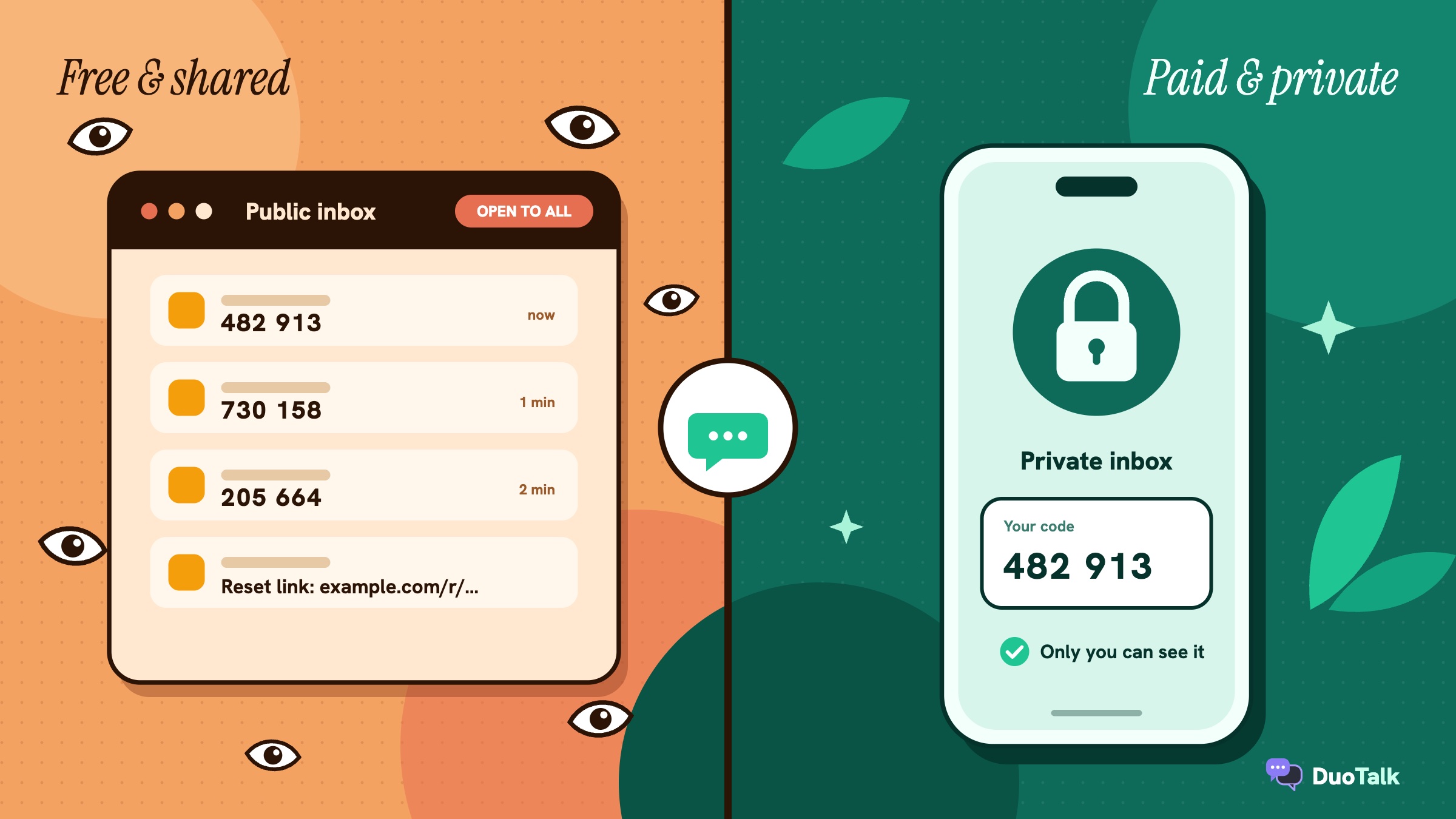
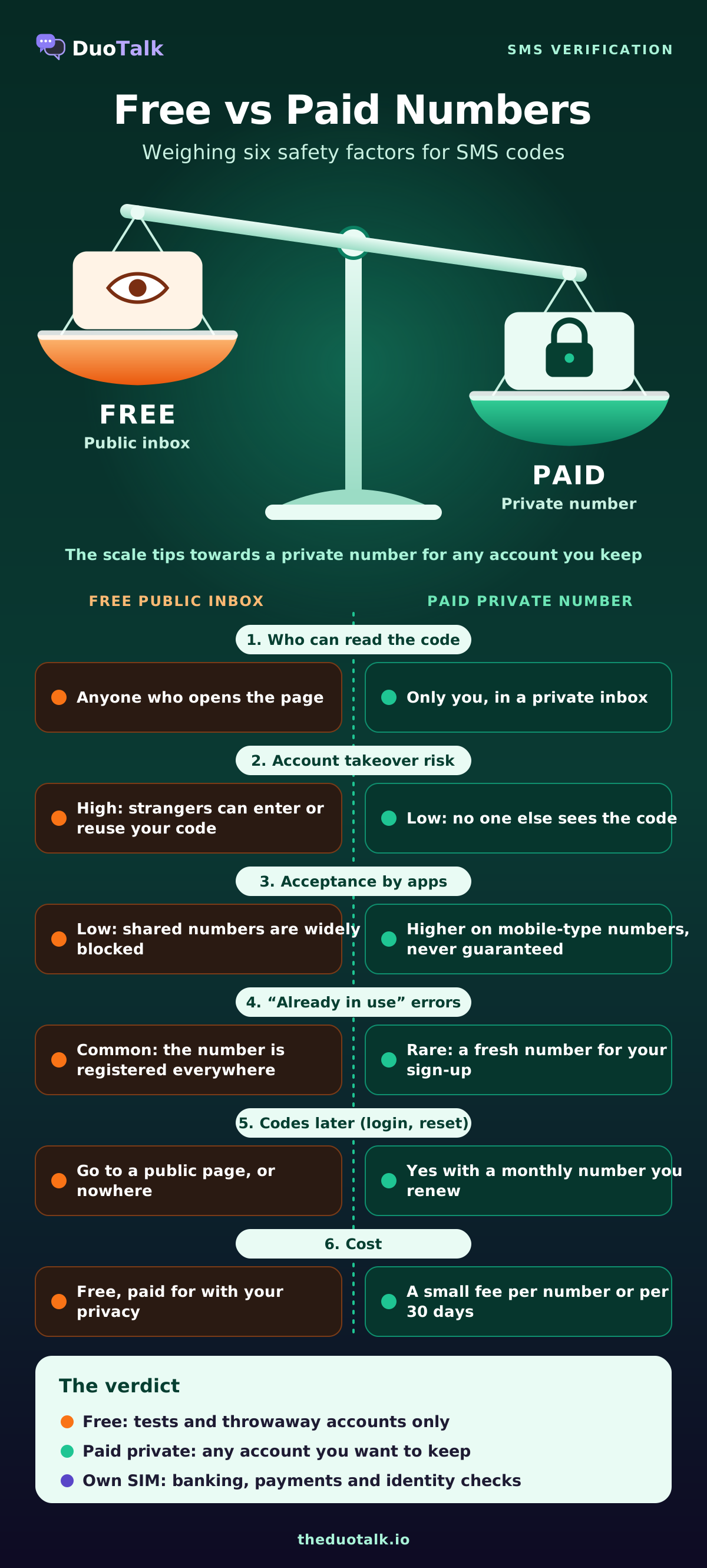
Head-to-head: free vs paid on six safety factors
On every safety factor that matters for verification, paid private numbers beat free public inboxes, and free number apps sit in between. Here is what each factor means in practice.
1. Privacy: who sees the message
- Free public inbox: everyone. The page shows the sender, the full text and the time. If the message contains your name, an address, an order number or a link, that is public too.
- Free number app: you, plus the app provider, under its privacy policy.
- Paid private number: you, plus the provider. Read the provider's privacy page to see how long messages are stored.
2. Account takeover risk
Account takeover is the biggest danger of free inboxes. Two routes are common:
- Race to the code. Someone watching the same public number enters your code before you do and completes the sign-up you started, or links the account to their own device.
- Reset later. Weeks after you sign up, anyone can type the same public number into the service's "forgot password" form, read the reset code on the public page and take the account.
The FTC's alert "What's a verification code and why would someone ask me for it?" explains why a code in someone else's hands is so dangerous: the code is the proof of ownership. A public inbox hands that proof to everyone.
With a free app number, the takeover risk comes later, if the number is reclaimed and reassigned. With a paid monthly number you keep, the risk is lowest.
3. Acceptance: will the service even send the code?
Popular services keep lists of numbers and number ranges they refuse. Public inbox numbers are the first to land on them because they are used thousands of times. Many services also check the line type and refuse VoIP: WhatsApp's help centre, for example, says VoIP numbers cannot be used to register. That hurts free app numbers most.
Paid numbers on mobile-type lines get through more often, but no provider can promise acceptance: services change their rules, and a service can still refuse a number after sending a code. If you keep seeing "this phone number cannot be used for verification", read why a virtual number is not accepted and what to try next.
4. "Already in use" collisions
A shared public number has probably been registered on every big app already. You type it in and get "this number is already linked to another account" (wording varies), or worse, the service sends the code to the existing account's owner flow. A fresh private number is far less likely to collide.
5. Recovery: can you get codes later?
Most accounts ask for a code again: on a new device, after a password change, or during a security review. A public inbox number cannot be relied on for that, and a paid one-time number is gone once its window closes. Only a number you keep (a monthly number you renew, or your own SIM) can receive those future codes. Our guide to disposable vs dedicated phone numbers covers this trade-off in depth.
6. Data handling and trust
Free sites earn money somehow, usually through ads and trackers on the inbox pages. Some log which numbers are used for which services. A paid provider has a business relationship with you and a privacy policy you can hold it to. Neither is a reason to trust blindly: check who runs the service, how you pay, and what happens if no code arrives.
Real risk scenarios: what actually goes wrong with free numbers
Abstract risks are easy to ignore, so here are five realistic scenarios. None of them needs a skilled attacker, just a stranger refreshing the same public page.
Scenario 1: the messaging app taken over in minutes
You use a public inbox number to set up a messaging account. Your code shows up on the page at the same moment as it reaches you. Another visitor, waiting for their own code on the same number, sees yours and types it into their app first. The account is now registered on their device, and your contacts and chats go to them.
Scenario 2: the password reset three weeks later
You sign up for a shopping site with a public number and forget about it. Three weeks later, someone browsing the inbox history sees the site's welcome text, tries "forgot password" with the same number, reads the reset code on the page and logs in. Your saved address and order history are now theirs.
Scenario 3: the link that opened an invoice
A delivery service texts a tracking link to the number you used. On a public inbox, that link sits on the page for anyone to click. As the 2026 CCS study showed, many such links open pages with personal details without asking for a password.
Scenario 4: the free app number that went quiet
You use a free app number for an online marketplace account, then stop opening the app. After the provider's inactivity period, the number is reclaimed and later given to someone else. A year later the marketplace asks for a code to confirm a new device. The code goes to the new owner of the number, and you are locked out.
Scenario 5: the right number for the wrong job
Even paid numbers can be misused. You buy a one-time number to sign up for an email account you plan to keep for years. The sign-up works. Six months later the provider asks for a code at login, and that one-time number expired long ago. Nothing was stolen, but you lost access. A monthly number, or your own SIM, was the right choice.
The first four scenarios are caused by the number being shared or reclaimed. The fifth is caused by choosing a short-lived number for a long-lived account. Both are avoidable.
Are paid temporary phone numbers safe?
Paid temporary phone numbers are safe for verification when the inbox is private, the number is used for the right kind of account, and the provider is clear about what happens if no code arrives. Paying does not make every risk disappear, so here is the honest list of limits.
- Acceptance is never guaranteed. A code can arrive and the service can still refuse the number or flag the account later. Anyone who promises 100% acceptance is overselling.
- One-time numbers are reassigned. After the window ends, the number can go to another customer. Do not use a one-time number for an account you need to recover.
- Paid does not always mean private. Some services labelled "paid" still share a number between several buyers at once. Check that the provider says the number is assigned to you alone for its period.
- Payment and identity. Payment exposes some data. Check what the provider asks for and how payment works before you top up.
Seven checks before you pay for a verification number
- The inbox is private to your account, not a shared page.
- The provider shows live stock and price per service and country before you pay.
- It states how long the number works (for example, 60 minutes or 30 days).
- It explains what happens if no code arrives: extension, replacement or refund.
- It is clear whether the number receives from one service or any service.
- It offers a keepable option (monthly) for accounts you will log in to again.
- It does not promise that every service will accept the number.
For a broader look at what you pay for and why prices vary by country and service, see our breakdown of SMS verification cost.
When free SMS verification is fine (and when it never is)
Free SMS verification is fine when the account holds nothing of value and you will never need it again; it is never fine for money, identity, email, messaging or anything you want to recover. Use the account itself to decide, not the price of the number.
Free is usually fine for
- Testing whether your own sign-up form sends an SMS, using a dummy account you will delete.
- A one-off download or a forum you will read once, with no personal data in it.
- Checking that a code arrives from a service before you buy anything.
Use a paid one-time number for
- One-off sign-ups you might use for a few days: a trial, a coupon, a single booking.
- Services that send codes only once, at registration, and where you are happy to lose the account later.
Use a paid monthly number or your own SIM for
- Email accounts, cloud storage and anything other accounts reset through.
- Messaging apps (WhatsApp, Telegram, Signal), where the number is your identity.
- Social media profiles you will keep.
- Marketplaces, ride and delivery apps with saved addresses or cards.
Use your own SIM only for
- Banks, payment apps, crypto exchanges and anything with identity checks. Follow the service's identity rules and use a number you will keep long term. A temporary number is the wrong tool here.
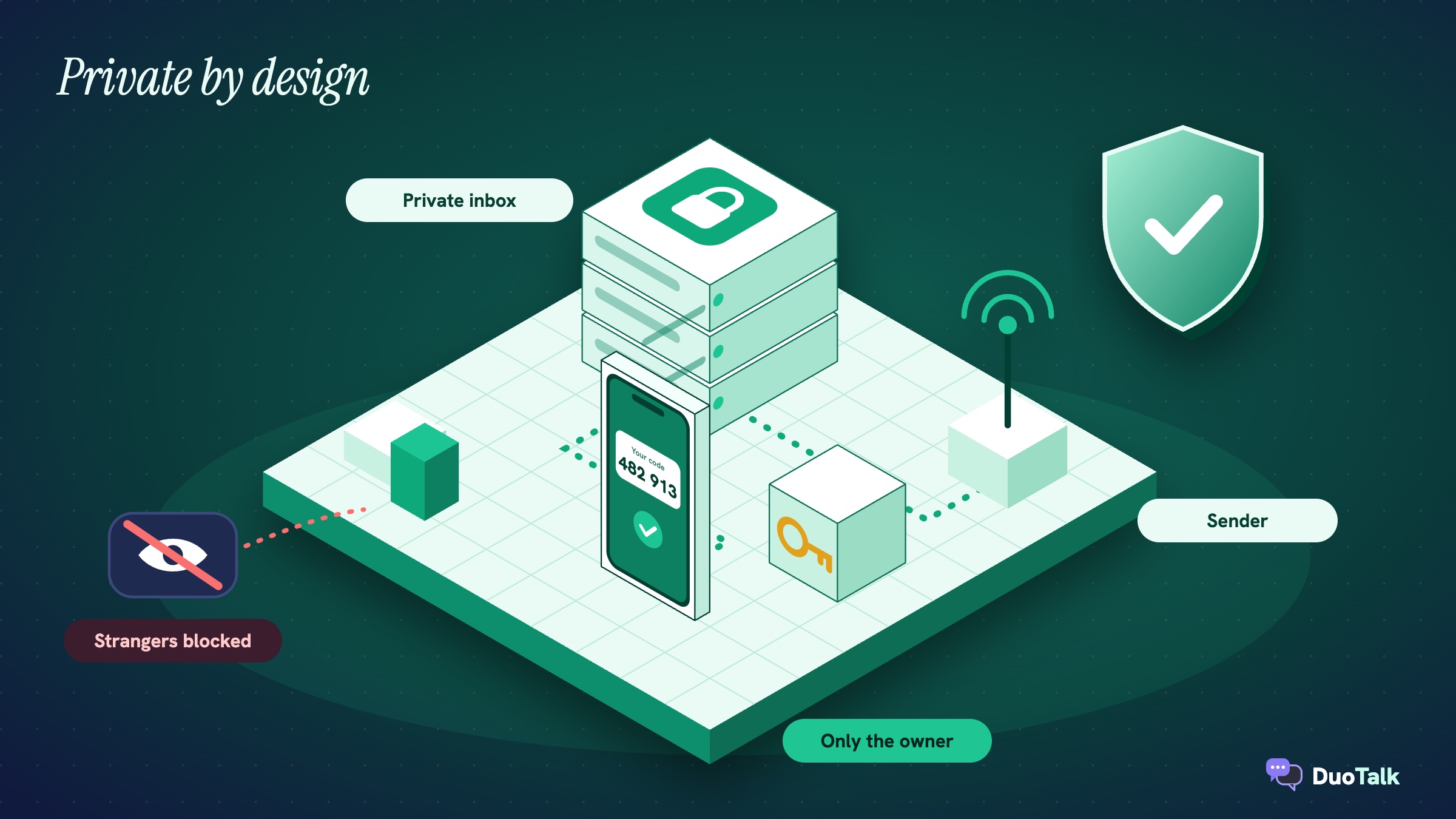
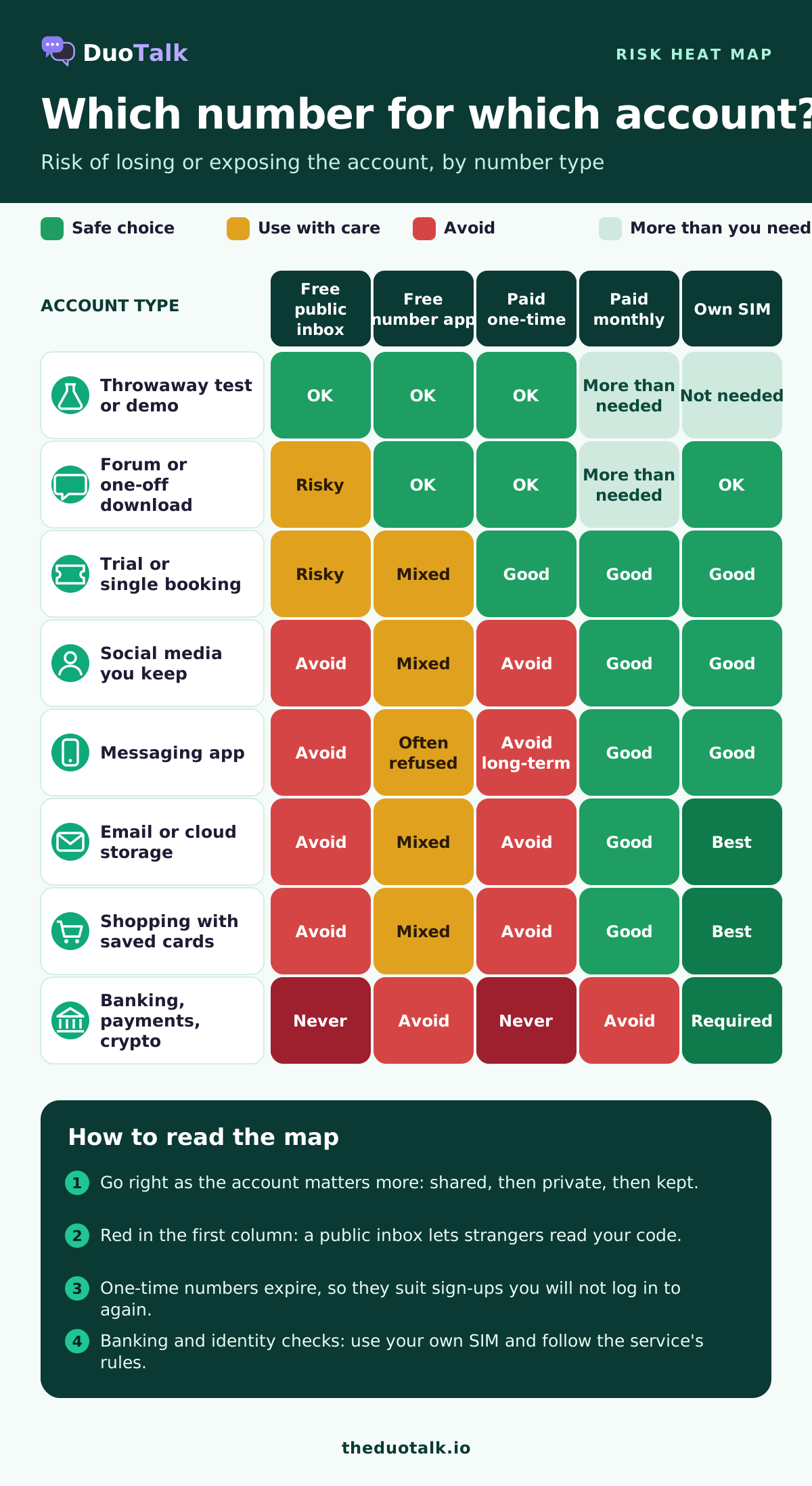
Risk by account type at a glance
| Account type | Free public inbox | Free number app | Paid one-time | Paid monthly | Own SIM |
|---|---|---|---|---|---|
| Throwaway test or demo | OK | OK | OK | More than needed | Not needed |
| Forum or one-off download | Risky | OK | OK | More than needed | OK |
| Trial or single booking | Risky | Mixed | Good | Good | Good |
| Social media profile you keep | Avoid | Mixed | Avoid | Good | Good |
| Messaging app | Avoid | Often refused | Avoid for long-term use | Good | Good |
| Email or cloud storage | Avoid | Mixed | Avoid | Good | Best |
| Shopping with saved cards | Avoid | Mixed | Avoid | Good | Best |
| Banking, payments, crypto | Never | Avoid | Never | Avoid | Required |
The infographic below turns this table into a heat map you can scan in a few seconds.
How to verify safely with either option, step by step
Whichever route you choose, a few habits remove most of the risk. Follow the steps for your path.
If you use a free number (tests only)
- Use the account for testing only, with no real name, address or card.
- Choose a number on the page that shows recent messages, which means it is still receiving.
- Request the code once, then refresh. Repeated requests can trigger rate limits.
- Enter the code immediately, before anyone else can.
- Do not add personal data to the account later, and delete it when the test is done.
If you use a paid private number
- Decide how long you need the account. One sign-up only: short-term. Logins and recovery later: monthly.
- Pick the service and the country the service expects, and check live stock and the price before paying. You can see live numbers and prices by service and country.
- Buy the number and copy it exactly, with the country code.
- Request the code once in the service, then watch your private inbox.
- Enter the code, finish the sign-up, and save any backup codes the service offers.
- If the account matters, add a second sign-in factor right away (see the next section).
On DuoTalk, a short-term number stays open for 60 minutes; when the first code arrives, it stays open 7 more minutes so you can receive a second code. If nothing arrives, you can extend once for free for another hour on the same number, and if it still fails you report it and the money returns to your DuoTalk balance. The full sequence is on the how it works page, and the number lifecycle page explains each state.
After you verify: lock the account down
The safest number is one you stop depending on. Once the account exists, move its security away from SMS where the service allows it.
- Add an authenticator app or passkey. The FTC's guide to two-factor authentication notes that app-generated codes are not exposed to a SIM swap.
- Save backup codes offline, in a password manager or on paper.
- Add a recovery email you control, so a lost number is not the only way back in.
- Remove a temporary number from the account if the service allows another factor, before that number is reassigned.
- Protect your own SIM too. Set a carrier account PIN. In the US, the FCC adopted rules against SIM swap and port-out fraud that require carriers to authenticate customers before moving a number and to notify them of changes.
The cost of these steps is five minutes. The cost of skipping them is an account you cannot get back.
When the code does not arrive
A missing code has the same few causes whether the number is free or paid: the service refused the number, the number type or country did not match, a rate limit kicked in, or the route was slow. Free inboxes fail more often because their numbers are blocked or overused, and you have no one to ask.
Work through these checks:
- Confirm you typed the full number with the right country code.
- Wait at least a minute before requesting again, and request only once or twice.
- Check whether the service showed an error such as "number not supported" (wording varies). That means it refused the number, so no code is coming.
- Try a number in the country the service expects, or a different number type.
- On a paid number, use the provider's no-code policy. On DuoTalk that means the free extension first, then a report and refund to your balance, as explained in the help article on reporting a number and getting a refund.
For a monthly DuoTalk number, nothing renews automatically: renew from your numbers list before the 30 days end. If a monthly number never receives any SMS, you can request a refund within 48 hours.
Choosing a private number on DuoTalk
DuoTalk (theduotalk.io) is a web app that gives you a private virtual phone number to receive SMS online for verification codes, so you do not hand out your personal number. It is built around the paid, private side of this comparison, and it is honest about the limits covered above.
- Private inbox. Codes appear only in your account.
- Two lengths. Short-term numbers for one sign-up (60 minutes, one chosen service) and monthly numbers for accounts you keep (30 days, any service, in some countries).
- Clear no-code path. Extend once for free, then report for a refund to your balance.
- Receive only. Numbers receive SMS; they cannot send messages or take calls.
- Live stock and prices. Check the Numbers page for current countries, services and prices; there are no fees or tax added at checkout, and payment comes from your balance, topped up with crypto (USDT on TRC20 or BEP20, TRX, LTC, BTC or ETH).
Getting a code never guarantees a service will accept the number, so pick the number type that fits the account, and keep your own SIM for banking and identity-checked services. If privacy of the inbox is your top concern, our guide to choosing a private SMS verification number goes deeper.
Questions people also ask
Are free SMS verification sites safe?
No, not for any account you want to keep. Free SMS verification sites publish every incoming message on a public page, so anyone can read your code, enter it first, or use the same number later to reset your password. Research on public SMS gateways has found sensitive personal data and private links exposed this way. They are acceptable only for throwaway tests with no personal data, and you should delete the test account afterwards.
Are temporary phone numbers safe to use?
Temporary phone numbers are safe when the inbox is private and you use them for the right accounts. A paid private temporary number shows codes only to you, which removes the main risk of free public inboxes. The remaining risk is recovery: once a one-time number expires it can be reassigned, so do not use one for email, messaging or anything you will need to log in to again. Use a monthly number or your own SIM for those.
Can someone hack my account if I use a free phone number?
Yes, and it does not take any hacking skill. If you verify an account with a public inbox number, anyone who opens that page can request a password reset code to the same number, read it and log in. They can also take over a sign-up in progress by entering your code first. Move the account to an authenticator app or passkey, and change its phone number if you can.
What is the difference between free and paid SMS verification?
The difference is who controls the number. Free SMS verification usually means a shared public number that thousands of people use and everyone can read, or a free app number you lose if you stop using it. Paid SMS verification gives you a number assigned to you alone for a set time, with a private inbox, a stated window and a policy for when no code arrives. Paid numbers are also blocked less often.
Why do free numbers not work for verification?
Free numbers often fail because services block them. Public inbox numbers are used thousands of times on the same apps, so they end up on block lists or show "this number is already in use" (wording varies). Free app numbers are usually VoIP lines, and many services, including WhatsApp, refuse VoIP numbers for registration. A private number on a mobile-type line, in the country the service expects, works more often but is still not guaranteed.
Is it safe to pay for a verification number?
It is safe when the provider is clear about what you are buying. Before paying, check that the inbox is private, that live stock and prices are shown up front, how long the number lasts, and what happens if no code arrives. Avoid any service that promises every app will accept its numbers. Use your own SIM for banking, payments and identity-checked services, whatever you pay.
Can a temporary number be traced back to me?
A private temporary number is not publicly linked to your name, which is why people use one to keep their personal number out of sign-up databases. The provider still knows which account bought it, and the service you verify with still sees your device, IP address and the details you enter. A temporary number protects your real number from spam and data leaks; it does not make you anonymous, and it is not a way around any service's rules.
Sources
- Reaves et al., "Sending out an SMS: Characterizing the Security of the SMS Ecosystem with Public Gateways", IEEE S&P 2016
- Danish et al., "The Tragedy of Convenience: Cascading User-Data Leakage from SMS-Delivered URLs", ACM CCS 2026 (arXiv 2601.09232)
- Lee and Narayanan, Security and Privacy Risks of Number Recycling at Mobile Carriers, Princeton University
- NIST SP 800-63B: Digital Identity Guidelines, Authentication and Authenticator Management
- FTC Consumer Alert: What's a verification code and why would someone ask me for it? (March 2024)
- FTC Consumer Alert: SIM swap scams, how to protect yourself
- FTC: Use two-factor authentication to protect your accounts
- FCC News Release: FCC adopts rules to protect consumers' cell phone accounts (November 2023)
- WhatsApp Help Center: How to register your phone number
Last reviewed: November 2026