How to Buy a Virtual Phone Number for SMS Verification
How to buy a virtual phone number that receives SMS codes: what you pay for, where to buy, eight checks before paying and the checkout step by step.
By the DuoTalk team · Published 2026-11-05 · Updated 2026-11-11
To buy a virtual phone number for SMS verification, you pick the country and the service that will send the code, choose how long you need the number (one session or a month), pay, and then read the code in a private online inbox. The purchase takes a few minutes. The part people get wrong is not the payment: it is buying the wrong kind of number for the account, then losing access when the number ends. This walkthrough shows what you are really paying for when you buy a virtual phone number, where to buy one, what to check before you pay, how the checkout works on DuoTalk (including the crypto top-up), and what to do in the first hour and the first month.
The short answer: You can buy a virtual phone number online in a few minutes: choose the service and country, choose a short-term number for a single code or a monthly number for an account you will keep, pay, and read the code in your inbox. Check the number type, the access period and the refund rule before paying, because a code arriving never guarantees the service will accept the number.
What are you actually buying when you buy a virtual phone number?
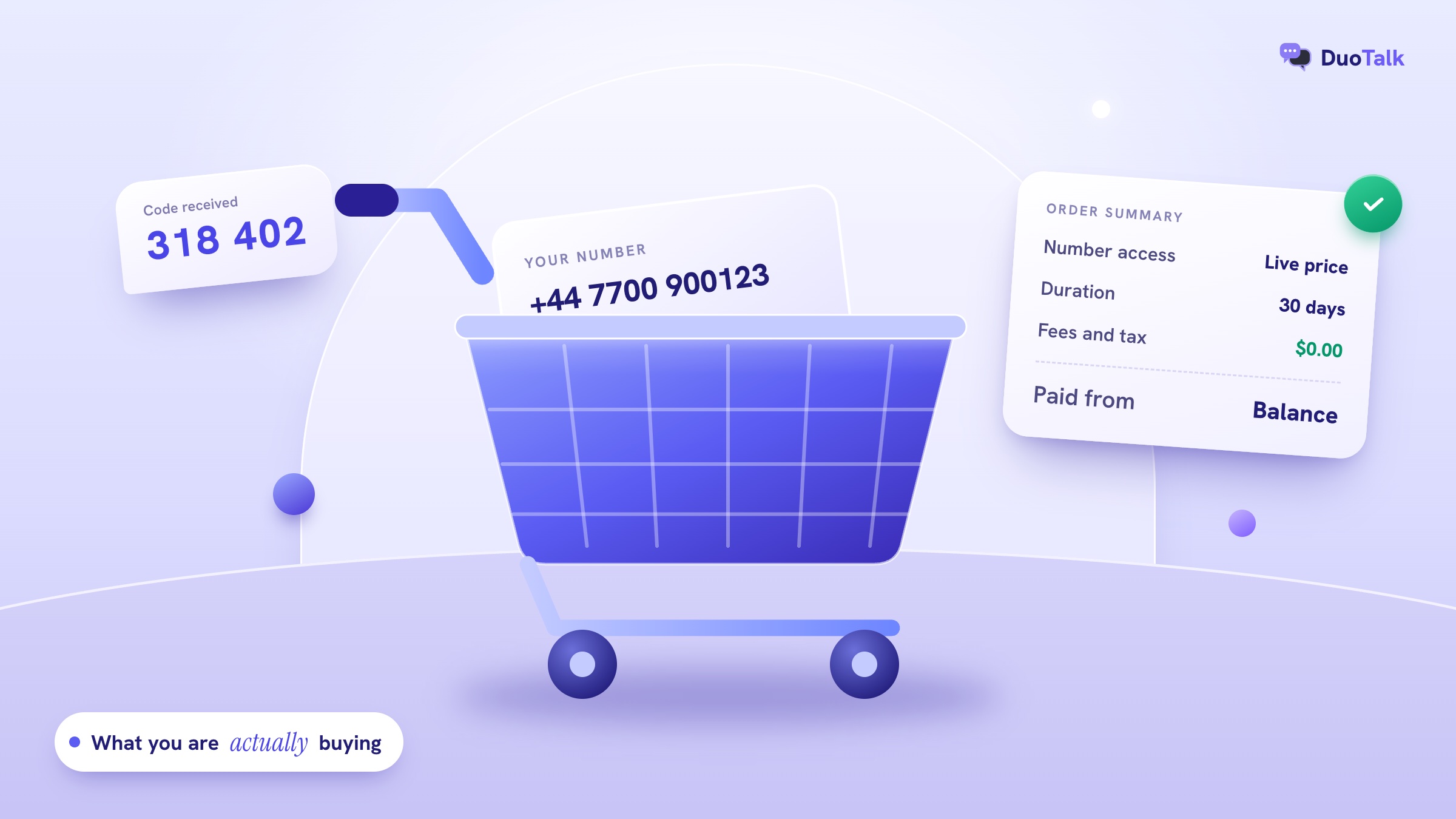
When you buy a virtual phone number, you are buying time-limited access to a real, dialable number and the private inbox where its text messages land. You are not buying the number itself. Telephone numbers follow the ITU's E.164 numbering plan, regulators hand blocks of them to carriers, and carriers assign them to customers. Every seller, from a mobile network to a verification service, is selling you a right to use a number for a while.
That sounds like a technicality, but it explains almost every bad purchase. Four attributes define what you are paying for, and the listing should tell you all four before you pay.
| Attribute | What it means | Typical values | Why it matters for codes |
|---|---|---|---|
| Number type | How phone databases label the line | Mobile, landline, fixed VoIP, non-fixed VoIP | Many apps look up the line type and refuse some VoIP ranges |
| Access period | How long texts keep reaching your inbox | 60 minutes, 30 days, ongoing subscription | Decides whether you can log in or recover the account later |
| What it receives from | Which senders get through | One named service, or any service | A single-service number ignores codes from other apps |
| Who can read it | Whether the inbox is private | Private to your account, or public web page | Public inboxes let strangers use your code |
Two more facts belong on every listing: the country code (+1 for the US and Canada, +44 for the UK) and whether the number can send messages or take calls. Verification numbers usually receive SMS only. If a service insists on a voice call, an SMS-only number cannot help.
Short-term number or monthly number?
The access period is the single most important choice. A short-term (one-time) number is for one sign-up code; a monthly number is for an account you will need to verify again. On DuoTalk, a short-term number works for 60 minutes after purchase and stays open 7 more minutes after the first code arrives, in case the service sends a second one. A monthly number lasts 30 days and is offered in some countries only.
Use this rule: if you might ever see "We sent a code to your phone" on that account again, for a new device, a password reset or a security check, buy monthly. If the account is throwaway by design, such as a one-off download or a trial you will not keep, short-term is enough. Our one-time vs monthly virtual number guide works through the cost over time with examples.
Buying is not the same as owning
When the period ends, the number goes back to the provider. You cannot port a verification number to your mobile carrier, and after a quiet period it may be given to someone else. In the US, the FCC set a minimum aging period of 45 days before a disconnected number can be reassigned, and it runs a Reassigned Numbers Database because reassigned numbers keep receiving messages meant for the old owner. Plan for the end date on the day you buy. The lifecycle of a rental, renewal and reuse is covered in depth in our guide on how to rent a phone number.
Where can you buy a virtual phone number?
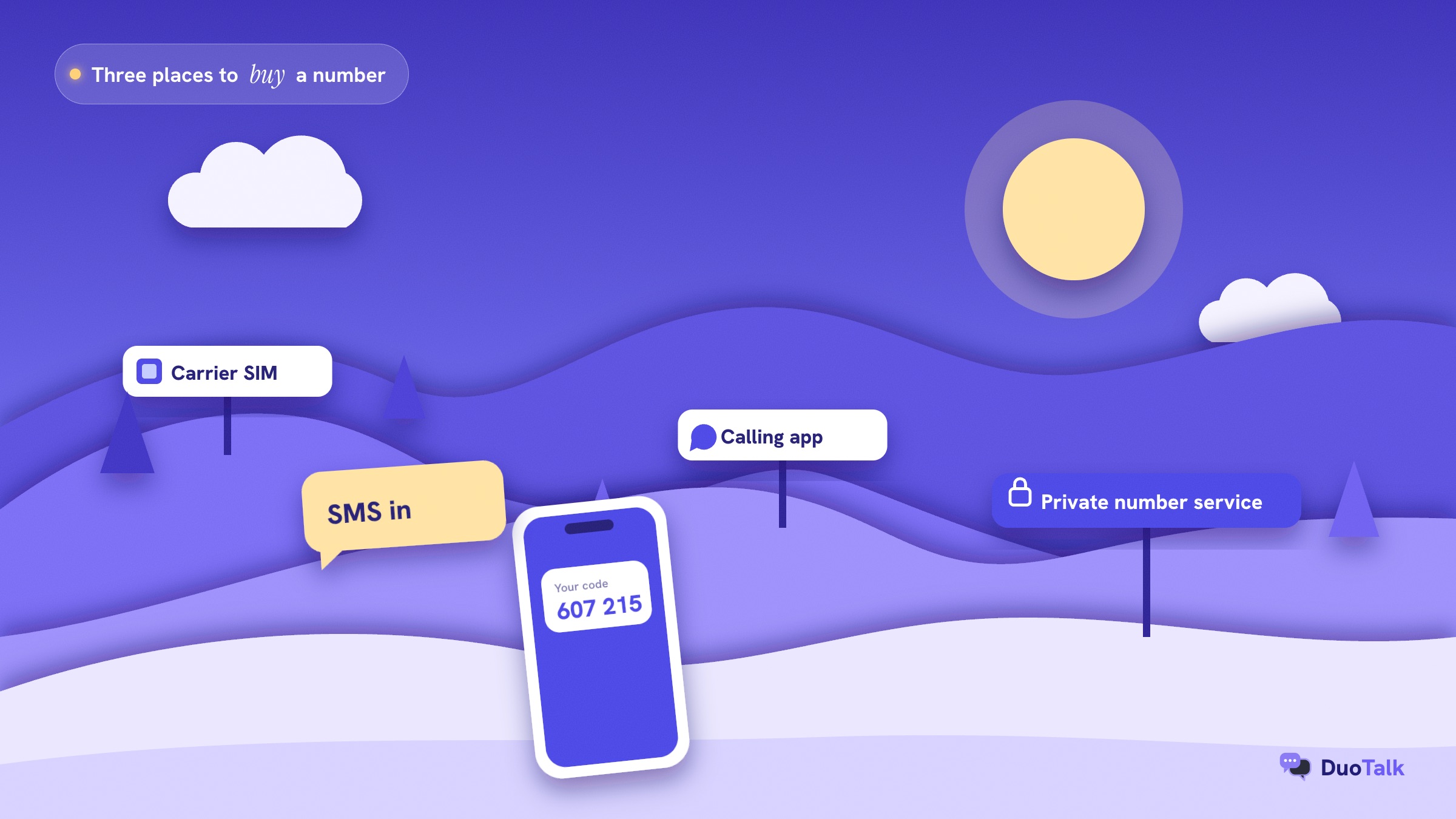
You can buy a phone number from four kinds of places: a mobile carrier (a SIM or eSIM line), a calling app or business phone platform, a private number service built for receiving verification codes, and, at the bottom of the list, free public inbox sites that do not sell anything. Each one fits a different job, and the cheapest is rarely the safest.
| Where you buy | What you get | Paperwork | Accepted for codes? | Best for |
|---|---|---|---|---|
| Mobile carrier (prepaid SIM or eSIM) | A full mobile line with calls, texts, data | Often ID, depending on the country | Highest acceptance, mobile line type | Banking, government, your main identity |
| Calling app or business phone platform | A VoIP number for calls and texts, monthly plan | Varies; some ask for an address or business details | Mixed; many apps reject VoIP ranges | Business calls, team texting |
| Private number service for codes | A number reserved to your account, receive-only, by the hour or month | Usually an account and a balance | Varies by service and country; listings show live stock | Sign-ups, keeping your real number private, travel |
| Free public inbox site | A number anyone can read | None | Often blocked; codes visible to all | Nothing you care about |
Carrier lines: most accepted, most commitment
A prepaid SIM or an eSIM line from a carrier is the most widely accepted number you can buy, because databases label it as mobile and it can take voice calls as well as texts. The trade-offs: many countries require ID to register a SIM, you need a phone that can hold the line, and you must keep it topped up. For a bank, a tax account or anything tied to your legal identity, this is the right purchase.
Calling apps and business phone numbers
Calling apps and business phone platforms sell VoIP numbers on monthly plans for calls and texts. They are a good buy for a second line for clients and a weaker buy for verification: line-type lookups label many of these numbers as VoIP, and a growing number of services decline VoIP for sign-up codes. Google Voice, a common free option, is aimed at people in the US, and its setup asks you to verify with a phone that can already receive texts, according to Google's Voice help pages. So it rarely solves the problem of not wanting to use your own number.
Private number services for receiving codes
A private number service sells numbers specifically for receiving verification codes: you choose the service and country, the number is reserved to your account for a set time, and the code appears in an inbox only you can open. DuoTalk (theduotalk.io) is one of these: a web app for getting a virtual phone number to receive SMS verification codes online in a private inbox, so you do not hand out your personal number. This is the right place to buy when you want a code without exposing your own number, and the whole topic of how to receive SMS online starts here.
Free public inbox sites
Free public inbox sites show every incoming message on a web page anyone can open. Whoever opens the page after you can read your code, request a password reset and take over the account. Many services also block these numbers because thousands of people have used them. Treat them as fine only for something you would not mind a stranger controlling.
Before you pay: 8 checks for any virtual number
Before you buy a virtual phone number, confirm eight things: the country, which services it receives from, the access period, privacy, the no-code rule, renewal, the payment method and the seller's honesty about acceptance. If a listing does not answer one of them, ask or buy elsewhere. (For the wider question of which kind of number to choose at all, see our guide to a virtual phone number for SMS.)
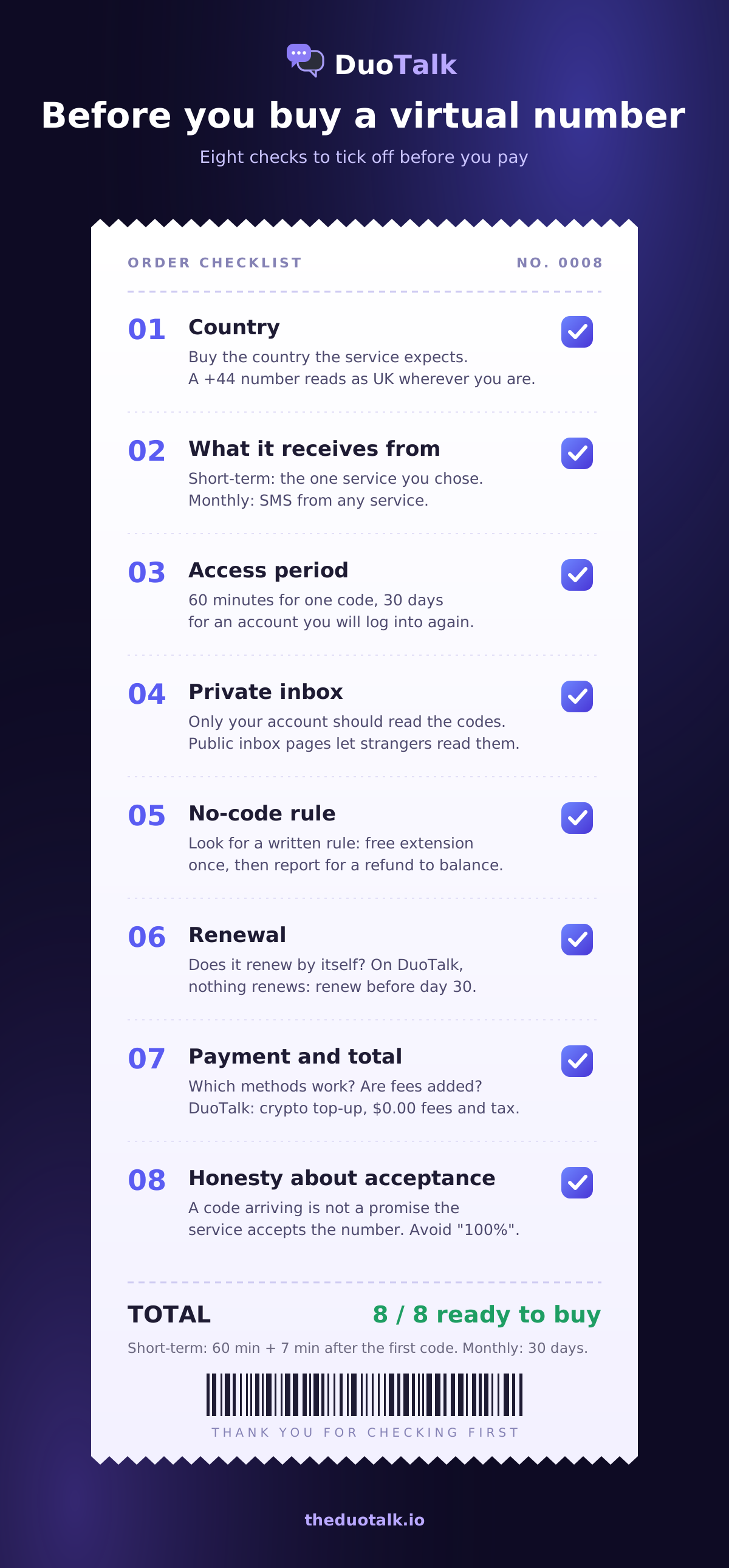
- Country. Buy the country the service expects for your account or region. A UK bank app, a US marketplace or a Canadian delivery app may check that the country code matches. A number keeps its country code wherever you are, so a +44 number still reads as UK while you are travelling.
- What it receives from. Check whether the number receives from one service or any service. On DuoTalk, a short-term number receives SMS only from the one service you chose at purchase; a monthly number receives SMS from any service. If you plan to verify two apps, one short-term number will not do both.
- Access period vs account life. Match the period to how long the account needs the number. A 60-minute number on an account you will keep for a year is the most common way people lock themselves out.
- Private inbox. Make sure only your account can read the messages. Ask, if the listing does not say.
- What happens if no code arrives. Look for a written rule. On DuoTalk, if no code arrives on a short-term number you can extend it once for free for another hour on the same number, and if it still fails you report it and the money goes back to your DuoTalk balance.
- Renewal. Find out whether the number renews by itself. Some plans auto-charge; on DuoTalk nothing renews automatically, so a monthly number needs a manual renewal from your numbers list before the 30 days end.
- Payment and total price. Check which payment methods work and whether fees or tax are added at the end. DuoTalk takes payment from your balance, adds no fees or tax at checkout, and accepts top-ups in crypto only (more on that below).
- Honesty about acceptance. A good seller tells you plainly that receiving a code does not guarantee the service will accept the number. Services change their rules without notice. Be wary of any listing that promises "works 100%".
One more check people skip: the refund window for monthly numbers. On DuoTalk, you can ask for a refund within 48 hours if a monthly number never receives an SMS.
Not sure the price is fair? Our guide to SMS verification cost explains what pushes a number's price up or down (country, demand for the service, number type, duration and stock).
How to buy a virtual phone number on DuoTalk, step by step
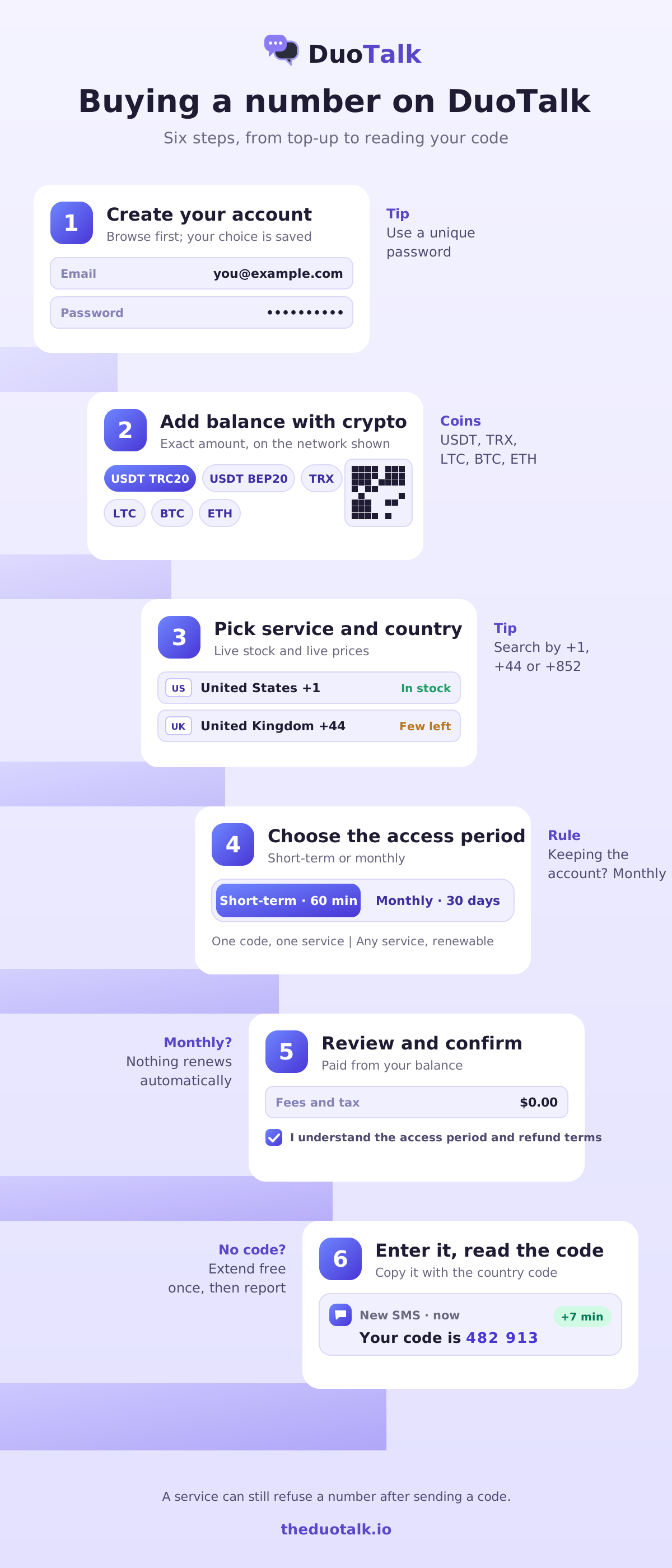
On DuoTalk you buy a virtual phone number in six steps: create an account, add balance with crypto, choose the service and country, choose short-term or monthly, review and confirm, then enter the number in the app and read the code. The crypto confirmation is usually the slowest part.
Step 1: Create your account
Create a DuoTalk account. You can browse the Numbers page and compare live stock and prices before you sign in; if you pick a number first, the site asks you to log in and keeps your choice. The account matters because the number, its timer and its inbox are tied to it. Use a password you do not use anywhere else, since anyone who gets into your account can read your codes.
Step 2: Add balance with crypto
Numbers are paid from your DuoTalk balance, and you add balance with crypto: USDT (on TRC20 or BEP20), TRX, LTC, BTC or ETH. The balance is added automatically once the network confirms the payment.
- Open Recharge and enter the amount. The minimum top-up is $15.
- Pick the coin. For USDT, pick the network too: TRC20 is USDT on the TRON network (Tether lists it among its supported protocols), BEP20 is USDT on BNB Smart Chain.
- Scan the QR code or copy the address, and send the exact amount shown on the network shown, in one transaction.
- Wait for confirmation. Most coins confirm within a few minutes; BTC can take longer. You can leave the page; the balance updates by itself.
The full process is on the top-up help page, and the purchase side is covered in depth in how to buy a temporary phone number online.
Step 3: Choose the service and the country
On the Numbers page, search for the app or site that will send the code (for example WhatsApp, Telegram or Google), then pick the country. Each row shows live stock and the live price, which change during the day. You can also search by country code such as +1, +44 or +852. For some US numbers you can pick an area code, or choose any, where stock allows.
If your service is not listed, look for its parent brand (Gmail sits under Google) or contact support; do not buy a number for a different service and hope it works, because a short-term number only receives from the service you chose.
Step 4: Choose short-term or monthly
Pick the access period. Short-term gives you 60 minutes from purchase, plus 7 minutes after the first code, for one service. Monthly gives you 30 days, receives SMS from any service, and can be renewed from your numbers list before it ends. If monthly is not offered for that country, the page tells you and offers short-term instead.
Step 5: Review your number and confirm
The review page lists the service and country, the number type, the access period, what the number receives, and the stock, then repeats the rules for your choice under "Before you reserve": the free extension and refund to balance for short-term, manual renewal and the 48-hour refund window for monthly, and for both, that the number receives SMS only (no sending, no calls) and that a service can still refuse a number after sending a code.
The order summary shows the price, the duration, "Fees and tax $0.00" and the total. Tick the box to confirm you understand the access period, what the number can receive and the refund terms, then confirm. If your balance is short, the page tells you how much more you need and opens the top-up.
Step 6: Enter the number and read the code
Your number appears in My numbers with a timer. Copy it exactly as shown, with the country code, into the app that asked for it. Request the code. It usually lands in your inbox within seconds on tested routes; give it a minute before you press "resend" in the app, and press it only once. Type the code into the app and you are done.
Buying for a specific job
The right purchase depends on the job. These are the jobs people search for most.
Buy a phone number to receive SMS once
If you need one code for one sign-up, buy a short-term number for that exact service and country. It is the cheapest option, the inbox is private, and the free extension covers you if the first hour produces nothing. Do not use it for anything you will need to log into from a new device later, because the number closes after its access time and cannot receive the next code.
Buy a USA virtual phone number
A US number has the +1 country code followed by ten digits: a three-digit area code and a seven-digit number, written like +1 (213) 555-0142 (a fictional example). Canadian numbers share +1, so some services tell the two apart only by area code. When you buy a USA virtual phone number:
- Choose the US listing for the service, not just any +1 number, because Canadian area codes look the same at a glance.
- Some US services send codes from short codes (five- or six-digit sender numbers); whether those reach a given number depends on the route, one reason listings are per service.
- For an account you will keep, such as a US marketplace or freelance profile, buy monthly and plan to move the account to an authenticator app.
The full US number guide covers which US services commonly ask for +1 and why, and the temporary US phone number guide covers the one-time case.
Buy a number for WhatsApp verification
WhatsApp ties your account to the number, so buy a number you can keep: a monthly number where offered, not a short-term one. WhatsApp's help centre says you can only verify a phone number you own and that it sends a 6-digit code by SMS, with a voice call as a fallback. Two practical points follow:
- A receive-only number cannot take the fallback call, so the SMS route is the one that has to work. If the first SMS does not arrive, wait for the in-app timer instead of switching to "Call me".
- WhatsApp will ask for a code again when you move to a new phone. Turn on two-step verification (a six-digit PIN) and add an email address in WhatsApp settings so you have a second way back in, and renew the number while you still use the account.
The step-by-step for registering is in our guide to a virtual number for WhatsApp.
Accounts that hold money or identity
For banks, payment apps, crypto exchanges, tax and government accounts, follow that service's identity rules and use a number you can keep for years, which usually means your own carrier SIM. If such a service does accept a virtual number for you, use a monthly number and renew it on time. Never use any number to get around identity checks or a ban; that breaks the service's terms and puts the account at risk.
What to know about paying with crypto
Paying with crypto has three rules that card payments do not: match the network, send the exact amount, and wait for confirmations. Payments cannot be pulled back by the sender; as bitcoin.org puts it, a Bitcoin transaction cannot be reversed, only refunded by whoever received it.
| Coin | Network to pick | What to watch |
|---|---|---|
| USDT | TRC20 (TRON) or BEP20 (BNB Smart Chain) | The address and network must match; USDT sent on another network can be lost |
| TRX | TRON | Keep a little TRX in your wallet for network fees |
| LTC | Litecoin | Usually confirms in minutes |
| BTC | Bitcoin | Network fees and confirmation time vary with load; can take up to an hour |
| ETH | Ethereum | Network fees change through the day |
- Copy the address, never type it, and check the first and last four characters against the screen.
- Watch withdrawal fees. Some exchanges deduct a fee from the amount you send; if less arrives than the amount shown, the top-up will not finish by itself.
- Keep the TXID. If a top-up does not appear, open a ticket with the transaction ID and the amount so it can be checked and added.
After you buy: the first hour and the first 30 days
What you do right after buying decides whether the number keeps working for you. Short-term numbers are about the first hour; monthly numbers are about the renewal date and your exit plan.
Short-term number: the first hour
The timer starts when the number is assigned to you. Enter the number in the app straight away; codes usually arrive in seconds. When the first SMS lands, you get 7 more minutes from that moment, in case the service sends a second code. When the timer ends, the number closes, and codes you already received stay in your SMS history.
If nothing arrives:
- Check that you entered the number with the right country code and no extra leading zero.
- Request a new code in the app once, and wait about a minute.
- Use the free extension. If no code has arrived, you can extend the same number once for another hour at no cost; the details are on the extend and renew help page.
- Still nothing? Report the number. Approved refunds go back to your DuoTalk balance, and you can try another country or a monthly number.
Monthly number: the first 30 days
A monthly number is yours for 30 days and receives SMS from any service. Use those 30 days well:
- Day 1: finish sign-up, then add a stronger second factor. The FTC recommends authenticator apps and security keys over text codes, and NIST's digital identity guidelines (SP 800-63B, revision 3) treat SMS as a restricted authenticator and say methods that do not prove possession of a device, such as VoIP, should not be used for out-of-band authentication. Save backup codes too, so a future login no longer depends on the number.
- Before day 30: renew from your numbers list if you still need texts on that number. Nothing renews automatically.
- If you are leaving: change the account's phone number or turn off SMS sign-in before the number ends, because an expired number can be reassigned to someone else.
One safety rule applies to every number you will ever own: never share a verification code with anyone who asks for it. The FTC's alert on why someone would ask for your verification code explains how scammers use that request to take over accounts.
Two worked examples
These examples show how the same checklist leads to different purchases. They are illustrations, not promises about any service's rules.
1. A freelancer separating work chats. Daniel wants a messaging account for clients that is separate from his family number. He will use it for months, and he expects to reinstall the app on a new phone this year. He buys a monthly number, verifies the app, turns on two-step verification with a PIN and an email address, and sets a calendar reminder three days before the renewal date. Short-term would have been cheaper on day one and a lockout on day forty.
2. A shopper checking a US marketplace from abroad. Priya is studying overseas and wants a US account on a shopping site that only accepts +1 numbers. She picks the US listing for that service rather than any +1 number, and chooses monthly because she will order again. If the site later asks for ID or a US payment method, she follows its rules rather than looking for a workaround.
Common mistakes when buying a virtual number
Most failed purchases come from a short list of avoidable mistakes. Here they are with the fix for each.
| Mistake | What happens | Fix |
|---|---|---|
| Buying short-term for an account you keep | Next login or reset sends a code to a closed number | Buy monthly; move 2FA to an authenticator |
| Choosing any +1 number for a US-only service | The service reads it as Canadian, or the reverse | Pick the country listing, not just the code |
| Pressing "resend" again and again | The service rate-limits or blocks the number | Resend once, wait, then extend |
| Sending crypto on the wrong network | Top-up does not arrive | Match coin and network; keep the TXID |
| Letting a monthly number lapse | Number may be reassigned; recovery texts go to someone else | Renew before day 30 or change the account's number |
| Treating a delivered code as acceptance | Service refuses the number after sending the code | Expect this sometimes; try another country or monthly |
If privacy is your main reason for buying, our guide to choosing a private SMS verification number goes deeper into who can read your codes and how to keep recovery possible.
Questions people also ask
Can I buy a virtual phone number online?
Yes. You can buy a virtual phone number online from a mobile carrier (as an eSIM line), a calling app, or a private number service for verification codes. To receive SMS online, a private number service is the quickest: choose the service and country, pay, and the code arrives in an inbox only you can read. Check the access period and refund rule before paying, and remember that no seller can guarantee a service will accept a number.
How much does it cost to buy a virtual phone number?
The price depends on the country, the service sending the code, the number type and how long you keep it. Short-term numbers for a single code are usually far cheaper than monthly ones, and carrier lines and business phone plans cost more again because they include calls. On DuoTalk, short-term numbers start from well under $1 in many countries; check live prices on the Numbers page, since they change with stock and demand.
Can I buy a phone number just to receive SMS?
Yes. Receive-only numbers are made for this: they accept incoming texts, such as verification codes, and show them in an online inbox, but cannot send messages or take calls. That is enough for most sign-ups. It is not enough when a service insists on a voice call or needs you to reply by text, so check what the number can do before you buy it.
Can I buy a US phone number from outside the US?
Yes, in most cases. Private number services and many calling apps sell US virtual phone numbers to buyers abroad, and the number keeps its +1 country code wherever you are. Choose the US listing for the specific service, not just any +1 number, because Canadian numbers share +1. Some US options, such as personal Google Voice, are limited to people in the US. For accounts you will keep, choose a monthly number.
Can I buy a number for WhatsApp verification?
You can, but buy a number you can keep. WhatsApp ties the account to the number and asks for a fresh code when you change phones, so a short-term number can leave you locked out later. Choose a monthly number where offered, verify by SMS, then turn on two-step verification and add an email address in WhatsApp settings. A receive-only number cannot take WhatsApp's fallback voice call.
Is it legal to buy a virtual phone number?
Buying a virtual phone number is legal in most countries; regulated carriers and licensed providers sell them every day. What can be illegal is the use: fraud, harassment, impersonation or evading a ban break the law or the service's terms. Some countries also require ID to register a SIM card. Use a virtual number for privacy, separating work and personal life, travel or testing, and follow each service's rules.
Can I keep a virtual number forever?
Not a verification number. You hold the right to use it for its access period, 60 minutes for a short-term number or 30 days for a monthly number on DuoTalk, renewable from your numbers list where offered. When you stop renewing, the provider can reassign it. For a number you want for years, a carrier SIM or eSIM line you keep topped up is the better buy.
Buy a virtual phone number on DuoTalk
DuoTalk sells private short-term and monthly numbers for receiving SMS verification codes. Pick the service and country on the Numbers page, check live stock and the live price, choose short-term (60 minutes, plus 7 after the first code) or monthly (30 days, some countries), and pay from your balance with no fees or tax added at checkout. If a short-term number gets no code, extend it once for free, then report it and the money returns to your balance. Codes usually arrive within seconds on tested routes, though a service can still refuse a number after sending a code.
Sources
- ITU-T, Recommendation E.164: The international public telecommunication numbering plan
- Federal Communications Commission, Reassigned Numbers Database
- NIST, SP 800-63B (revision 3) Digital Identity Guidelines: Authentication and Lifecycle Management
- WhatsApp Help Center, How to verify your phone number
- Google Voice Help, Get started with Google Voice
- Tether, Supported protocols
- Bitcoin.org, Some things you need to know
- Federal Trade Commission, Use two-factor authentication to protect your accounts
- Federal Trade Commission, What's a verification code and why would someone ask me for it?
Last reviewed: November 2026