Private SMS Verification Number: How to Choose One
How to choose a private SMS verification number: who can read your codes, will you get back in next year, plus picks for social, email, shopping and dating.
By the DuoTalk team · Published 2026-11-16 · Updated 2026-11-16
A private SMS verification number is a phone number whose incoming texts only you can read, used to receive one-time codes when an app or website asks for a phone number. Choosing one well comes down to two questions: who else can see the codes sent to it, and will you still control that number the next time the account asks for a code? Get both right and you keep your real number out of sign-up forms without risking the account later. This guide covers how to judge privacy, how to keep recovery possible, and which number type fits social, email, shopping, dating, messaging and payment accounts.
The short answer: Pick a number with a private inbox (never a public page where anyone can read messages), in the country the service expects, held for as long as the account needs codes. Use a short-term private number for one-off sign-ups and a monthly private number for accounts you will log in to again, then add an authenticator app or backup codes so recovery never depends on that number alone.
What is a private SMS verification number?
A private SMS verification number is a real, dialable mobile-format number assigned to one customer at a time, whose texts appear only in that customer's logged-in inbox. It exists to receive verification codes (OTPs), not to chat, and it is the opposite of the free "receive SMS online" pages that publish every incoming message on an open web page.
Three attributes decide how private a verification number really is:
- Inbox visibility. Private means your codes show only after you log in. Shared means anyone with the page link, or anyone browsing the site, sees the same messages.
- Assignment. Private numbers are assigned to you for a fixed window (for example 60 minutes or 30 days). Shared numbers are handed to hundreds or thousands of visitors at once.
- Holding period. How long the number stays yours decides whether a future code reaches you or a stranger.
Our pillar guide on how to receive SMS online covers every route, including eSIMs and free apps. This post covers one decision: choosing the private option for the right account.
Private inbox vs shared inbox
The difference is not cosmetic. A code is a key, and a shared inbox hands copies of that key to strangers.
| Attribute | Shared public inbox | Private verification number |
|---|---|---|
| Who reads incoming texts | Anyone who opens the page | Only the logged-in buyer |
| Number assigned to | Every visitor at once | One customer for a set window |
| Typical holding period | None; messages pile up for days or weeks | 60 minutes (short-term) or 30 days (monthly) at DuoTalk |
| Acceptance by apps | Low; these numbers are heavily reused and widely flagged | Varies by service and country; never guaranteed |
| Risk of someone else using your code | High, because the code is visible | Low while the number is yours |
| Safe for accounts you keep | No | Yes for the holding period; monthly for ongoing use |
The scale of the shared-inbox problem is well documented. University security researchers analysed more than 900,000 text messages sent to public SMS gateways over 28 months and found services sending sensitive data and low-entropy codes in the clear, readable by anyone (Reaves et al., ACM Transactions on Privacy and Security, 2018). Our comparison of free vs paid SMS verification walks through the risk scenarios in detail.
What "private" does and does not mean
Private means other customers and the public cannot read your messages. It does not mean anonymous. Be precise about the limits:
- The sending service sees the number. That is the point of verification. It may also look up the number's carrier and line type.
- The number provider can see the messages it delivers to you, the same way your mobile carrier can see texts reaching your SIM. Choose a provider you trust with that.
- The account you create is still yours. A private number protects your real number from spam lists and breaches. It does not make you untraceable, and it should never be used to dodge a ban or a platform's identity rules.
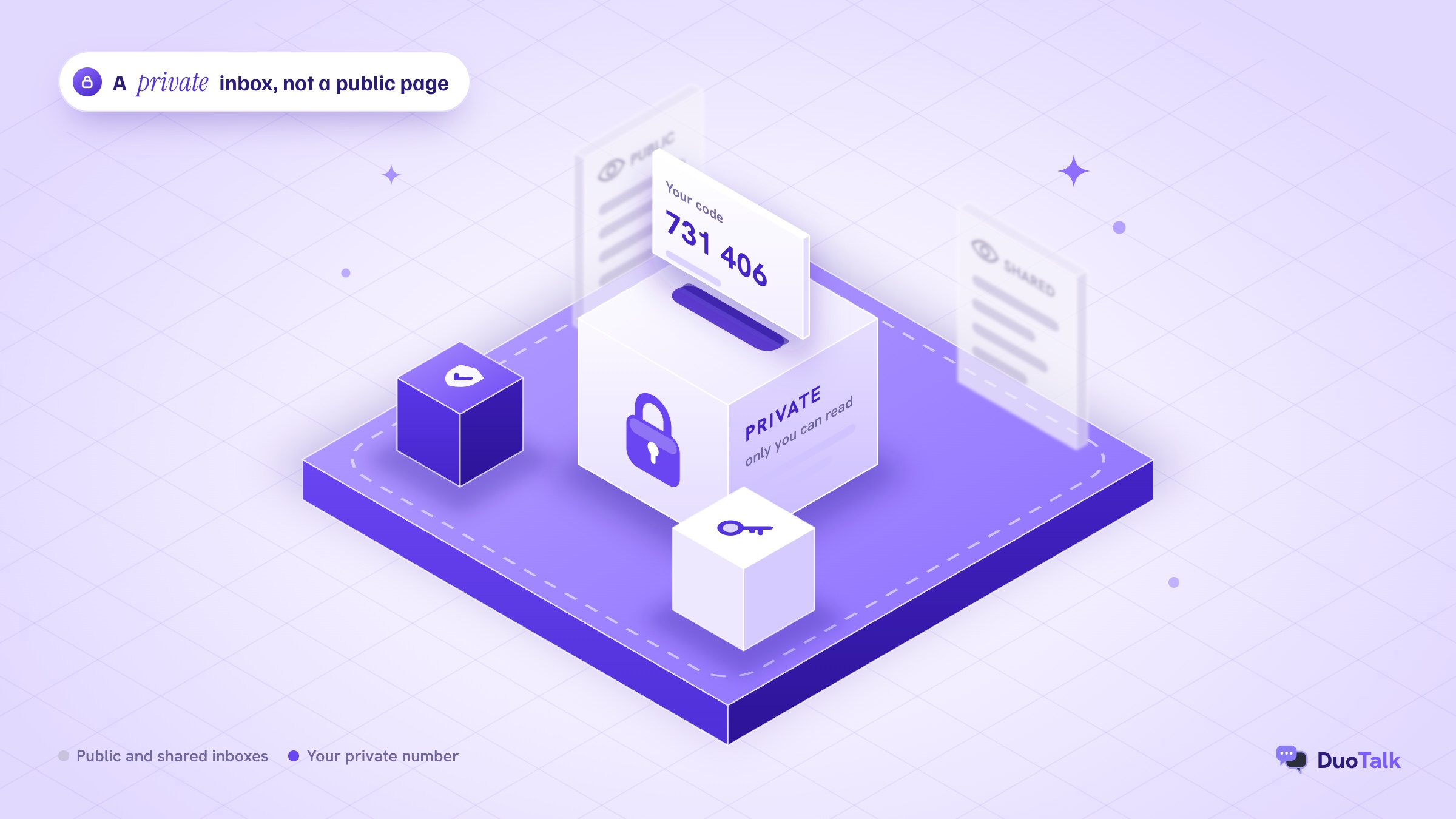
Who can read your verification codes?
On any phone number, a verification code passes through several hands before you see it. With a private number, the list of readers is short and known; with a shared inbox, it is unlimited. Here is the full path, from the "Send code" button to your screen:
- The service that sends it (for example a social network or shopping app) writes the code and passes it to an SMS gateway.
- Carriers route the message across networks to the operator holding the number. Standard SMS is not end-to-end encrypted.
- The number provider receives the message on its platform instead of on a SIM in your pocket.
- You read it in a logged-in inbox, in a browser or app.
- On a shared inbox only: everyone else. The message is published on a page, often for weeks, and anyone can copy the code or the number.
Steps 1 to 4 exist for every SMS, including texts to your own phone. Step 5 is the one a private number removes, which is why it is a real upgrade over free inbox sites, while still sitting below an authenticator app or passkey that never travels over SMS.
The two threats that matter most
Most guides stop at "free numbers are public". The more useful framing is: what could someone do with your code or your number?
- Read and use a live code. On a public inbox, a stranger can type your sign-up or login code before you do, or later reset the account through the same number. The FTC's plain advice is that anyone who asks you for a verification code is a scammer, because the code is the key (FTC consumer alert, March 2024).
- Inherit the number later. When a number is released, someone else eventually holds it. If your account still lists that number, their phone receives your reset codes. Princeton researchers sampled 259 numbers offered to new subscribers at two major US carriers and found 215 were recycled and exposed to hijacking or personal-data lookups; in a one-week honeypot, 19 of 200 numbers still received sensitive messages such as passcodes meant for previous owners (Princeton CITP, May 2021).
A private number solves the first threat completely while it is yours. The second threat is about holding period and what you do before the number goes, which the next sections cover.
How private is each option? The privacy staircase
Not every "second number" gives the same protection. Think of the options as steps, from codes anyone can read to accounts that do not depend on SMS at all.
| Step | Option | Who can read codes | How long you control it | Best use |
|---|---|---|---|---|
| 1 | Free public inbox site | Anyone | Never really yours | Nothing you care about |
| 2 | Free calling or texting app number | You, while active | Until the app reclaims it for inactivity | Casual contact, some low-risk sign-ups |
| 3 | Private short-term number | Only you | About an hour | One-off sign-ups you will not revisit |
| 4 | Private monthly number | Only you | 30 days at a time, renewable | Accounts you will log in to again |
| 5 | Your own SIM or eSIM plus an authenticator or passkey | Only you | As long as you keep the line | Banking, main email, anything critical |
Two notes keep this honest. Step 5 is the strongest for control but the weakest for privacy, because your real number is tied to your identity and appears in breach data and people-search sites. And step 2 apps often require that you use the number regularly; if you do not, the number can be reassigned, which creates the recycling risk from the previous section.
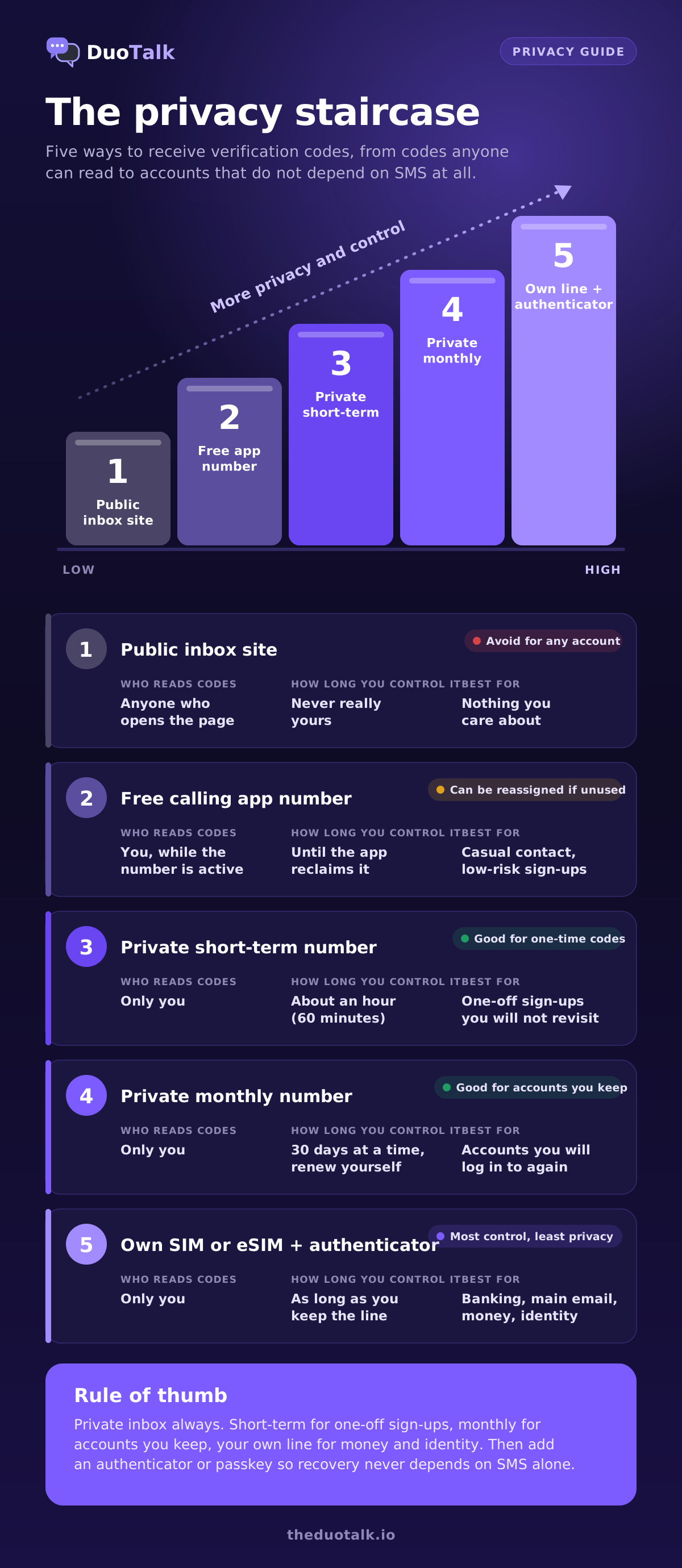
For most people, the sweet spot for sign-ups is step 3 or step 4: a private number that keeps the real one out of the database, with a holding period matched to the account. The rest of this guide is about choosing between those two and making the account safe afterwards.
How to choose a private SMS verification number: 6 checks
Run these six checks before you pay for any private number. They focus on privacy and account longevity; for the general buying checklist (line type, wait windows, price), see our guide to choosing a virtual phone number for SMS.
1. Is the inbox private by design?
The inbox must require a login and show messages only to the buyer. If a provider shows a list of numbers with messages visible before you pay, that is a public inbox, whatever the marketing says. Quick test: open the site in a private browser window without logging in. If you can read anyone's codes, so can everyone else.
2. Is the number assigned to you alone for a defined time?
Look for a stated window, such as "60 minutes" or "30 days", and a clear rule for when it ends. Vague wording like "use it as long as it works" usually means the number is shared or rotated.
3. Does the holding period match the account?
This is the longevity check, and it matters more than price. Ask yourself one question: will this account ever send me a code again? New-device logins, password resets, suspicious-activity checks and two-factor prompts all send codes to the number on file. If the answer is yes, a one-hour number is the wrong tool. Our guide on disposable vs dedicated phone numbers goes deeper on this trade-off.
4. Does it cover the right service and country?
Some numbers receive codes only from one chosen service; others accept texts from any sender. At DuoTalk, short-term numbers receive SMS only from the one service you choose at purchase, while monthly numbers receive SMS from any service. Country matters too: a UK-only app may expect +44 and a US-only service +1. Check live stock for the exact service and country before you start.
5. What happens if no code arrives?
A fair provider tells you before you pay. Good answers include a free extension, a replacement, or a refund to your balance. Also check how the provider frames acceptance: an honest one says that a delivered code never guarantees the service will accept the number, because services change their rules.
6. What do you hand over to get it?
The point of a private number is to share less. Look at what the provider asks for at sign-up and payment, and read its privacy page. A setup that wants your real phone number to "verify" you before giving you a verification number defeats the purpose.
| Check | Pass | Fail |
|---|---|---|
| Private inbox | Login required, messages visible to buyer only | Codes readable without logging in |
| Assignment | One buyer, stated window | Shared or rotating pool |
| Holding period | Matches how often the account will ask for codes | One hour for an account you keep |
| Service and country | Live stock shown per service and country | "Works everywhere" with no detail |
| No-code policy | Extension, replacement or refund stated | Nothing stated |
| Data asked | Minimal, with a readable privacy policy | Asks for your real number first |
If you want ranked recommendations for specific jobs, our guide to the best virtual phone number for SMS verification scores options use case by use case.
Keeping account recovery possible
Account recovery is where most privacy plans fail. The number you give at sign-up often becomes a recovery key, and losing control of it can lock you out, or let someone else in.
Why the verification number becomes a key
Many services quietly promote the sign-up number to a recovery channel. Google, for example, says a recovery phone is used to send you a code if you are locked out, to block someone using your account without permission, to prove the account is yours, and to alert you to suspicious activity. It also advises using a mobile number that only you use and keep with you, and warns that changes to a recovery number can take up to 7 days to take effect (Google Account Help).
If you verify a long-term account with a number that disappears an hour later, its recovery depends on a number you no longer control. Nothing breaks on day one. It breaks months later, on a new phone, when the service says "We sent a code to +1 --0142".
The holding-period rule
Use this rule to pick between short-term and monthly:
- Use a short-term private number when the account is a one-off: a trial, a single download, a coupon, a test sign-up, a forum you will read once. The code arrives, you finish, you are done.
- Use a monthly private number when you will log in again, from another device, or when the service is known to re-check phone numbers. Renew it before the 30 days end; at DuoTalk nothing renews automatically, so renewal is a deliberate step from your numbers list (see extend and renew).
- Use your own line for banking, government services, your primary email and anything holding money or identity documents.
Harden the account before the number goes
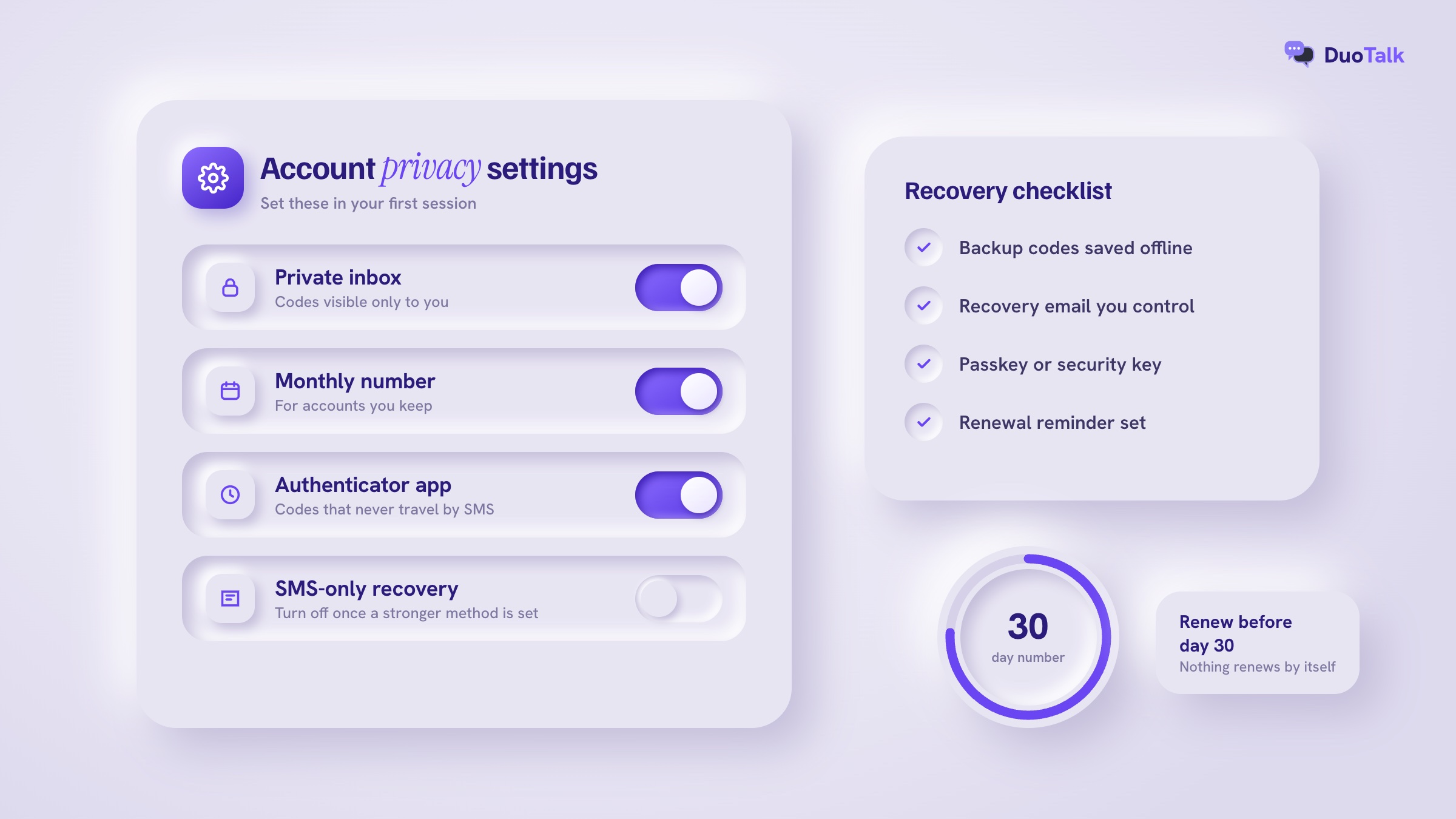
Whatever number you used, the safest move after sign-up is to stop relying on SMS for that account. Do this in the first session, while the number still works:
- Turn on an authenticator app or a passkey where the service offers one. NIST's digital identity guidelines classify SMS and voice codes (the PSTN) as a "restricted" authenticator and require services to offer an alternative (NIST SP 800-63B-4, section 3.1.3.3).
- Save backup codes offline, in a password manager or on paper.
- Add a recovery email that you control long term.
- Turn on the app's own lock, such as two-step verification on messaging apps. WhatsApp's help centre describes managing two-step verification, including a linked email address, and notes it is upgrading the 6-digit PIN to a password (WhatsApp Help Center).
- Remove or replace the phone number in security settings if the service allows it, before a short-term number ends.
The FTC recommends authenticator apps and security keys over texted codes because they cannot be redirected by a SIM swap (FTC: Use two-factor authentication). CISA's guidance points the same way (CISA: More than a password).
What about your real number's own risks?
Keeping your real number for critical accounts does not make it risk-free. SIM swapping, where a criminal convinces a carrier to move your number to their SIM, targets exactly those accounts. In the US, the FCC adopted rules in November 2023 requiring wireless carriers to use secure methods to authenticate customers before a SIM change or port-out, and to notify customers of such requests (Federal Register, 8 December 2023). Ask your carrier for a port-out PIN or number lock either way. A private verification number for everything else shrinks how often your real number is exposed in the first place.
Private number picks by account type
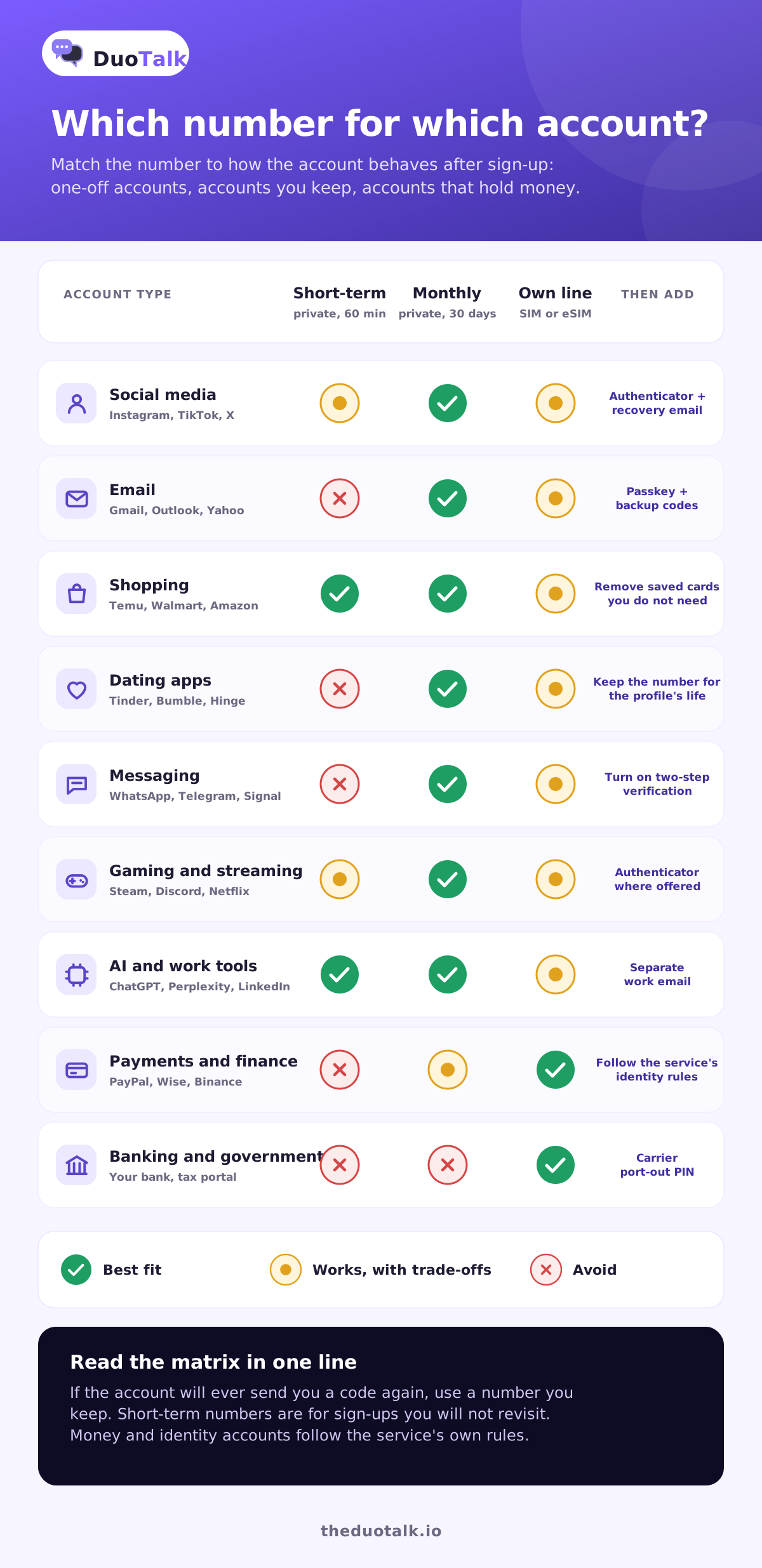
The right private number depends less on the app and more on how the account behaves after sign-up. Use this table as a starting point, then read the notes for your account type.
| Account type | Examples | Re-asks for codes? | Recommended number | After sign-up |
|---|---|---|---|---|
| Social media | Instagram, TikTok, X, Snapchat | Often, on new devices | Monthly private number if you keep it; short-term for a test profile | Authenticator app, recovery email |
| Gmail, Outlook, Yahoo | Yes, recovery and security checks | Monthly private number, then a stronger recovery method | Passkey, backup codes, recovery email | |
| Shopping | Temu, Walmart, Amazon | Sometimes, at checkout or login | Short-term for one order; monthly if you shop often | Remove saved cards you do not need |
| Dating | Tinder, Bumble, Hinge | Yes, phone is often the login | Monthly private number | Keep the number for the life of the profile |
| Messaging | WhatsApp, Telegram, Signal | The number is the account | Monthly private number | Two-step verification or PIN |
| Gaming and streaming | Steam, Discord, Netflix | Occasionally | Short-term or monthly, by how long you play | Authenticator where offered |
| AI and work tools | ChatGPT, Perplexity, LinkedIn | Sometimes | Short-term for trials; monthly for a work account | Separate work email |
| Payments and finance | PayPal, Wise, Binance | Yes, and identity rules apply | A number you keep (monthly) or your own line; follow the service's identity rules | Authenticator, follow KYC rules |
| Banking and government | Your bank, tax portal | Yes | Your own SIM or eSIM | Carrier port-out PIN |
Social media accounts
Social apps tend to re-check phone numbers on new-device logins, password changes and unusual-activity checks. For a profile you will keep, use a monthly private number and switch the account to an authenticator app in the first session. A short-term number suits a throwaway test profile or a one-time event page you will not revisit. Our post on receiving verification codes online has per-platform tips for keeping your real number off social profiles.
Email accounts
Email is the master key: password resets for every other account land there. Treat any email account you plan to use as a long-term account, even a "secondary" one. Verify it with a number you can keep, then add a passkey, backup codes and a recovery email. If a provider later asks for the phone number during a security check and the number is gone, recovery can take days or fail outright.
Shopping accounts
Shopping apps often need a number once, to stop coupon abuse or confirm a delivery contact. For a single order, a short-term private number is fine. If you will reorder, save addresses or store a card, use a monthly number, because a login code at checkout months later is common.
Dating apps
Dating apps are the clearest case for privacy: you do not want a match, or a scammer posing as one, to have your real number. Many dating apps also use the phone number as the login itself, so losing the number can mean losing the profile and its matches. Pick a monthly private number, renew it while the profile is active, and never move the conversation to your personal number until you choose to.
Messaging apps
On WhatsApp, Telegram and Signal, the phone number is the account identity. If someone else later receives a code for that number, they may be able to register the account on their device. Use a monthly private number for any messaging account you keep, turn on two-step verification or a registration lock in the first session, and keep renewing for as long as the account matters.
Payments, crypto and finance
Payment, money-transfer and crypto platforms have identity checks for legal reasons. Follow those rules exactly: use your real identity, and use a phone number you can keep, which means a monthly number or your own line, depending on what the service accepts. Never use a short-term number for an account that holds money. For banks and government portals, use your own SIM or eSIM.
How to get a private verification number, step by step
Here is the full flow on DuoTalk (theduotalk.io), a web app that gives you a private virtual number to receive SMS online in an inbox only you can see. Numbers receive SMS only; they cannot send texts or take calls.
- Decide the holding period first. One-off sign-up: short-term. Account you will keep: monthly. Use the picks table above.
- Open the Numbers page and pick the service and the country. Live stock and live prices are shown per service and country, so check them there rather than relying on any list.
- Top up your balance if needed. Top-ups are crypto only (USDT on TRC20 or BEP20, TRX, LTC, BTC or ETH), and the balance is added automatically once the network confirms. There are no fees or tax added at checkout.
- Buy the number. A short-term number is active for 60 minutes and receives codes only from the service you picked. A monthly number lasts 30 days and receives codes from any service.
- Enter the number in the app or website in full international format, with the right country code, and tap "Send code".
- Read the code in your private inbox. On tested routes codes usually arrive within seconds. On a short-term number, once the first code arrives the number stays open 7 more minutes in case the service sends a second one.
- Harden the account right away: authenticator app or passkey, backup codes, recovery email.
- For monthly numbers, set a renewal reminder. Nothing renews automatically; renew from your numbers list before the 30 days end. The number lifecycle page explains each state.
Worked example 1: a one-off sign-up
Maya wants a 7-day trial of a design tool that insists on a phone number, and she will not keep the account. She buys a short-term USA virtual phone number for that service, enters it in international format, like +1 201 555 0142, receives the code in her inbox within the 60-minute window and finishes sign-up. Her real number never enters the tool's database, and because the account is disposable, the number expiring does not matter.
Worked example 2: an account you keep
Daniel is creating a new social profile for a side business and expects to run it for a year. He buys a monthly private number, verifies the profile, and in the same session turns on an authenticator app and saves the backup codes. He renews the number every month from his numbers list. Eight months later, a new-phone login asks for an SMS code; it lands in his private inbox, not with a stranger who inherited a released number.
When the code does not arrive or the number is refused
Two different things can go wrong, and they need different fixes. Either the code never reaches the number, or the code arrives but the service refuses the number.
No code arrived. Check the number was entered with the correct country code, wait a full minute before tapping "Resend", and do not request codes repeatedly, because many services rate-limit resends. On a DuoTalk short-term number, if no code arrives you can extend once for free, which gives you another hour on the same number. If it still fails, report it and the money returns to your DuoTalk balance. Monthly numbers can be refunded on request within 48 hours if they never receive an SMS. Our help page on what to do when no SMS arrives lists the checks in order.
The number was refused. Messages such as "This phone number cannot be used for verification" or "Number not supported" (wording varies by service) usually mean the service ran a line-type or reputation check and rejected it. A code arriving never guarantees acceptance, and a service can still refuse a number after sending a code. Try a different country the service expects, or switch number type. Our troubleshooting guide on why a virtual number is not accepted covers each cause in detail.
| What you see | Likely cause | First fix |
|---|---|---|
| No code after 2 minutes | Delivery delay or blocked route | Resend once, then use the free extension |
| "Too many attempts" | Rate limit on resends | Wait, then try once more |
| "Number not supported" (wording varies) | Line-type or reputation check | Different country or number type |
| Code arrives, account later locked | Service re-checked the number | Keep a monthly number; add an authenticator |
| Code for an account you closed | Number reused after release | Remove numbers from accounts before letting them go |
Questions people also ask
What is a private SMS verification number?
A private SMS verification number is a phone number assigned to you alone for a set period, whose incoming texts appear only in your logged-in inbox. You use it to receive one-time codes when apps or websites ask for a phone number, so your real number stays out of their database. Unlike free public inbox sites, nobody else can read the codes sent to it while the number is yours.
Can other people see my verification code on a temporary number?
On a free public inbox, yes: every incoming message is published on an open page that anyone can read, often for weeks. On a private temporary number, no: the code appears only in your account after you log in. The sending service and the number provider handle the message in transit, just as your mobile carrier handles texts to your SIM, but other customers and the public cannot see it.
Is it safe to use a virtual number for verification?
It is safe when the number has a private inbox and you hold it for as long as the account needs codes. The risks come from public inboxes, where strangers can use your code, and from numbers that expire while still linked to an account you keep. Use a monthly number for accounts you will revisit, add an authenticator app, and keep your own line for banking and government services.
Can I use a temporary number for account recovery?
Not reliably. A short-term number is yours for about an hour, so it cannot receive a recovery code months later. If you verify an account you plan to keep, either use a monthly number that you renew, or replace SMS recovery straight away with a passkey, authenticator app, backup codes and a recovery email. Google advises using a recovery phone that only you use and keep with you.
Is a paid SMS verification number more private than a free one?
Usually, because paid private numbers are assigned to one buyer and shown only in that buyer's inbox, while most free "receive SMS online" sites publish messages to everyone. Price alone does not prove privacy, though. Check that the inbox needs a login, that the number is assigned to you for a stated time, and that the provider explains what happens when no code arrives.
What happens if someone gets my old verification number?
They may receive codes meant for you. If an account still lists that number, the new holder could get login or reset codes and, on some services, take over the account. Princeton researchers found recycled carrier numbers still receiving passcodes for previous owners. Before letting any number go, remove it from every account that uses it and switch those accounts to an authenticator or another number you keep.
Can a private verification number be traced back to me?
A private number keeps your personal number out of the sign-up, but it is not anonymity. The service sees the number and the provider knows which customer holds it, and your account activity, email, payment details and device can still identify you. Treat it as protection from spam, breaches and over-sharing, not as a way to hide from a platform's rules or the law.
Choose private, choose for the account's lifetime
The best private SMS verification number matches the account: private inbox always, short-term for one-off sign-ups, monthly for accounts you keep, your own line for money and identity. Then take SMS out of the recovery path. When you are ready, see live numbers by service and country and pick the holding period that fits.
Sources
- Reaves et al., "Characterizing the Security of the SMS Ecosystem with Public Gateways", ACM Transactions on Privacy and Security, 2018
- Princeton CITP: Phone number recycling creates serious security and privacy risks (May 2021)
- NIST SP 800-63B-4, Digital Identity Guidelines: Authentication and Authenticator Management
- Google Account Help: Set up a recovery phone number or email address
- FTC: Use Two-Factor Authentication To Protect Your Accounts
- FTC consumer alert: What's a verification code and why would someone ask me for it? (March 2024)
- Federal Register: Protecting Consumers from SIM-Swap and Port-Out Fraud (8 December 2023)
- WhatsApp Help Center: How to manage two-step verification settings
- CISA: More than a password (multifactor authentication)
Last reviewed: November 2026