Telegram Without Phone Number: What Actually Works
Telegram without phone number: sign-up always needs one, but nobody has to see yours. Compare privacy settings, +888 numbers and a separate virtual number.
By the DuoTalk team · Published 2026-10-25 · Updated 2026-11-11
Searching for "Telegram without phone number" usually means one of two things: you do not want your personal SIM number tied to a Telegram account, or you do not want strangers in groups and channels to see it. Telegram can solve the second problem completely and the first one partly. You cannot create a Telegram account with no number at all, but you can choose which number you use and make sure nobody else sees it. Below are the three routes that work in October 2026, what each costs, and how to keep the account yours.
The short answer: You cannot create a Telegram account without a phone number, because Telegram identifies every account by a mobile number. You can, however, hide your number from everyone with privacy settings and a username, sign up with an anonymous +888 number bought on Fragment, or register with a separate number that is not your personal SIM.
Can you use Telegram without a phone number?
No, not to create an account. Telegram's FAQ states that accounts "can only be connected to a mobile number" and that landline numbers are not supported. Each phone number is one account, and the number is how Telegram identifies you when you log in on a new device.
What you can do is use Telegram without a phone number being visible or being your own. It helps to separate three different things people mean by "no phone number":
| What you want | Is it possible? | How |
|---|---|---|
| Sign up with no number at all | No | Every account needs a number |
| Sign up without a SIM card | Yes | Anonymous +888 number from Fragment |
| Sign up without your personal number | Yes | A separate or virtual number you control |
| Keep your number but hide it from others | Yes | Privacy settings plus a username |
| Use Telegram on a computer without a phone nearby | Yes, after sign-up | Log in once, then the session stays active |
Pick the row that matches your goal, then read the matching option below.
Once an account exists, Telegram usually sends login codes inside the app on any device where you are logged in. SMS only matters when you have no other active session, which is why the number you choose still matters months later.
Option 1: keep your number but hide it completely
If you already have a Telegram account, or you are fine giving Telegram itself your number as long as other users never see it, privacy settings are the best route. They are free, take two minutes, and are fully supported by Telegram.
By default, Telegram shows your number only to people you have saved as contacts. Strangers in a group cannot see it. You can go further and hide it from everyone.
How to hide your phone number on Telegram
- Open Telegram and go to Settings.
- Tap Privacy and Security.
- Tap Phone Number.
- Under Who can see my phone number, choose Nobody.
- A second setting appears: Who can find me by my number. Choose My Contacts so people who only have your number cannot look you up.
- Optional: use Add exceptions to always show your number to specific people, such as family.
One limit is worth knowing. Telegram's FAQ notes that people who already know your number and have saved it in their address book will always see it. Privacy settings stop new people from learning your number. They cannot erase it from someone's phone.
Set a username so people can reach you without a number
A username lets people find you in search and message you with no number exchanged. Your link becomes t.me/yourname.
- Go to Settings and tap your profile, or Edit profile.
- Tap Username.
- Choose a name using letters a-z, numbers 0-9 and underscores. Usernames must be at least five characters.
- Save. Share the username or link instead of your number.
If you do not want a public username either, Telegram can generate a temporary QR code that lets someone add you as a contact without seeing your number. Telegram introduced this in December 2022 for people who hide their number and have no username.
Trade-off: Telegram still holds your real SIM number. If your goal is to keep your carrier number out of Telegram's records or away from a leak, this option does not achieve that. If your goal is to stop other users from seeing it, it does.
Option 2: anonymous numbers sold through Fragment
Telegram's anonymous numbers are virtual numbers starting with +888 that exist only on Telegram and are not tied to any SIM card. Telegram launched them on 6 December 2022, announcing that you can "have a Telegram account without a SIM card." They are sold on Fragment, Telegram's auction platform built on the TON blockchain.
Here is how they work, based on Fragment's own description:
- The number is a collectible recorded on the TON blockchain and held in your crypto wallet.
- It works only for Telegram. It cannot receive normal SMS messages or calls, and you cannot use it to sign up for other services unless they choose to support it.
- When Telegram asks for a login code, you connect your wallet to Fragment and read the code there instead of receiving an SMS.
- You can create a new account with it, or switch an existing account to it from the mobile app's settings.
- You can sell it, auction it or transfer it to another wallet later.
What it costs in 2026
At launch, random +888 numbers started at 9 Toncoin, about $16 at the time, according to TechCrunch. That price no longer exists. Fragment states that all 136,566 numbers sold out in December 2022, so today you can only buy from an existing owner. When we checked Fragment's "for sale" list on 23 October 2026, the cheapest listings were priced in the low thousands of units of the platform currency, which Fragment's site converted to thousands of US dollars. Fragment now calls that currency Grams. Prices move with the crypto market, so check the live listings before deciding.
How to sign up with a +888 number
- Install a TON wallet such as Tonkeeper or MyTonWallet and back up its recovery words offline.
- Buy the currency on an exchange and send it to your wallet. Some exchanges ask for ID, which Fragment itself mentions.
- Open Fragment, connect your wallet with Connect TON, and buy a number from a current owner.
- In Telegram, start sign-up and enter the +888 number.
- When asked for the code, open your numbers page on Fragment with the same wallet connected and copy the code shown there.
- Turn on two-step verification right away (see the settings section below).
Trade-offs: This is the only route that needs no SIM card at all, and the number is not linked to a carrier contract. It is also expensive, technical, and only as safe as your wallet. If you lose the wallet's recovery words or transfer the number away, you lose the way to receive login codes. The purchase is also recorded on a public blockchain, and buying crypto may involve an exchange that knows your identity, so "anonymous" means "not tied to a SIM", not "untraceable".
Option 3: a separate virtual number for Telegram
A virtual number for Telegram is a phone number that you receive SMS on through an app or website instead of a SIM card in your phone. It lets you create a Telegram account without your personal phone number, and it costs far less than a +888 number. Telegram does not publish a list of accepted number types, so acceptance varies by number and country.
Most people take this route for a work or community account. The idea is the same as using a second phone number for privacy: one number for the people who know you personally, another for everything else.
Short-term or monthly: pick the one that matches the account
The single biggest mistake with virtual numbers is choosing one that disappears while the account still depends on it. Telegram's FAQ is blunt about this: Telegram identifies you by your phone number, and it advises keeping your account connected to "a phone number you control" or you risk losing access permanently.
| Number type | How long you can receive SMS | Good for | Risk |
|---|---|---|---|
| Short-term (one-time) number | A short window, often minutes to an hour | Testing, a throwaway account you will not log back into | You cannot receive a new login code later |
| Monthly (dedicated) number | 30 days | An account you plan to keep and log back into | You must secure the account before the period ends |
| Your own second SIM or eSIM | As long as you pay the carrier | Long-term accounts, recovery | Ongoing cost, still tied to a contract |
A short-term number works for a one-time code, which our guide to a temporary phone number for verification covers in detail. For a Telegram account you will keep, a monthly number is the better fit because you can receive more codes during that period, for example when you install Telegram on a new laptop. Even then, set up the security steps below so the account does not depend on SMS forever.
Why a code may not arrive
Some virtual numbers never receive a Telegram code. Common causes are a number range Telegram does not send to, a number that was already used for another Telegram account, or Telegram choosing to deliver the code inside the app on a device you are already logged into. Telegram may also ask some users to set up a login email so codes arrive by email. Receiving a code does not guarantee Telegram will keep accepting the number later, because services change their rules.
Telegram without phone number: the three routes compared
The right choice depends on what you are hiding and from whom.
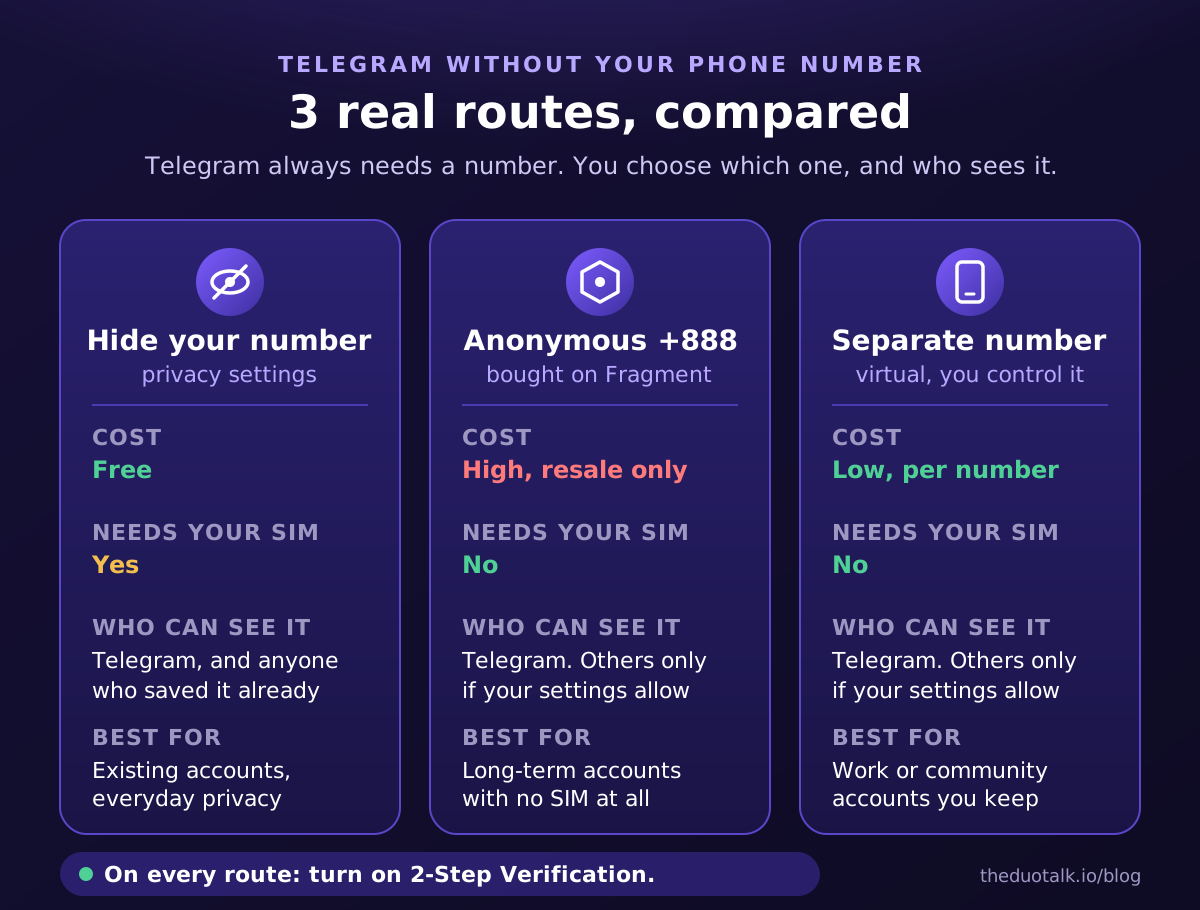
| Hide your number | Anonymous +888 number | Separate virtual number | |
|---|---|---|---|
| Cost | Free | High, resale only, paid in crypto | Low, pay per number |
| Needs your SIM number | Yes | No | No |
| Who can see the number | Nobody, if set to Nobody | Nobody, if set to Nobody | Nobody, if set to Nobody |
| Telegram knows your real number | Yes | No | No |
| How login codes arrive | SMS to your SIM or in-app | On Fragment or in-app | SMS to the virtual number or in-app |
| Main risk | Number already saved by contacts | Losing your wallet | Losing access to the number |
| Setup effort | 2 minutes | 30-60 minutes, crypto wallet needed | About 5 minutes |
| Best for | Existing accounts, everyday privacy | Long-term anonymity without a SIM | A separate work, community or project account |
Decision rules:
- Use privacy settings if you only want to stop other Telegram users from seeing your number.
- Use a +888 number if you need an account that is never tied to a SIM, and you are comfortable managing a crypto wallet and the cost.
- Use a separate virtual number if you want your personal number out of the account entirely, at low cost, and you will secure the account with a password and passkey.
- Whichever route you pick, also apply Option 1's privacy settings. A +888 or virtual number is still visible to others unless you hide it.
How to sign up with a separate number, step by step
This walkthrough uses a separate virtual number. It takes about five minutes if you have everything ready.
Before you start
- Decide whether this is a throwaway test or an account you will keep. For an account you keep, choose a monthly number.
- Think of a strong, unique password for two-step verification, and have an email address ready for recovery.
- If Telegram is already installed with your personal account, you can add a second account inside the same app (Settings, then Add Account). Telegram apps support several accounts at once.
The steps
- Get a number. On DuoTalk, open the Numbers page, choose Telegram, pick a country with stock, and choose short-term or monthly. Live stock and prices are shown per country. DuoTalk (theduotalk.io) is a web app that gives you a virtual phone number to receive SMS online in a private inbox.
- Open Telegram on your phone or desktop and tap Start Messaging, or use Add Account if you are already logged in.
- Select the number's country and enter the number exactly as shown, without the country code twice.
- Tap Next. Telegram sends a code by SMS.
- Watch your DuoTalk inbox. Codes on tested routes usually arrive within seconds. Copy the code into Telegram.
- Enter a display name. It does not have to be your legal name.
- Before doing anything else, open Settings, Privacy and Security and complete the setup in the next section.
If the code does not arrive on a DuoTalk short-term number
A short-term temporary phone number stays active for 60 minutes after purchase. If no code arrives, you can extend it once for free for another hour on the same number. If it still fails, report it; an approved refund goes back to your DuoTalk balance. After the first code arrives, the number stays open for 7 more minutes in case Telegram sends a second code.
Do not request codes many times in a row: Telegram limits repeated attempts. If a number fails twice, try a different country.
A worked example
Sam runs a hobby community and wants a Telegram admin account that is separate from his personal one. He buys a monthly number, signs up, sets a username, hides the number from everyone, turns on two-step verification with a recovery email, and adds a passkey. He logs in on his laptop while the number is still active. Months later, when he installs Telegram on a new phone, the login code arrives inside Telegram on his laptop, and his password protects the account even though the number has expired. His personal SIM number never touched the community account.
Privacy settings to change after you sign up
These settings matter for every route, including +888 numbers. Telegram's defaults are reasonable, but they are tuned for convenience, not maximum privacy. Go through this checklist once.
| Setting (Settings, Privacy and Security) | Recommended choice | Why |
|---|---|---|
| Phone Number: Who can see my phone number | Nobody | Hides the number from everyone, including contacts |
| Phone Number: Who can find me by my number | My Contacts | Stops strangers matching your number to your profile |
| 2-Step Verification | On, with a recovery email | A code alone is no longer enough to log in |
| Passkeys | Add one on devices you own | Lets you log in without an SMS code |
| Last Seen and Online | My Contacts or Nobody | Limits activity tracking |
| Profile Photos | My Contacts | Keeps your face out of public groups |
| Calls: Use peer-to-peer with | Nobody or My Contacts | Calls are relayed, so your IP address is not shared directly |
| Groups and Channels: Who can add me | My Contacts | Stops spam groups adding you |
| Devices / Active Sessions | Review and end unknown sessions | Removes access you did not approve |
| If away for (account self-destruct) | Longer than your expected absence | Telegram deletes inactive accounts after the set period |
Turn on two-step verification
- Go to Settings, Privacy and Security, 2-Step Verification.
- Set a password you do not use anywhere else, and a hint that does not reveal it.
- Add a recovery email and confirm the code Telegram sends to it. Telegram's FAQ advises protecting that email with a strong password and two-step verification too.
With this on, logging in on a new device requires both the login code and your password. This is what protects an account on a virtual or recycled number: even if someone else later receives SMS on that number, the code alone does not let them in.
Add a passkey
Telegram supports passkeys, which can replace the SMS code at login. Create one from a logged-in session in Settings, Privacy and Security, Passkeys, on a device you own. Telegram's FAQ notes you can still request an SMS code, so keep the password from the previous step as well.
Keep at least one session alive and check the inactivity timer
Telegram sends login codes to your logged-in devices first, so a second active session (for example Telegram Desktop) is your best backup. Also check the account self-destruct setting. Telegram's FAQ says the default is 18 months without coming online, after which the account and its messages are deleted.
Plan for the day the number ends
If your number is temporary, decide now what happens later. You can move the account to a number you keep with Settings, tap your number, Change Number. Telegram keeps your contacts, cloud messages, media and Secret Chats when you change numbers. If another Telegram account already uses the new number, that account must be deleted first.
Mistakes to avoid
These are the most common problems when people try to use Telegram without a phone number of their own.
- Using a public "free SMS" website. Anyone can read the codes on those pages, and the same number has usually been used for many accounts already. Use a number only you can read.
- Skipping two-step verification. On any number you do not own long-term, this is the one setting that stands between you and a lost account.
- Assuming a +888 number hides you from everyone. It hides your SIM, not your activity. Your profile, username and messages are still visible according to your privacy settings.
- Creating many accounts. Telegram acts against spam and fake accounts, and mass sign-ups can get numbers and accounts limited. Use a separate number for a legitimate separate identity, such as work or a community you run, and follow Telegram's terms.
If you also use WhatsApp and want the same separation there, our guide to a virtual number for WhatsApp explains how WhatsApp's rules differ from Telegram's.
Questions people also ask
Can I use Telegram without a phone number?
No, you need a phone number to create a Telegram account, because Telegram identifies each account by a mobile number and does not accept landlines. After sign-up you can hide the number from everyone with Privacy and Security settings, give people a username instead, and use Telegram Desktop or Web through an existing session. To avoid using your own SIM, sign up with an anonymous +888 number from Fragment or a separate virtual number you control.
Can people see my phone number on Telegram?
By default, only people you have saved as contacts can see your number; members of groups and channels cannot. To hide it from everyone, go to Settings, Privacy and Security, Phone Number and choose Nobody, then set "Who can find me by my number" to My Contacts. People who already saved your number in their own address book will still see it, because the number is stored on their phone, not controlled by Telegram.
Can I use a virtual number for Telegram?
Yes, many people sign up for Telegram with a virtual number, but acceptance depends on the specific number and country, and Telegram does not publish a list of accepted types. Use a number only you can read, not a public free-SMS page. For an account you will keep, choose a monthly number, then turn on two-step verification, add a passkey and a recovery email, so the account does not depend on that number for future logins.
What is a +888 number on Telegram?
A +888 number is an anonymous Telegram-only number sold on Fragment and recorded on the TON blockchain. It needs no SIM card: when Telegram asks for a login code, you read it on Fragment with your crypto wallet connected. It cannot receive normal SMS or calls. All 136,566 numbers sold out in December 2022, so you can only buy one from an existing owner, and October 2026 resale prices are in the thousands of US dollars.
What happens if I lose access to the number I used for Telegram?
If you are still logged in on another device, Telegram sends login codes there, so you keep access. Turn on 2-Step Verification, end unknown sessions in Settings, Devices, and move the account with Change Number to a number you control. If you have no active session and cannot receive SMS on the number, Telegram's FAQ says it cannot help, which is why a password, passkey and second session matter.
Can I create a Telegram account with just an email?
No. Telegram does not let you sign up with an email address instead of a phone number. Email appears in two places only: as the recovery email for your 2-Step Verification password, and as a login email that Telegram asks some users to set up so login codes arrive by email. Both still sit on top of an account that was created with a phone number.
Get a separate number for Telegram on DuoTalk
If the third route fits you, DuoTalk gives you a separate number for Telegram in a few minutes. Open the Numbers page, choose Telegram, check live stock and prices for each country, and pick a short-term number for a one-time code or a monthly number for an account you will keep. You top up your balance with crypto (USDT on TRC20 or BEP20, TRX, LTC, BTC or ETH), and the code arrives in your private inbox. If no code arrives on a short-term number, you get one free extension, and if it still fails, an approved refund goes back to your DuoTalk balance. As with any number, a received code does not guarantee Telegram will accept it, so secure the account with the settings above as soon as you are in.
Sources
- Telegram FAQ: phone numbers, privacy, usernames, changing number, self-destruct, losing access, two-step verification
- Telegram blog, 6 December 2022: "Ultimate Privacy", sign up without a SIM card
- Fragment: anonymous numbers marketplace
- Fragment: about page, how collectible numbers and login codes work
- TechCrunch, 7 December 2022: Telegram auctions numbers to let users sign up without a SIM
Last reviewed: October 2026