Virtual Number for Telegram Verification
A virtual number for Telegram lets you receive the Telegram sign-up or login code in a private DuoTalk inbox instead of on your personal SIM. Pick a country in the live picker, choose a one-time or 30-day number, and read the code in seconds on tested routes.
Live prices and stock
Prices and stock on DuoTalk are live. They change during the day by country and service, so the number picker on this page loads the current price and the numbers in stock when the page opens in your browser. Choose or change the country and the service, check the live price, then press Get a Telegram Number.
The short answer: A virtual number for Telegram is a phone number you rent online that receives Telegram's SMS verification code in a private inbox, so you can sign up or log in without using your personal SIM. Buy a one-time number for a single code, or a 30-day monthly number for an account you plan to keep, then turn on 2-Step Verification so the account never depends on that number alone.
Get a Virtual Number for Telegram
You can get a virtual number for Telegram, also called a Telegram SMS verification number, in about two minutes: choose Telegram and a country in the live picker at the top of this page, pay from your DuoTalk balance, enter the number in Telegram, and read the code in your private inbox. DuoTalk (theduotalk.io) is a web app that sells private virtual phone numbers for receiving SMS verification codes online.
Telegram identifies every account by a mobile number. Its own FAQ says the phone number is "the only way for us to identify a Telegram user" and that accounts can only be connected to a mobile number, not a landline. That is why people look for a second number for Telegram, a private number for Telegram that keeps the account free of their personal number: a community admin who does not want members matching a profile to a personal SIM, a freelancer who keeps clients on a work account, a traveller whose home SIM is switched off, or a developer testing a bot from a clean account.
What you get with a DuoTalk Telegram number:
| What you get | One-time number | Monthly number |
|---|---|---|
| How long it receives SMS | 60 minutes after purchase, plus 7 more minutes after the first code | 30 days |
| Which senders it accepts | Telegram only (the service chosen at purchase) | Any service |
| If no code arrives | One free extension, then report for a refund to your balance | Refund on request within 48 hours if no SMS ever arrives |
| Who can read the codes | Only you, in your private inbox | Only you, in your private inbox |
| Best for | A one-off sign-up you will secure right away | A Telegram account you will log into again |
Two limits to know before you buy. DuoTalk numbers receive SMS only: they cannot send messages or take calls, so the "call me instead" option in Telegram will not help. And a code arriving never guarantees Telegram will accept the number for the long term, because Telegram changes its rules. If you mainly want to know whether Telegram can work with no number at all, our guide to Telegram without a phone number compares every route in depth.
How Telegram Verification Works with a Virtual Number
Telegram sends a short numeric code to the number you type in, and you prove you control it by entering the code. With a virtual number you receive Telegram SMS online: the OTP lands in your DuoTalk inbox instead of a phone, and everything else in Telegram works the same.
How to buy a number for Telegram and sign up
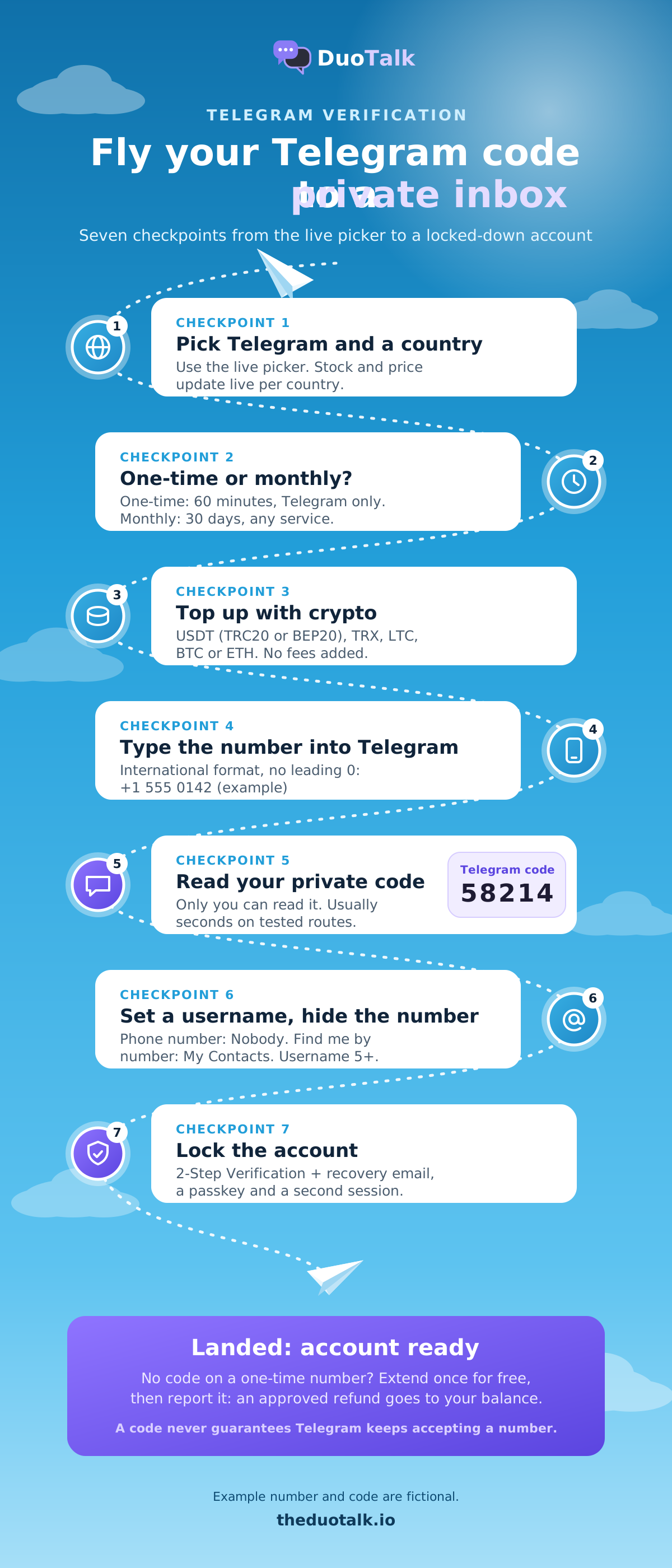
- In the live picker at the top of this page, keep Telegram selected, choose a country with stock and pick one-time or monthly.
- Pay from your balance. Top-ups are crypto only: USDT (TRC20 or BEP20), TRX, LTC, BTC or ETH. No fees or tax are added at checkout.
- Copy the number from your DuoTalk numbers list.
- Open Telegram and tap Start Messaging. If you already use Telegram, add a second profile with Settings, Add Account instead; one Telegram app can hold several accounts at once.
- Select the country and paste the number in international format, without repeating the country code or adding a leading zero.
- Tap Next. Telegram sends the code. On tested routes it usually appears in your DuoTalk inbox within seconds.
- Type the code into Telegram, set a display name, and go straight to the safety steps further down this page.
Telegram login code: SMS, app, email or passkey
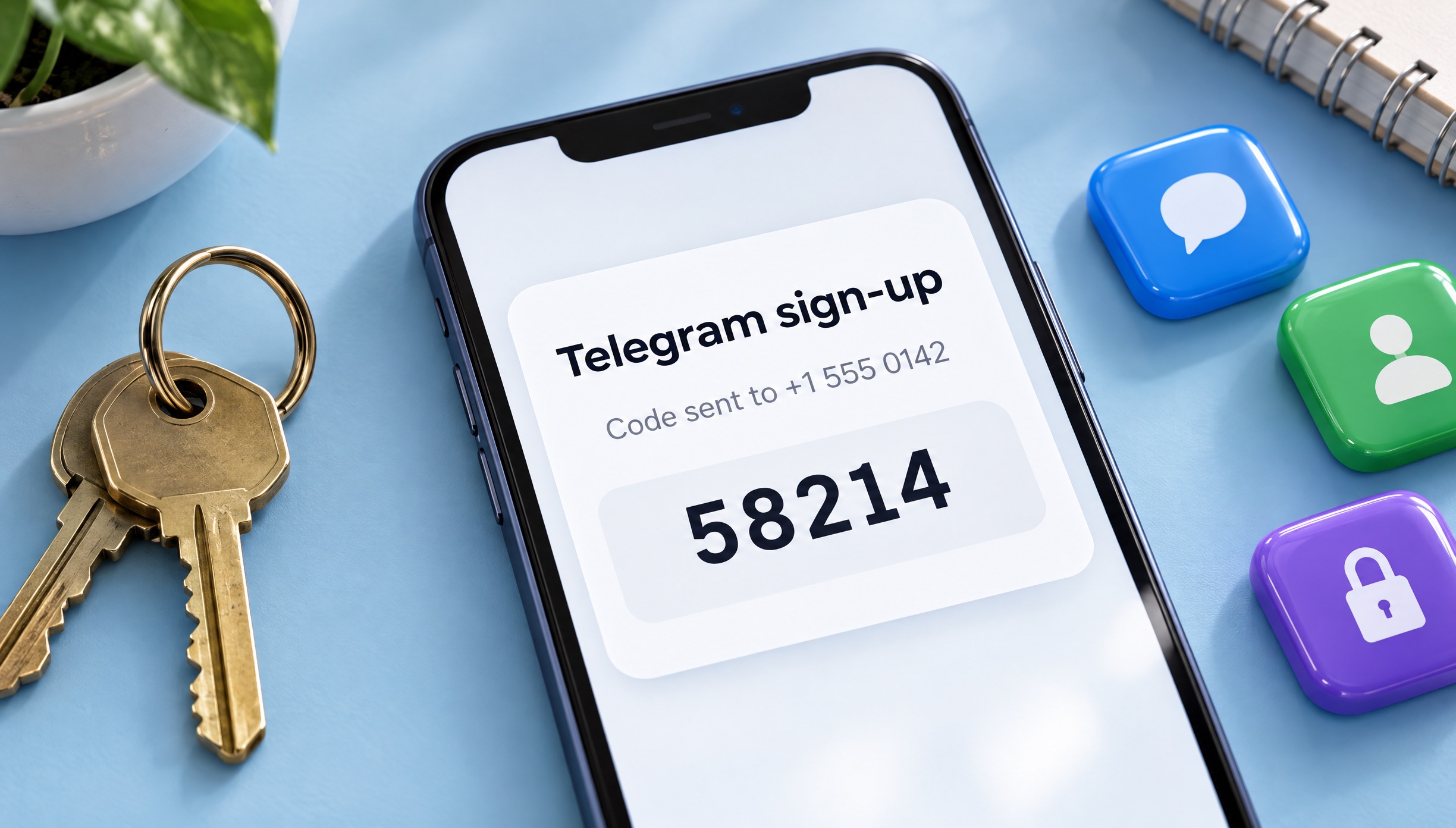
Telegram does not always use SMS. According to Telegram's developer documentation, a login code can arrive as a message inside the Telegram app on another logged-in device, by SMS, by voice call, by a flash or missed call, by email to a configured login email, or on Fragment for anonymous numbers. For a brand-new account there is no other device, so Telegram normally falls back to SMS, which is exactly what a virtual number receives.
| How the code can arrive | When Telegram uses it | Works with a DuoTalk number? |
|---|---|---|
| In-app message on another device | You are already logged in somewhere | Not needed, read it in Telegram |
| SMS | New sign-ups and logins with no other session | Yes, this is what it receives |
| Voice, flash or missed call | Fallback options on some routes | No, numbers do not take calls |
| Telegram login email | Telegram may ask frequent loggers to set one up | Not needed, codes go to your email |
| Payment required | Some regions where SMS is expensive | Telegram asks for Premium first |
| Passkey or QR login | You set them up earlier | Yes, no SMS at all |
The "payment required" row is real: people search for it as "Telegram Premium required for SMS code". Telegram's API documentation describes a response where, when SMS codes are too expensive for a user's country or carrier, the official app asks the user to buy Telegram Premium before it will continue the login or sign-up. If you see that screen, it comes from Telegram, not from your number provider. Choosing a number from a different country may avoid it, but Telegram decides this case by case.
Telegram also runs a Peer-to-Peer Login program in which volunteers' Android phones send some codes, so a code can occasionally arrive from an ordinary mobile number rather than a sender name.
Best Countries for Telegram Numbers
The best country for a Telegram virtual number is the one that has live stock for Telegram in the picker right now and a route that delivers codes; Telegram works the same everywhere once the account exists.
Country still matters for your Telegram number for sign-up in three ways:
- Delivery. Telegram's SMS routes differ by country and carrier. A country that delivers well this week may slow down next week, which is why DuoTalk shows live stock per service and country instead of a fixed list.
- Cost of the SMS to Telegram. Where SMS is expensive for Telegram, it may ask for Premium before sending a code, as described above.
- Visibility. If you ever set your number to visible, the country code tells people roughly where the number comes from. With the number hidden (see the privacy section), nobody sees it.
| If you want... | Look at | Why |
|---|---|---|
| A Telegram verification number in the USA or Canada | USA virtual phone number or Canada virtual phone number | Common formats, wide app support |
| A Telegram verification number in the UK | UK virtual phone number | Matches your audience if you share it |
| An Asian number for a regional project | Hong Kong virtual phone number or Indonesia virtual phone number | Regional fit |
| The fastest code, any country | The picker sorted by stock | Stock and price change live |
Decision rule: pick a country you would happily keep if you rent a number for Telegram monthly, and pick whatever has stock if it is a one-time code. If two numbers from one country fail in a row, switch country rather than retrying the same one. People also ask for a non-VoIP number for Telegram; our non-VoIP number guide explains what that label means. You can browse every country and service on the Numbers page.
One-Time vs Monthly Numbers for Telegram
A one-time number is a temporary number for Telegram verification: use it when you need a single code and will secure the account immediately; use a monthly number when you will log in again on new devices or may need a fresh SMS code later. This choice decides whether you can still receive Telegram codes next month.
Telegram's FAQ is clear about the risk: keep your account connected to "a phone number you control, otherwise you risk losing access to your account forever." If you lose the number and have no active Telegram session, Telegram says it cannot help.
| Question | One-time (60 minutes) | Monthly (30 days) |
|---|---|---|
| Can I receive a second code for the same sign-up? | Yes, for 7 minutes after the first code | Yes, any time in the 30 days |
| Can I log in on a new phone next week? | Only through another session, passkey or email | Yes, by SMS too |
| Does it receive codes from other apps? | No, Telegram only | Yes, any service |
| Does it renew by itself? | No; you can renew it for another paid hour before it ends | No, renew from your numbers list before day 30 |
| Refund if no code | Free extension once, then report for a balance refund | On request within 48 hours if no SMS ever arrived |
| Best Telegram use | Bot testing, a short project, an account you will move later | A Telegram monthly number for work, community admin, any account you keep |
Two worked examples
Ayesha, community admin. She runs a study group and wants an admin account that is not her personal number. She buys a monthly number, signs up, sets a username, hides the number, turns on 2-Step Verification with a recovery email and adds a passkey on her phone. In week three she logs in on her laptop with an SMS code to the same number. After 30 days she can renew, or let it end because the passkey, password and two live sessions now protect the account.
Leo, bot developer. He needs a test account for one afternoon, so a one-time number is enough. He sets a 2-Step Verification password, keeps Telegram Desktop logged in, and can later use Change Number if the project grows.
For a full cost and lifecycle comparison of the two types beyond Telegram, read one-time vs monthly virtual numbers, or see the temporary phone number page for short-term numbers in every country.

Telegram Usernames and Privacy Settings for a Virtual Number
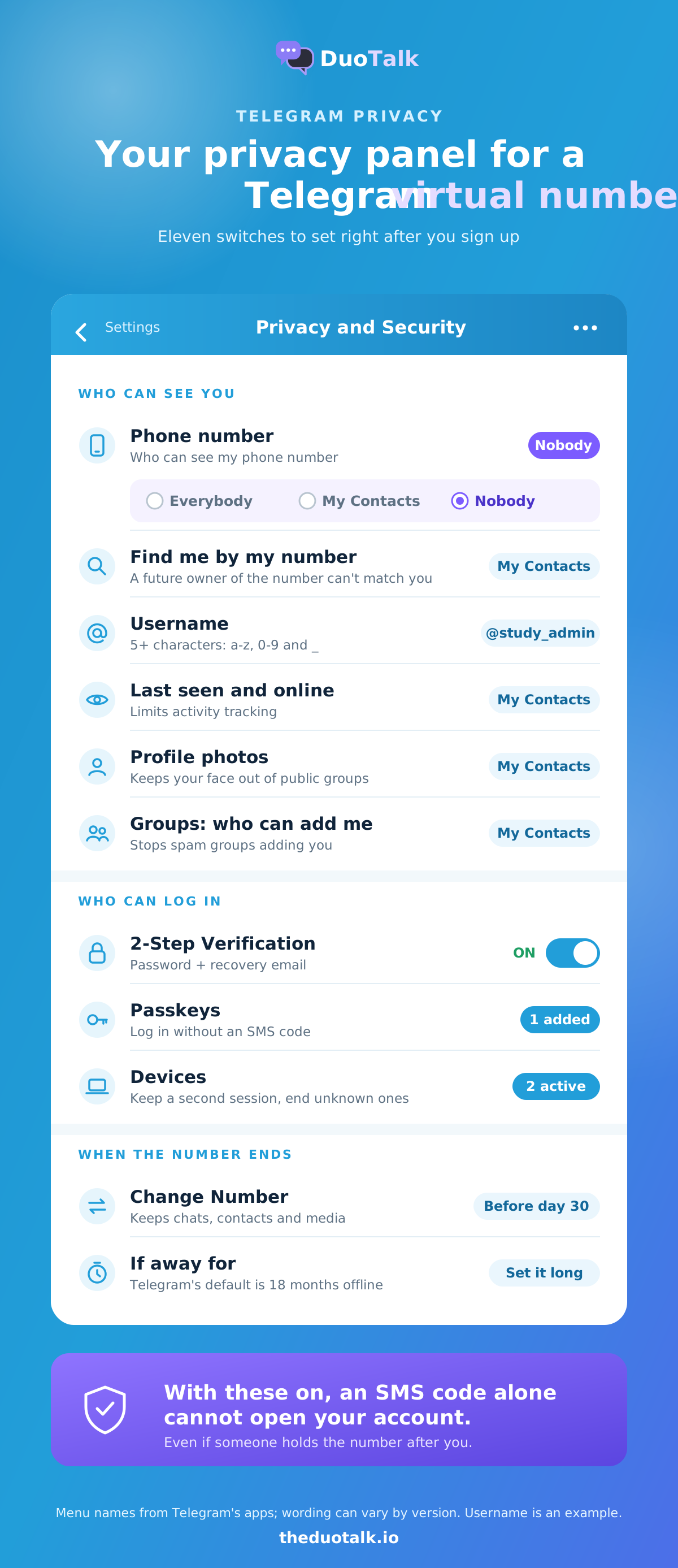
To hide your phone number on Telegram, set a username and change three privacy settings so no one can see or search your Telegram virtual number. By default Telegram shows your number only to people who saved you as a contact; you can hide it from everyone.
A Telegram username instead of a phone number lets people find and message you. Telegram's FAQ says usernames can use a-z, 0-9 and underscores and give you a t.me/username link; Telegram's app text adds that a username needs at least five characters. Share that link instead of the number.
| Setting (Settings, Privacy and Security) | Set it to | What it protects |
|---|---|---|
| Phone Number: Who can see my phone number | Nobody | Hides the virtual number from everyone |
| Phone Number: Who can find me by my number | My Contacts | Stops a future owner of the number matching it to you |
| Username (Settings, Edit profile) | A name of 5+ characters | Lets people reach you without a number |
| Last Seen and Online | My Contacts or Nobody | Limits activity tracking |
| Profile Photos | My Contacts | Keeps your photo out of public groups |
| Groups and Channels: who can add me | My Contacts | Stops spam groups adding you |
The second row matters more with a virtual number than with a personal SIM. Virtual numbers are eventually reassigned, so a stranger could one day hold the same digits. With "find me by my number" limited to contacts, typing that number into Telegram will not reveal your profile.
If you also hide your number and have no username, Telegram can generate a temporary QR code that lets someone add you without seeing the number, a feature Telegram introduced on 6 December 2022. Our Telegram without a phone number guide walks through every privacy screen in order.
Keep Your Telegram Account Safe
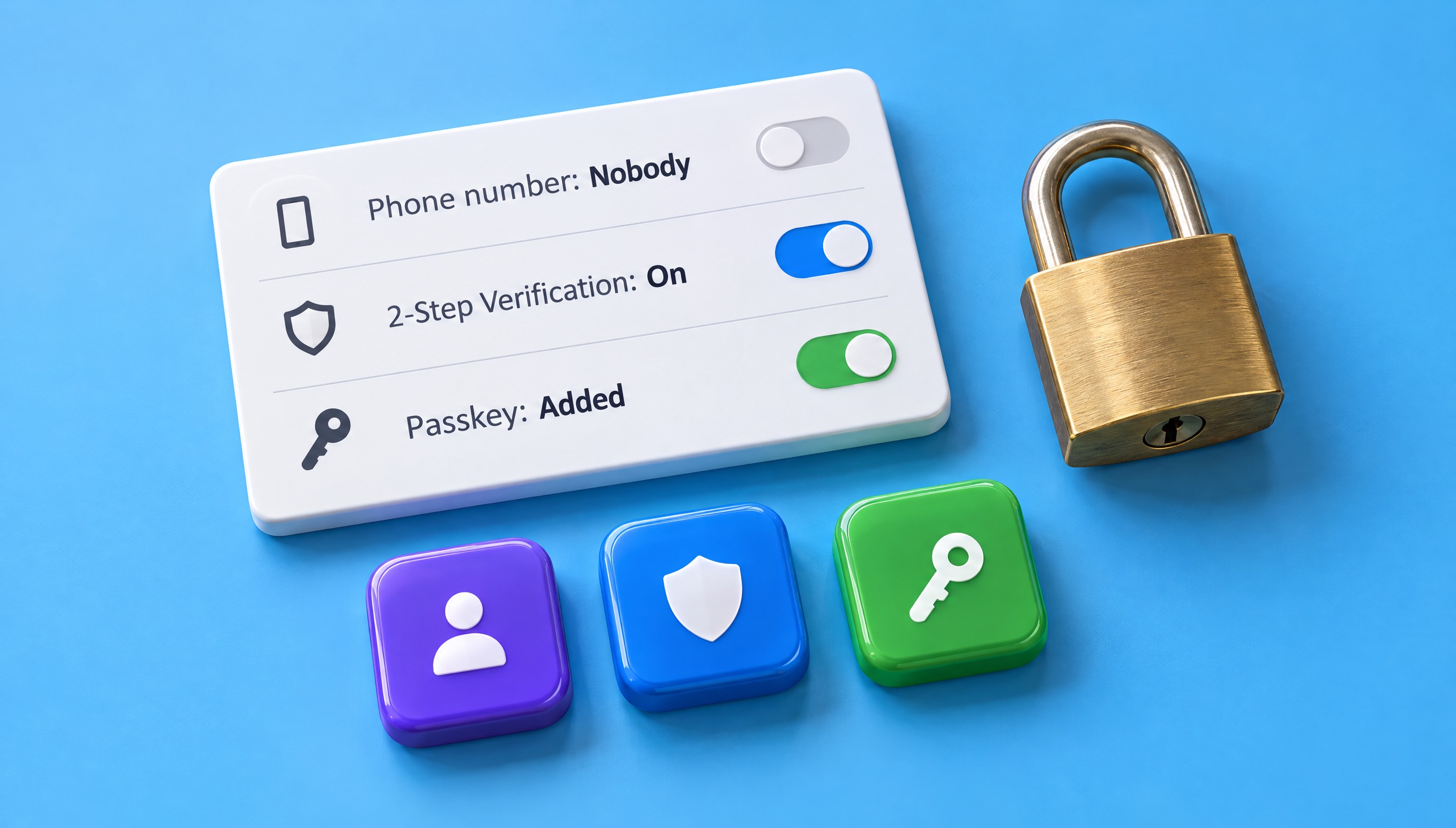
Secure a Telegram account on a virtual number with four things: a 2-Step Verification password with a recovery email, a passkey, a second logged-in device, and a plan for when the number ends. Together they mean an SMS code alone can never open your account, whoever holds the number later.
The safety checklist
- Telegram two-step verification. Go to Settings, Privacy and Security, 2-Step Verification, set a password you use nowhere else, and add a recovery email. Telegram's FAQ says that once enabled, you need both the SMS code and the password to log in.
- Telegram passkey login. Since December 2025 Telegram supports passkeys: go to Settings, Privacy and Security, Passkeys and create one on a device you own. Telegram describes passkeys as a login method that can be used "instead of SMS", but also says to make sure your account uses an up-to-date phone number that you control.
- A second session. Log in on Telegram Desktop or a second phone while the number is still active. Telegram usually sends new login codes to logged-in devices first, so a live session is your best backup.
- Review Devices. Under Settings, Devices, end any session you do not recognise.
- Check the inactivity timer. Telegram deletes accounts after a period offline; the FAQ gives 18 months as the default. Set it longer than any break you expect.
- Telegram Change Number. Before a monthly number ends, either renew it or move the account with Settings, tap your number, Change Number to a number you keep. Telegram says you keep your chats, contacts and media when you change number.
Play by Telegram's rules
Telegram account limited as a new account? Telegram restricts accounts that spam, and its spam FAQ admits that some brand-new accounts get limited before sending anything, because certain numbers trigger "an overly harsh response" due to their previous owners' activity "or due to them being certain virtual/VOIP numbers." If that happens, contact @SpamBot inside Telegram and explain your situation honestly.
Use a Telegram number for one legitimate separate identity: work, a community you run, a project or privacy from strangers. Do not use virtual numbers to mass-create accounts, get around a ban or impersonate anyone. That breaks Telegram's terms, and it gets numbers and accounts limited for everyone.
Telegram Number Pricing and Availability
Before you buy a Telegram verification number, see the live price in the picker above: it depends on the country, the number type and current stock. One-time and monthly numbers are priced separately, so compare both: a monthly number is yours for 30 days and accepts SMS from any service.
What moves the price:
| Factor | Effect on price |
|---|---|
| Country | Routes and demand differ by country |
| Number type | One-time and monthly numbers have separate prices |
| Stock | Countries with low Telegram stock can cost more |
| Demand | Popular countries for Telegram change over time |
How you pay and what protects you:
- Crypto top-ups only: USDT (TRC20 or BEP20), TRX, LTC, BTC or ETH, with a minimum top-up of $15. Your balance updates automatically once the network confirms.
- No added fees or tax at checkout; the price in the picker is what leaves your balance.
- One-time numbers: if no code arrives within 60 minutes, extend once for free on the same number; if it still fails, report it and an approved refund goes back to your DuoTalk balance. Details are on the refunds page.
- Monthly numbers: nothing renews automatically. Renew from your numbers list before day 30, or ask for a refund within 48 hours if the number never receives an SMS.
Compare the alternatives. A Telegram anonymous number (+888), which Fragment calls a collectible number, is traded on Fragment, a blockchain marketplace; Fragment says these "cannot receive regular SMS or phone calls" and work only on Telegram, and they are bought with crypto from existing owners, usually at a much higher price. Free public SMS websites cost nothing, but anyone can read their codes. A private paid number sits in the middle. For the buying process in general, read how to buy a virtual phone number or compare countries on the buy virtual phone number page.
Troubleshooting Telegram Codes
Telegram code not received? If it does not arrive on a virtual number, check the format, wait for the timer, then switch number or country instead of requesting codes again and again. Most failures come from repeated requests, a number already tied to another account, or Telegram choosing a delivery method other than SMS.
| What you see | Likely cause | What to do |
|---|---|---|
| No SMS after the timer ends | Route not delivering for this number | Use the free extension, then report it and try another country |
| Telegram "too many attempts, please try again later" (wording varies) | Telegram rate-limits repeated code requests | Stop requesting; wait several hours, then make one clean attempt with a fresh number |
| Telegram code sent to the app instead of SMS | You are logged in on another device | Open Telegram on that device and read the code in the official Telegram chat |
| Screen asking you to buy Premium to get the code | Telegram's paid-SMS rule for some regions | Try a number from another country, or use an existing session or passkey |
| Telegram asks for a login email | Telegram's login email setup | Add an email you control; future codes may go there |
| Code works but account is limited at once | Number's history or line type | Write to @SpamBot; for a kept account, use a monthly number |
| Number belongs to an existing account | Recycled number | Use a different number; do not try to take over that account |
| "Phone number invalid" | Wrong format | Remove the leading 0 and the duplicated country code |
A short checklist before you retry
- Confirm the country in Telegram matches the number's country.
- Request the code once and wait the full timer Telegram shows.
- Check every device where you are logged in to Telegram.
- On a one-time DuoTalk number, use the free extension before buying again.
- After two failed numbers, change country and wait a little before the next attempt.
For general causes that apply to every app, see not receiving verification codes and why apps reject virtual numbers. The same private-number approach also works for other messengers: see our virtual number for WhatsApp page and the Instagram verification phone number page. If you need codes from many services, the receive SMS online hub and the SMS verification service page cover every option.
Sources
- Telegram FAQ: phone numbers, privacy, usernames, Change Number, 2-Step Verification, passkeys, account self-destruct
- Telegram FAQ on spam and limited accounts, including new accounts and virtual/VoIP numbers
- Telegram blog, 12 December 2025: Passkeys, Gift Purchase Offers and More
- Telegram blog, 6 December 2022: Ultimate Privacy, sign-up without a SIM and temporary QR codes
- Telegram API documentation: user authorization and code delivery types
- Telegram Peer-to-Peer Login program terms
- Fragment: how anonymous numbers and login codes work
Last reviewed: November 2026
Frequently asked questions
Can I use a virtual number for Telegram?
Yes, you can sign up for Telegram with a virtual number, as long as it receives SMS and has not been used for another Telegram account. Telegram does not publish a list of accepted number types, and its spam FAQ notes some virtual or VoIP numbers can trigger limits on new accounts. Use a private number only you can read, then add a 2-Step Verification password and a passkey so the account does not depend on that number.
Where can I get a temporary phone number for Telegram verification?
You can get a temporary phone number for Telegram from a private virtual number service such as DuoTalk, where a one-time Telegram number receives codes for 60 minutes in a private inbox. Avoid free public SMS websites: anyone can read codes posted there, and their numbers are usually already linked to Telegram accounts. For an account you will keep, a 30-day monthly number is safer than a one-time number.
Why is Telegram not sending a code to my virtual number?
Telegram may not send a code because you requested too many codes, the number is already linked to an account, or Telegram delivered the code inside the app on another logged-in device. In some regions Telegram asks for Premium before sending an SMS. Check every Telegram session, wait out any limit, and then try one fresh number from a different country instead of retrying the same one.
Is it safe to use a virtual number for Telegram?
It is safe if the number is private and you secure the account straight after sign-up. The real risk is a reassigned number: if someone later receives SMS on it, an account without a password could be at risk. Turn on 2-Step Verification with a recovery email, add a passkey, set "Who can find me by my number" to My Contacts, and keep a second session logged in.
What happens to my Telegram account when the virtual number expires?
Your Telegram account keeps working after the number expires, because your logged-in sessions stay active when the rental ends. The problem comes at your next login on a new device with no other session: Telegram may send an SMS you can no longer receive. Before the number ends, renew it, move the account with Change Number, or rely on a passkey, password and live sessions.
Can I hide my phone number on Telegram and use a username instead?
Yes. Go to Settings, Privacy and Security, Phone Number, and set "Who can see my phone number" to Nobody, then set "Who can find me by my number" to My Contacts. Add a username of at least five characters using letters, numbers and underscores, and share your t.me link instead of a number. People who already saved your number in their contacts can still see it.
Are Telegram +888 anonymous numbers better than a virtual number?
A +888 number from Fragment needs no SIM and works only on Telegram, with login codes shown on Fragment instead of by SMS. It is bought with crypto from existing owners and usually costs far more than a virtual number, and losing your wallet means losing the code channel. A private virtual number is the low-cost choice for a separate account; +888 suits people who want a Telegram-only number held in a wallet.