How to Receive SMS Online with a UK Virtual Number
Receive SMS online from UK apps on a private +44 number: what works, what needs your own SIM, temporary vs monthly, and what to do when no code shows up.
By the DuoTalk team · Published 2026-11-08 · Updated 2026-11-11
To receive SMS online in the UK, you need a +44 mobile-type number (one that starts with 07) whose texts you can read in a web inbox instead of on a SIM in your own phone. You enter that number on the UK app or website, request the code by text, and read it online a few seconds later. This guide is about the receiving part: which UK services are happy with a virtual number, which ones should only ever get your own SIM, whether to pick a temporary or a monthly UK number, and exactly what to do when a code does not turn up. It reflects how things work in November 2026.
The short answer: To receive SMS online in the UK, get a private +44 7 number, enter it on the UK app with the country set to United Kingdom, request the code by SMS and read it in your online inbox. Use a temporary UK number for a one-off sign-up and a monthly one for an account you will log back into. Banks, GOV.UK and NHS services should get your own UK SIM.
If you want the background on UK number ranges, how Ofcom allocates them and the free options that exist, our UK virtual number guide covers that in depth. This post assumes you already know you need a +44 number and want the codes to arrive. For every other country and every method of getting texts in a browser, start with our guide to how to receive SMS online.
How receiving SMS online with a UK number works
Receiving SMS online with a UK number means a British app sends its code to a +44 mobile number, the UK mobile network delivers it to that number, and a provider shows the message to you in a web or app inbox. Nothing about the code changes on the way: it is the same text a person with a UK SIM would get.
The path a UK verification text takes has four stops:
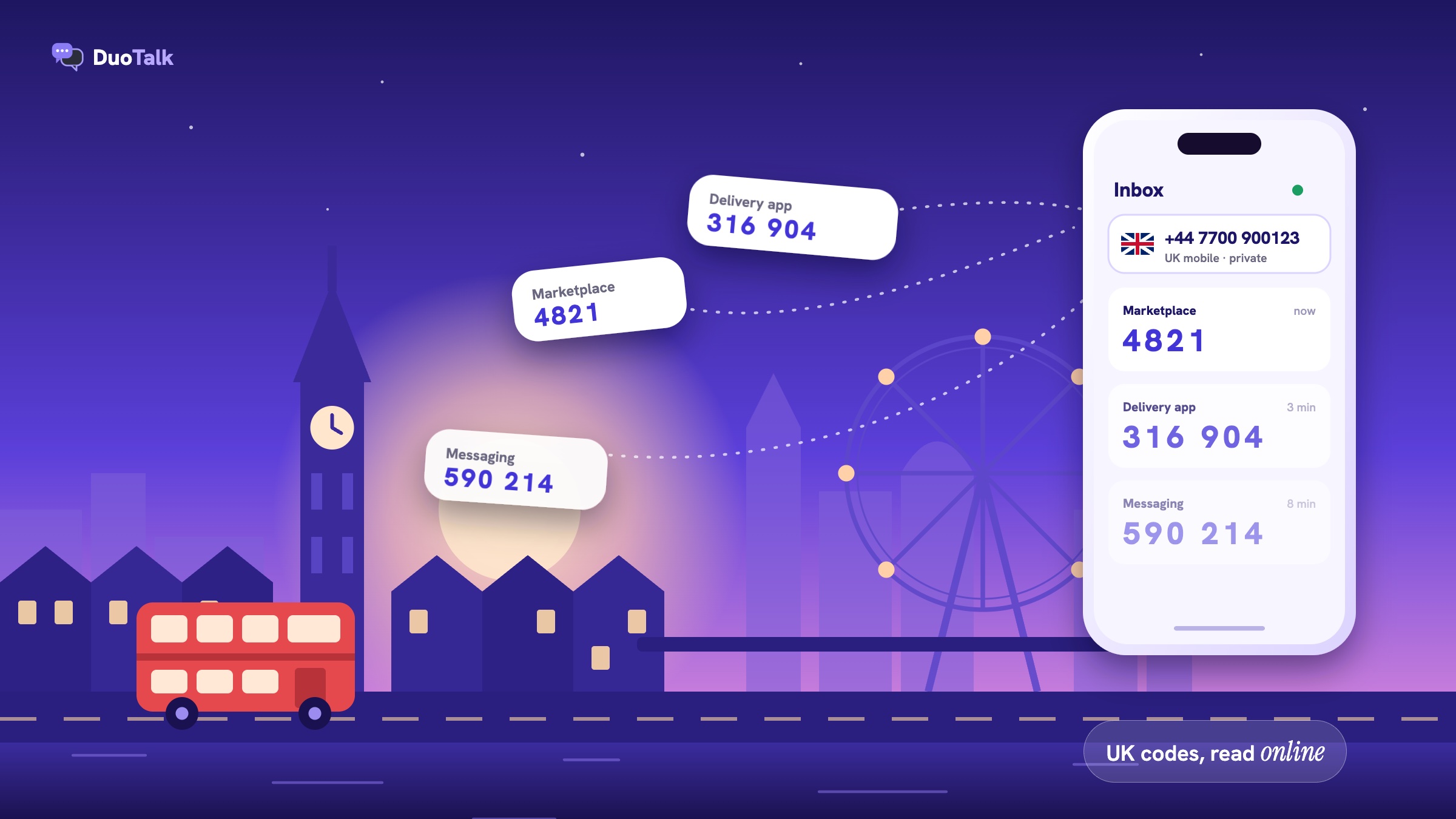
- The sender. The app (say, a UK marketplace) asks its SMS provider to send "Your code is 4821" to +44 7700 900123.
- The UK mobile network. The text travels over the network that holds that number, the same way a text from a friend would.
- The number. The virtual number receives the message like any other mobile line.
- Your inbox. The provider shows the message in a private inbox in your browser or app, usually within seconds.
Many UK services send their codes from an alphanumeric sender ID, a short name such as the brand name, rather than from a phone number. That is why you cannot reply to them, and why a receive-only number is all you need. Some services send from a short code (a 5 or 6 digit number) or a long +44 number instead; it makes no difference to receiving.
What a UK verification text looks like
A UK verification text is short: a sender name, a code of 4 to 8 digits, a validity time and a warning not to share it. A typical example (wording varies by service) reads: "Your verification code is 482913. It expires in 10 minutes. Do not share this code with anyone."
The details differ between services, and they matter when you are working against a timer:
| Service (UK) | Code length | How long it stays valid | Source |
|---|---|---|---|
| Vinted | 4 digits | Not stated; Vinted says to wait a few minutes | Vinted Help Centre |
| Gumtree | 6 digits | Not stated | Gumtree phone verification |
| 6 digits | Not stated; wait for the resend timer before asking again | WhatsApp Help Center | |
| GOV.UK One Login | Short numeric code | 15 minutes; use the most recent code | GOV.UK guidance |
The practical rule: always use the newest code you received, and do not request a second one until the first has had a minute or two to arrive. Requesting several codes in a row is the fastest way to hit a resend limit.
Why the number has to start with 07
UK apps check the first digits of the number before they send anything. A +44 7 number (07 in national format) is a mobile number and is the range built to receive texts. Numbers starting 01, 02 or 03 are fixed-line ranges, and 056 is a range for internet calling, so most sign-up forms either reject them or never manage to deliver the SMS. When you buy a UK number for SMS verification, make sure it is a mobile-type 07 number.
Which UK services accept a virtual number for SMS verification
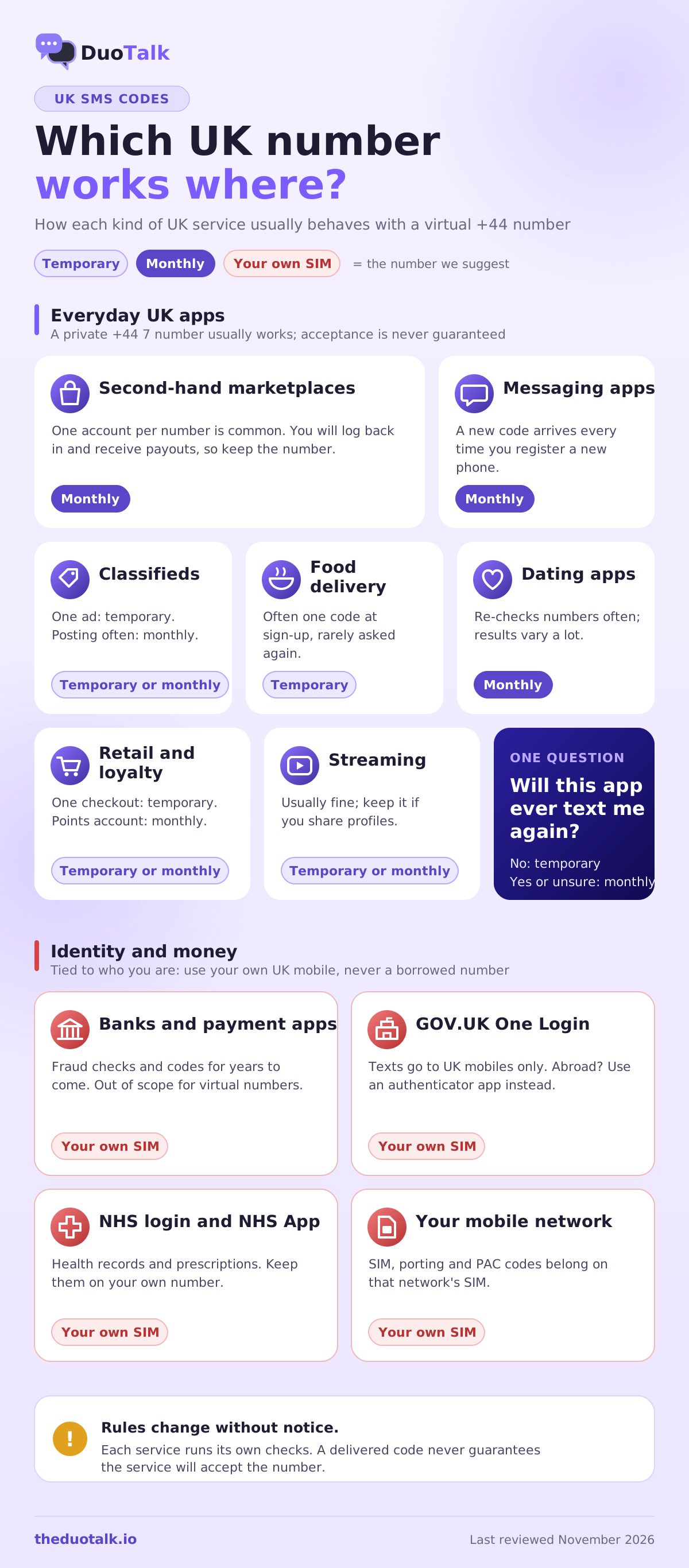
Most everyday UK apps, such as marketplaces, food delivery, messaging, dating, shopping and streaming, will send their codes to a private +44 mobile-type number. Banks, payment apps, GOV.UK and NHS services are the exception: they tie the number to your identity, so use your own UK SIM for them.
Acceptance is never fixed. Each service runs its own checks, and those checks change, so treat the table below as a guide to how each category usually behaves rather than a promise:
| UK service type | Examples of what they protect | Virtual UK number? | Which number to use |
|---|---|---|---|
| Second-hand marketplaces | Seller accounts, messages, payouts | Usually fine for sign-up | Monthly, because you will log back in and get paid |
| Classifieds | Ad posting, buyer contact | Usually fine | Temporary for a single ad, monthly if you post often |
| Food delivery and takeaway | Orders, saved cards | Usually fine | Temporary is often enough; monthly if you change phones a lot |
| Messaging apps | Your chats and contacts | Often fine, never guaranteed | Monthly, because re-registration sends a new code |
| Dating apps | Profile, matches | Varies a lot | Monthly; dating apps re-check numbers |
| Retail and loyalty | Orders, points | Usually fine | Temporary for one-off checkout, monthly for loyalty accounts |
| Streaming and media | Profiles, subscriptions | Usually fine | Temporary or monthly |
| Banks and payment apps | Money | No | Your own UK SIM |
| GOV.UK One Login, HMRC, DVLA | Tax, licences, benefits | No | Your own UK mobile or an authenticator app |
| NHS login and NHS App | Health records, prescriptions | No | Your own UK mobile |
| Your mobile network's account | Your SIM, porting, PAC codes | No | That network's SIM |
Marketplaces and classifieds
UK marketplaces use SMS to make sure each account belongs to a reachable person, and they usually allow one account per number. Vinted's help centre says a phone number "can only be used on one Vinted account" and pauses verification for 2 hours if you enter a wrong number too many times. Gumtree asks for a 6-digit text code when you create an account or post in the Pets category, and also lets one number verify only one account.
That one-account rule is the reason a public free number fails here: someone else has almost certainly used it on the same marketplace already. A private number has no history with the service. Because sellers also receive payouts and may be asked to verify again, a monthly number fits better than a one-hour number for anything you sell on.
Messaging apps, dating apps and social media
Messaging and dating apps send a new code every time you register on a new phone, reinstall or get logged out. That makes the receiving question a long-term one: can you read texts on this number in six months? For WhatsApp in particular, follow the virtual number for WhatsApp guide, which covers its number rules and two-step verification.
Banks, payments, GOV.UK and NHS: use your own number
Use your own UK SIM for banks, payment apps, GOV.UK One Login, HMRC, DVLA and NHS services. These services link the number to who you are, use it for fraud checks, and may send codes years from now. A number you cannot read later can lock you out of your money, your tax account or your health records. This is outside what a virtual number is for, and we do not recommend it.
GOV.UK One Login makes the point clearly: its security code guidance (updated 28 July 2026) says codes by text only go to UK mobile numbers, and that people with a non-UK number should switch to a UK mobile or an authenticator app. If you live abroad and lost your UK SIM, the authenticator app is the official route, not a borrowed number. Codes expire after 15 minutes, and if you asked for more than one, only the most recent works.
Temporary or monthly: which UK number should receive your codes?
Use a temporary UK number when you need one code for a sign-up you will not repeat, and a monthly UK number when the account matters and you will need codes again for logging in, recovery or a new phone. The deciding question is not price but "will this service ever text me again?"
| Question | Temporary UK number | Monthly UK number |
|---|---|---|
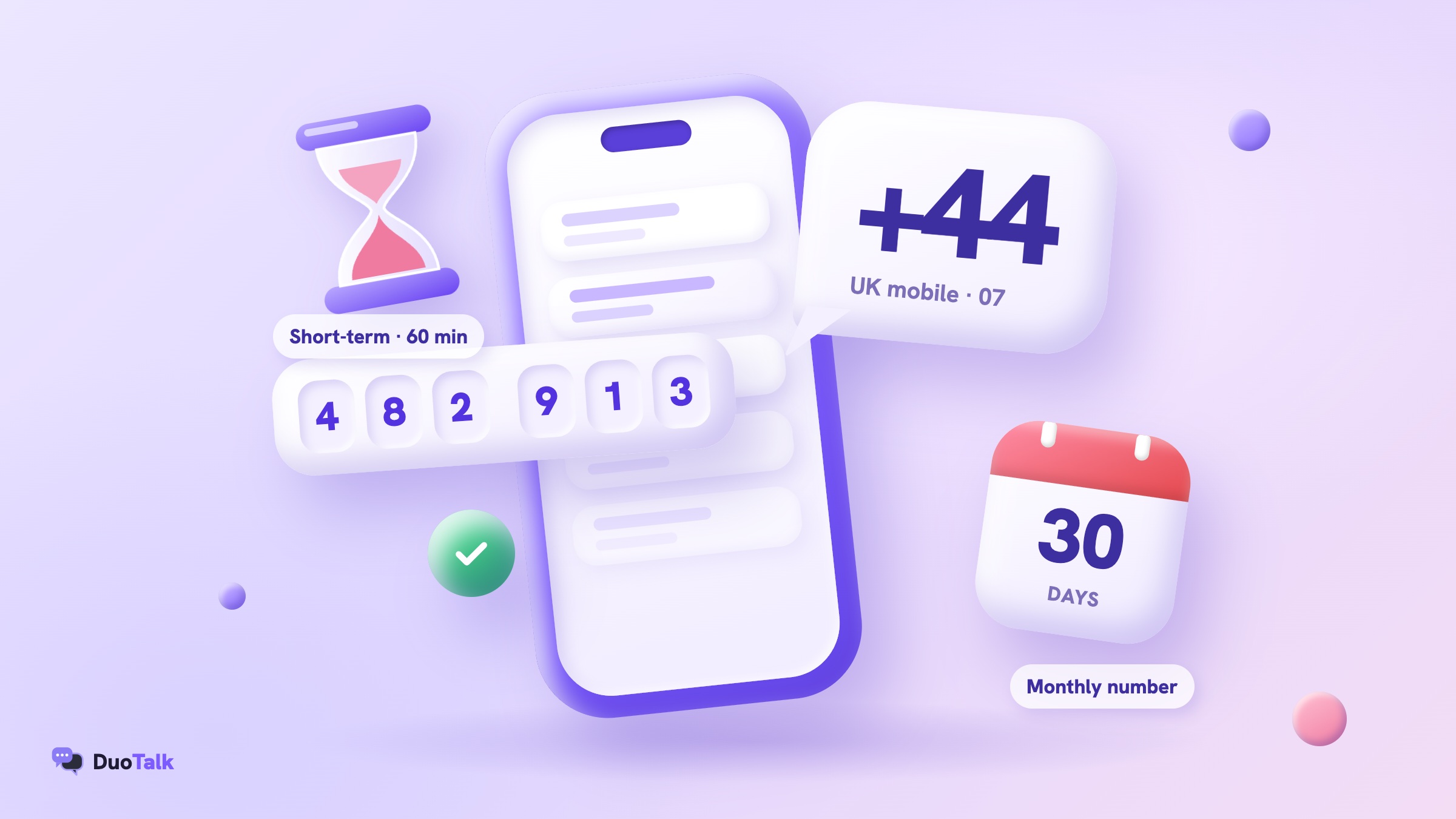
| How long can you receive on it? | A short window (on DuoTalk, 60 minutes) | 30 days, renewable before it ends |
| Which services can text it? | Only the one service you chose | Any service |
| Good for | A one-off sign-up, a test, a single order | Accounts you keep, re-logins, recovery |
| Can you get a code next month? | No | Yes, while you keep renewing |
| What happens if no code arrives? | Extend once free, then report for a refund to your balance | Refund on request within 48 hours if it never receives an SMS |
| Risk | Lose access if the app asks again later | Lose access if you forget to renew |
Decision rules you can apply in ten seconds
- One sign-up, never again (a single order, a one-time download, a quick test): temporary.
- You will log in from another device later: monthly.
- The account holds money, payouts or messages you care about: monthly at least; if it is a bank or payment app, your own SIM.
- The app is known to re-verify (messaging, dating, marketplaces): monthly.
- You are not sure: monthly. Losing an account costs more than an extra few weeks of a number.
Two worked examples
Example 1: a one-off order. You live in Dublin and want to order once from a UK retailer that insists on a +44 mobile at checkout. You buy a temporary phone number from the UK for that service, enter it, receive a 6-digit code within seconds and finish the order. You will never need a code from that retailer again, so the number expiring an hour later costs you nothing.
Example 2: a seller account. You are moving back to the UK in three months and want to start selling on a UK marketplace now. The marketplace will text you again when you log in on your new phone, and it may ask you to confirm the number before a payout. Here a monthly number is the right choice, renewed each month until you have a UK SIM, at which point you change the number in the app's settings while the old one still works.
For a deeper look at the trade-offs over a whole year, read one-time vs monthly virtual numbers.
How to receive SMS online with a UK number, step by step
To receive SMS online with a UK number: choose the service and United Kingdom, buy a temporary or monthly UK virtual phone number, enter it on the app in the format the form expects, request the code by SMS and copy it from your inbox. On DuoTalk the full process usually takes two to five minutes.
DuoTalk (theduotalk.io) is a web app that gives you private virtual phone numbers to receive SMS online for verification codes, so you do not hand out your personal number. Here is the exact flow.
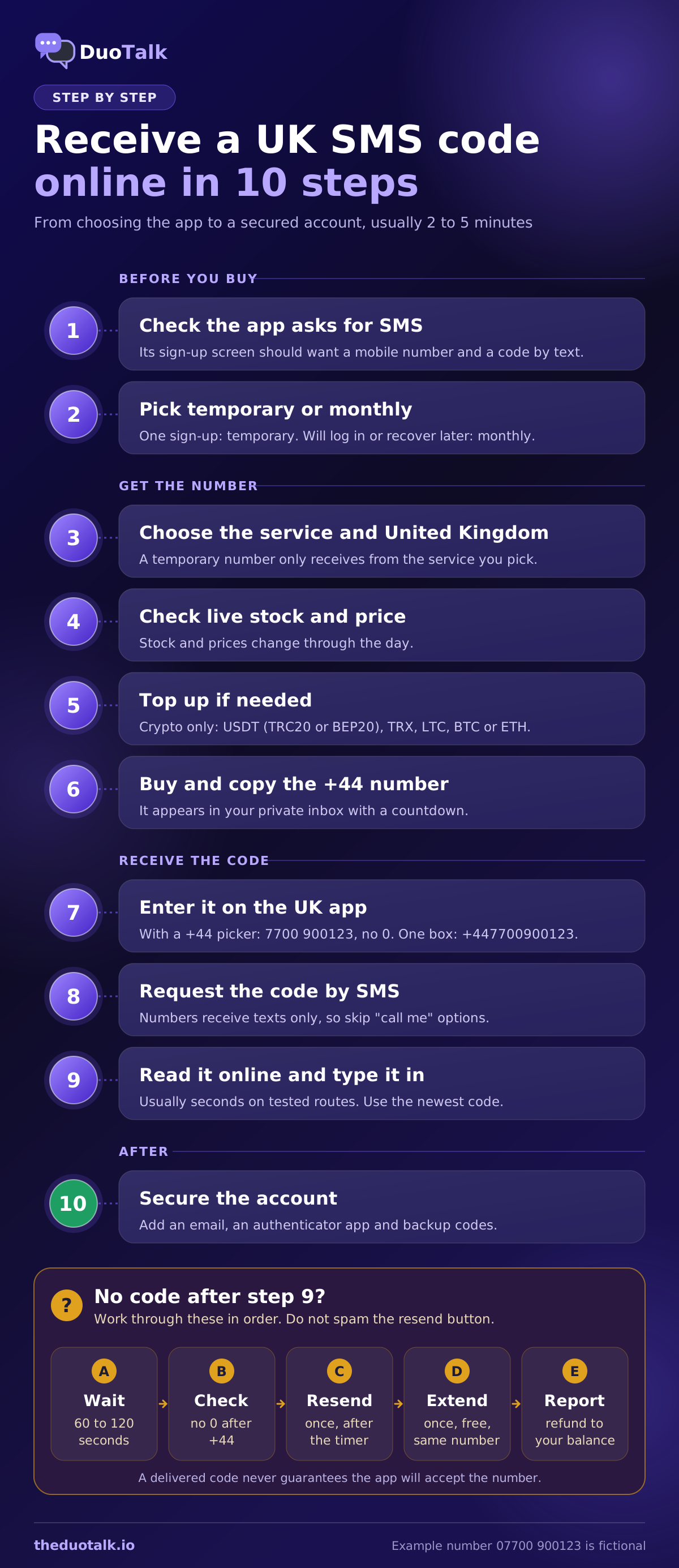
- Check that the service accepts a phone code by text. Open the app's sign-up screen first and confirm it asks for a mobile number and offers SMS (not only a voice call).
- Decide temporary or monthly using the rules above.
- Open the Numbers page and pick the service. Go to live UK numbers on the Numbers page, search for the app, and choose United Kingdom as the country. For a temporary number, the service you pick here is the only one that can text it, so pick carefully.
- Check stock and the live price. Stock and prices change through the day; what you see is what is available now.
- Top up your balance if needed. Top-ups are in crypto only: USDT (TRC20 or BEP20), TRX, LTC, BTC or ETH, with a $15 minimum. The balance appears once the network confirms. There are no fees or tax added at checkout.
- Buy the number and copy it. It appears in your inbox with a countdown.
- Enter it on the UK app. If the form has a country picker set to +44, type the 10 digits without the leading 0 (7700 900123). If it is one free-text box, type +447700900123.
- Request the code by SMS. The numbers receive texts only; they cannot take a "call me" voice code.
- Read the code in your inbox and type it in. On tested routes codes usually arrive within seconds. Use the newest code if more than one arrives.
- Finish the account set-up and add an email address and, if offered, an authenticator app before you close the tab.
Typing a +44 number into a UK form
Most UK forms fail for formatting, not delivery. The safe pattern is: country picker shows +44, so type the number without its first 0; no picker, so type the full international form starting +44. Vinted, for example, asks for the number with "+" and the country code and no spaces. If a form rejects a correct number with a message like "Enter a valid UK mobile number" (wording varies), the problem is usually the 0 or a space, not the number. Our UK virtual number guide has the full format table, including how to dial from abroad.
The timing: 60 minutes, then 7 more
On DuoTalk a short-term number works for 60 minutes after purchase. When the first code arrives, the number stays open for 7 more minutes, which is there for apps that send a second code (for example, one to confirm the number and one to confirm a later step). Plan for that: have the app's sign-up screen open before you buy, so you do not spend the first 20 minutes of your hour looking for the right menu.
Monthly numbers: renew before day 30
A monthly UK number receives SMS from any service for 30 days. Nothing renews automatically: you renew from your numbers list before the 30 days end. Put a reminder in your calendar a few days early. If the number lapses, you may not get the same number back, and an app that texts it later will not reach you.
Receiving UK codes while you are abroad
You do not need to be in the UK to receive a code on a virtual UK number, because the text goes to the number, not to your location. You read it in a browser or app from anywhere with an internet connection, with no roaming charges and no UK SIM in your phone.
That solves the most common reason people search for a temporary UK phone number: they live abroad, or are travelling, and a British app only accepts +44. A few things are still worth knowing before you start.
Your location and the app's rules are separate questions
A UK number gets you the code. It does not change where the app thinks you are, and it does not change the app's terms. Some UK apps only operate for people who live in the UK, ask for a UK address or a UK payment card, or limit features by region. Follow each service's own rules: the number is for privacy and convenience, not for pretending to be somewhere you are not.
Time zones and timers
Codes expire in minutes, and your UK number's window is measured in minutes too. If you are in Bangkok or Los Angeles, buy the number when you are ready to finish the sign-up in one sitting, not late at night with the app half set up. UK services also do not slow down their texts at night, so there is no "better time" to request a code.
Keeping a UK SIM while living abroad
If you still have a UK SIM, keep it for banks, GOV.UK and NHS logins, and use a virtual number for everything else. Pay-as-you-go UK SIMs can be closed after months without use, and the number then goes back to the network for reuse, so use it now and then. If you are moving away for good, switch government sign-ins to an authenticator app before you leave.
For travellers who also need codes from North America, the same approach works with a temporary US phone number or a Canadian phone number for OTP.
Free UK numbers vs a private UK number
Free UK numbers on public receive-SMS websites show every message to anyone who opens the page, so your code, and the account it opens, are visible to strangers. They are fine for testing whether a form sends texts at all, and wrong for any account you want to keep.
Three problems come up again and again with free public UK numbers:
- Anyone can read your code. Whoever reads it first can use it, sometimes to finish the sign-up before you do or to take over the account later with a password reset.
- The number is already used. Because UK marketplaces and messaging apps allow one account per number, an overused public number is often refused with a message like "This number is already registered" (wording varies).
- You cannot get the next code. Public numbers rotate. When the app asks again next month, the number is gone or belongs to someone else.
A private UK number fixes all three: only you see the inbox, it has no history with the service you choose, and a monthly one stays yours for as long as you renew. Our free vs paid SMS verification comparison goes through those risks in more detail.
When a UK verification code does not arrive
If a UK code does not arrive within two minutes, check the number format first, wait for the app's resend timer, request once more, and then switch to a fresh number. On DuoTalk you can extend a short-term number once for free, and if it still fails, report it and the money goes back to your balance.
Most missing codes come down to five causes. The error wording below is typical but varies by service:
| What you see | Most likely cause | What to do |
|---|---|---|
| "Enter a valid UK mobile number" | The leading 0 is still there, or there is a space | Type +44 then the 10 digits without the 0 |
| "This phone number can't be used for verification" | The service's line-type or reputation check refused the number | Try a monthly number or a different service route; for banks, use your own SIM |
| "This number is already registered" | The number was linked to another account | Use a private number; never a public inbox |
| "Too many attempts, try again later" | Too many code requests or wrong entries | Stop and wait; Vinted, for example, pauses verification for 2 hours |
| Nothing at all, no error | Delay or filtering on the sender's side | Wait for the resend timer, request once, then extend or report |
A calm order of operations
- Wait 60 to 120 seconds. Most UK codes arrive in seconds; a few take a minute.
- Check the number on the form. Look for a stray 0 after +44 and the right country.
- Use "Resend code" once, only after the app's timer allows it.
- Extend once (short-term numbers). On DuoTalk, if no code has arrived, you can extend once for free for another hour on the same number. See what to do if no SMS arrives.
- Report and switch. If it still fails, report the number from your inbox; the refund goes to your DuoTalk balance and you can try a fresh number. The report and refund help page shows the steps.
The code arrived, but the app refused the number
Receiving a code does not guarantee that the service will accept the number. A service can still refuse a number after sending a code, for example after a later check. That is the service's decision, and the rules change without notice. If it happens, do not keep retrying the same number: switch to a monthly number, a different number, or, for anything financial, your own SIM. Our guide on why a virtual number is not accepted explains the checks apps run and what to do about each.
Keep the account safe once the code has arrived
After you verify, add a second way into the account: an email address, an authenticator app or passkey if offered, and backup codes if the service gives them. A phone number should be one of several recovery methods, not the only one, whichever kind of number you use.
A short checklist for any UK account you verified with a virtual number:
- Add and confirm an email address you control.
- Turn on an authenticator app or passkey if the service supports it. Guidance from the US standards body NIST (SP 800-63B) treats SMS codes as a restricted method and favours stronger authenticators, which is a good reason to add one.
- Save backup codes offline if offered.
- Note which number you used and its renewal date, in a password manager entry for that account.
- Never share a code. No real UK company will ask you to read a verification code back to them by phone or text.
Scam texts that pretend to be UK services
The UK sees a steady stream of scam texts pretending to be parcel firms, HMRC, banks or the NHS, and some ask you to "confirm" a code. If a text you did not ask for contains a code or a link, do not use it. On a UK SIM you can forward suspicious texts to 7726 for free, as the National Cyber Security Centre explains. A private virtual number used only for sign-ups also keeps your personal number off many marketing and breach lists to begin with.
Receiving UK SMS on DuoTalk
DuoTalk gives you private +44 numbers that receive SMS verification codes in an online inbox, either for 60 minutes (short-term) or for 30 days (monthly). Codes are visible only to you, and live UK stock and prices for each service are on the Numbers page.
What to expect, in plain terms:
- Short-term UK numbers work for 60 minutes and receive SMS only from the one service you chose at purchase. After the first code arrives, the number stays open 7 more minutes for a second code. No code? Extend once for free; if it still fails, report it and the money returns to your balance.
- Monthly UK numbers last 30 days and receive SMS from any service, where monthly stock is available for the UK. Nothing renews automatically: renew from your numbers list before day 30. If a monthly number never receives an SMS, you can ask for a refund within 48 hours.
- Receive only. DuoTalk numbers receive SMS. They cannot send messages or take calls, so choose "send code by SMS" when the app gives you a choice.
- Payment. Your DuoTalk balance pays for numbers; top-ups are in crypto (USDT on TRC20 or BEP20, TRX, LTC, BTC, ETH), with no fees or tax added at checkout.
- Honest limits. Codes usually arrive within seconds on tested routes, but getting a code never guarantees that a service will accept the number, because services change their rules.
To start, see live UK numbers, pick the app you are signing up for, and choose temporary or monthly with the rules from this guide. The app can also be installed on your phone, so the inbox is one tap away when the next code comes.
Questions people also ask
How can I receive SMS online in the UK?
You can receive SMS online in the UK by using a +44 mobile-type virtual number with a web inbox. Choose the service and United Kingdom on a provider such as DuoTalk, buy a temporary or monthly number, enter it on the app (without the leading 0 if the form shows +44) and read the code in your browser. Avoid public free inboxes, because anyone can read the code there.
Can I get a UK phone number for verification if I live abroad?
Yes. A virtual UK number receives texts wherever you are, because the code goes to the number and you read it online. That covers most UK apps that only accept +44. It does not change an app's own rules about residence or payment cards, and government, banking and NHS services should get your own UK mobile, or an authenticator app where offered.
Is there a free temporary UK phone number for SMS?
Free temporary UK numbers exist on public receive-SMS websites, but every message on them is visible to anyone, and most are already used on popular apps. They are useful only for checking that a form sends texts. For an account you want to keep private and recoverable, a paid private UK number is the safer option.
Can I use a UK virtual number for GOV.UK One Login?
You should not. GOV.UK One Login sends text codes only to UK mobile numbers and expects you to keep access for future sign-ins, which a temporary number cannot give you. GOV.UK's own advice for people without a UK mobile is to use an authenticator app instead. Keep government sign-ins on your own number or an authenticator.
Why am I not receiving UK verification codes?
The most common reasons are a formatting error (a 0 left after +44), a resend limit after too many requests, a number type the service refuses, or a delay on the sender's side. Fix the format, wait for the resend timer, request once more, then extend or switch to a fresh number. On DuoTalk, a short-term number that gets no code can be extended once for free, then reported for a refund to your balance.
How long does a temporary UK number last?
It depends on the provider. On DuoTalk a short-term UK number works for 60 minutes after purchase and stays open 7 more minutes after the first code, in case a second one comes. A monthly UK number lasts 30 days and can be renewed from your numbers list before it ends; it does not renew automatically.
Can a UK virtual number receive texts from any app?
A monthly DuoTalk UK number can receive texts from any service, while a short-term number receives only from the one service you chose when buying it. Whether an app accepts the number is a separate question: each service runs its own checks, so a delivered code is never a guarantee of acceptance.
Sources
- GOV.UK, Getting a security code for GOV.UK One Login (updated 28 July 2026)
- Vinted Help Centre, Issues adding your phone number
- Gumtree, Protecting our users via phone verification
- WhatsApp Help Center, How to verify your phone number
- National Cyber Security Centre, Report a scam text message
- Ofcom, Telephone numbers for use in TV and radio drama (source of the fictional 07700 900xxx examples)
- NIST, SP 800-63B Digital Identity Guidelines: Authentication
Last reviewed: November 2026