Virtual Phone Number Without SIM Card: Benefits, Costs and Setup
A virtual phone number without SIM card: receive-only numbers, eSIM lines and VoIP apps compared on cost, what each can do and how to set it up.
By the DuoTalk team · Published 2026-11-17 · Updated 2026-11-17
A virtual phone number without SIM card hardware is a real, dialable number that lives on a provider's servers instead of on a chip inside your phone, so you reach it through a website or an app over the internet. In 2026 there are three practical ways to have one: a receive-only virtual number for SMS codes, an eSIM line from a mobile carrier (no plastic card, but still a SIM in software), and a VoIP calling app that gives you a number for calls and texts. They differ a lot in cost, in what they can do and in how often apps accept them. This guide explains each one in plain terms, gives realistic price ranges with sources, and walks through setup step by step.
The short answer: You can have a phone number without a physical SIM card. A receive-only virtual number gets SMS codes in an online inbox and costs per number; an eSIM line is a full mobile plan with calls, texts and data on a digital SIM; a VoIP app gives you a number for calls and texts over the internet. Pick by the job: codes, a full second line, or cheap calling.
What a virtual phone number without a SIM card actually is
A phone number and a SIM card are two separate things. The SIM is a security credential that lets one device log in to one mobile network; the number is an entry in a database that says where calls and texts for that number should go. Remove the SIM from the picture and the number can still exist, as long as something else receives its traffic.
On a normal mobile line, the SIM stores a subscriber identity (the IMSI) and a secret key. When your phone connects, the network checks that key and then looks up which phone number belongs to that identity. The number itself is not written on the chip in any way that matters: if you lose the SIM, the carrier can put the same number on a new one in minutes.
A virtual number skips the SIM step completely. The provider holds the number on its own platform, which is connected to the phone network. When someone sends a text or places a call to that number, the network delivers it to the provider, and the provider shows it to you in a web inbox or an app. Every number still follows the international numbering plan, ITU-T E.164, which allows up to 15 digits including the country code, so a virtual US number looks exactly like any other: +1 followed by ten digits.
The three SIM-free routes, defined
- Receive-only virtual number. A number that receives SMS into a private online inbox. It cannot call or send texts. It is built for one job: getting verification codes (one-time passwords) without giving out your personal number. Sold for a single code or for a set period.
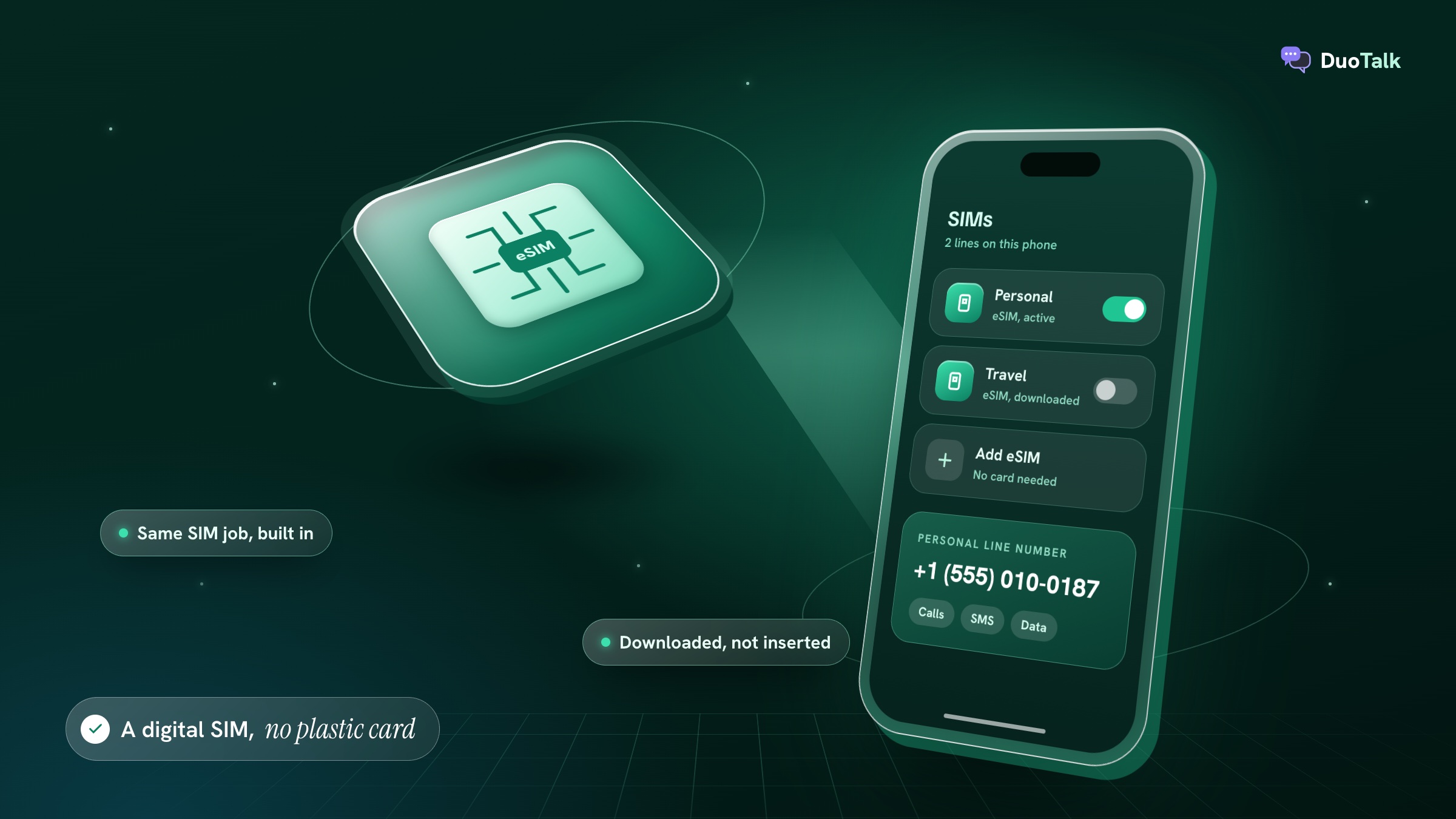
- eSIM line. A full mobile subscription loaded onto a chip soldered inside your phone. You download it instead of inserting a card. It gives you calls, texts and usually data, exactly like a physical SIM. The GSMA, which writes the eSIM standard, describes it as the same SIM function, provisioned remotely.
- VoIP app number. A number that belongs to an internet calling service. You make and take calls and send texts inside the app over Wi-Fi or mobile data. Google Voice is the best-known example in the US.
Wi-Fi calling is not on the list on purpose. It lets your existing carrier number work over Wi-Fi, but it still needs that carrier's SIM or eSIM in the phone, so it is not a way to have a number without one.
How SMS reaches a number that has no SIM
The route is the same one a text to your own phone takes, with the last hop changed:
- The sending app (a bank, a social network, a shop) hands the message to an SMS gateway.
- The gateway sends it into the phone network, addressed to the number.
- Carriers route it to whoever holds that number.
- For a SIM line, the network pushes it to the handset. For a virtual number, the provider's platform accepts it and puts it in your inbox.
If you want the full hop-by-hop picture, including short codes, sender IDs and why some messages never arrive, see our explainer on how a temporary SMS number works.
Virtual number vs real phone number: how the options compare
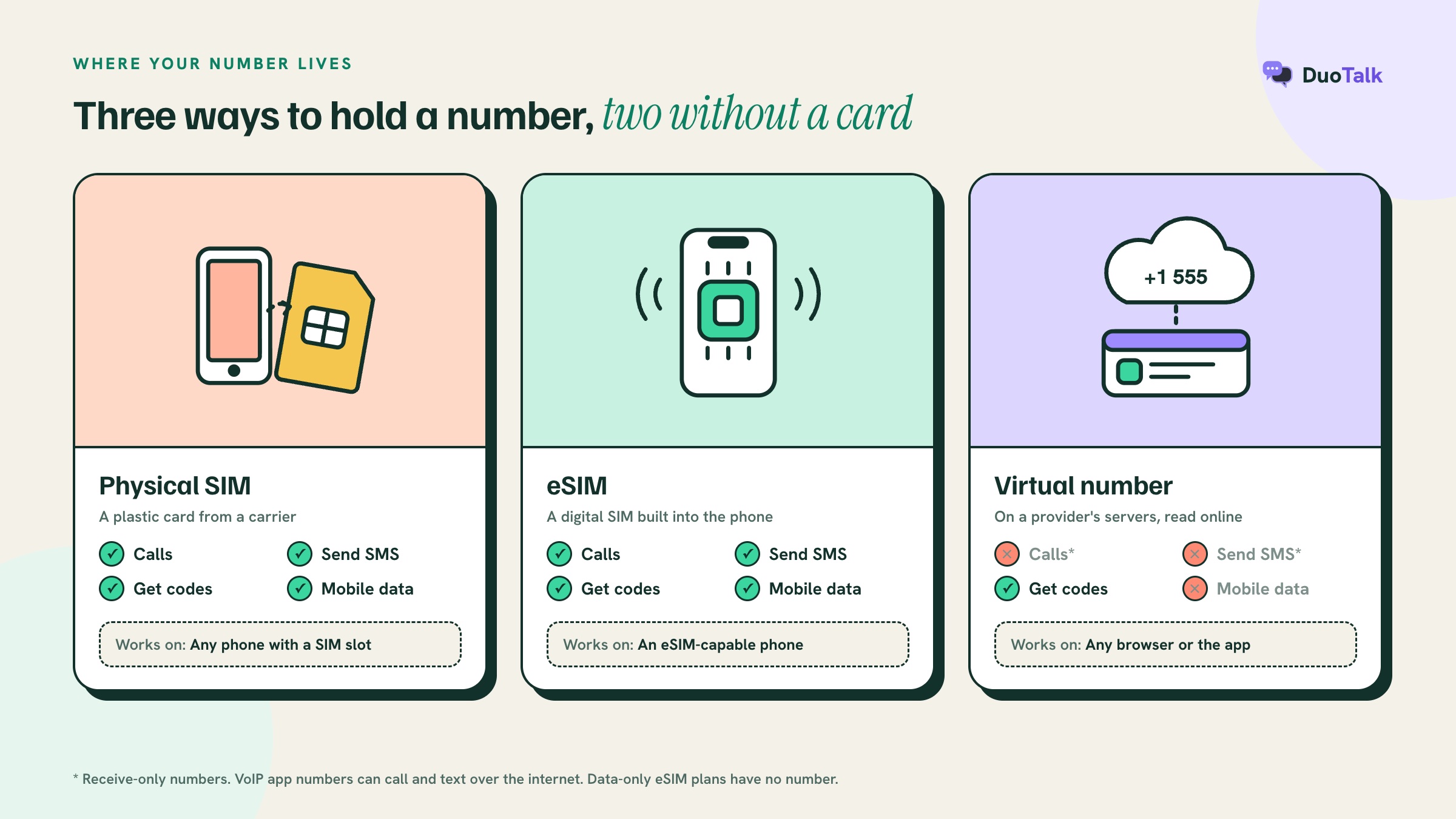
A real phone number on a physical SIM or eSIM can do everything: calls, texts, data and emergency calls, and almost every app accepts it. A virtual number trades some of that for privacy, flexibility and a lower price. The table puts the four options side by side.
| Physical SIM line | eSIM line | VoIP app number | Receive-only virtual number | |
|---|---|---|---|---|
| Needs a plastic card | Yes | No | No | No |
| Needs a compatible phone | Any phone not carrier-locked | eSIM-capable phone | Phone, tablet or computer with the app | Any browser or the provider's app |
| Make and take calls | Yes | Yes | Yes, over the internet | No |
| Send SMS | Yes | Yes | Usually, within its country | No |
| Receive SMS codes | Yes | Yes | Often, but many apps refuse VoIP lines | Yes, that is its job |
| Mobile data | Yes | Yes (data-only eSIMs have no number) | No, it uses your data | No |
| Line type in lookups | Mobile | Mobile | VoIP in most cases | Depends on the number; mobile-type numbers are preferred |
| Identity checks to get it | Often (varies by country) | Often (varies by country) | Account sign-up, sometimes a phone check | Account and payment only |
| Typical commitment | Monthly plan or prepaid | Monthly plan or prepaid | Free tier or monthly plan | Per number: about an hour, or 30 days |
Two rows decide most choices. Calls: if you need to talk to people on the number, a receive-only number is the wrong tool. Line type: many apps run a lookup before they send a code and refuse numbers labelled VoIP, which is why a free calling-app number often fails for verification. Our guide to non-VoIP numbers explains how those lookups work, and if privacy is your main reason, the second phone number comparison weighs five ways to keep your personal line private.
Is an eSIM a virtual number?
No. An eSIM is a digital version of the SIM card, not a different kind of number. The number on an eSIM line is an ordinary mobile number from a carrier; only the chip that authenticates you has changed from removable plastic to a built-in component. Apple describes eSIM as "an industry-standard digital SIM" and says an iPhone can store eight or more eSIMs, while you switch between them or run two at once in Dual SIM mode.
That matters for three reasons. First, an eSIM line is treated by apps exactly like a SIM line, so acceptance is high. Second, getting one usually means a contract or prepaid plan with a carrier, with whatever identity checks your country requires. Third, many "travel eSIMs" sold online are data-only: they give you internet abroad but no phone number at all, so they cannot receive an SMS code. Read the plan details before buying one for verification.
Benefits of a phone number without a SIM card
The main benefit is separation: a number that is not your personal SIM number, which you can give out, use for one purpose, and drop or keep as you choose. Everything else follows from that.
- Privacy for sign-ups. Your real number is tied to your name, your carrier account and often years of data. Giving a different number to a shopping app, a forum or a marketplace keeps your personal line out of their database and out of the next breach.
- No hardware to buy or swap. Nothing to post, insert or lose. A receive-only number or a VoIP number works on the device you already have, and an eSIM downloads in minutes.
- Works on devices with no SIM slot. Tablets and laptops can read an online inbox or run a VoIP app.
- Numbers from other countries. You can hold a UK or US number while living somewhere else, which helps when a service only accepts local numbers. Availability depends on stock and the service.
- Short commitments. A receive-only number can last about an hour for a single code, so you pay once and nothing renews. A monthly one covers an account you will log in to again.
- Less exposure to SIM-swap attacks. A number that is not on your carrier account cannot be moved to a criminal's SIM through your carrier. The FCC adopted rules in November 2023 that require US wireless carriers to verify customers before a SIM change or port-out, because SIM-swap fraud had become common. Keeping low-value sign-ups off your real number reduces the places that number is known.
- Cheaper than a second plan. For codes only, a receive-only number costs far less than paying for a second mobile line every month.
None of these are absolute. A virtual number is not anonymous: the provider knows your account and payment, and every service you register with still applies its own checks.
Limits to know before you rely on one
A SIM-free number does fewer things than a SIM line, and the gaps are where people get caught out. Know these before you put an important account on one.
Receive-only means receive-only
A receive-only virtual number cannot place calls, take calls or send texts. If a service offers "call me with the code" instead of SMS, that option will not work. On DuoTalk, for example, numbers receive SMS only: they cannot send messages or answer voice calls.
Some apps refuse virtual and VoIP numbers
Before sending a code, many apps look up the number's carrier and line type. Some refuse anything labelled VoIP; some also refuse numbers with a poor reputation or numbers from a country that does not match your account. A code arriving is also not the same as acceptance: a service can still refuse a number after it has sent a code, and rules change without notice. If you hit an error such as "this phone number cannot be used for verification" (wording varies), our guide on why apps reject virtual numbers goes through causes and fixes.
Emergency calls
Do not count on a SIM-free number for emergencies. Google's own help page lists "no 911 emergency support" as a limit of the free Google Voice personal plan, and the FCC explains that internet calling services can have limits on 911 calls, such as location problems or no service during a power or internet outage. A receive-only number cannot call anyone at all. Most phones can still dial emergency numbers with no SIM inserted, but that call does not come from your virtual number.
Ownership and recovery
You hold a virtual number only as long as the plan allows. A one-time number ends after its window. A monthly number ends when you stop renewing. When a number ends, it can eventually be given to someone else, and anyone holding it later could, in theory, request a code to an account still linked to it. So for an account you plan to keep, either use a number you will keep, or change the account's phone number to one you control before the virtual one ends.
Country rules for SIM and eSIM lines
Many countries require identity registration for mobile SIM and eSIM lines; the rules differ by country and change over time. That applies to carrier lines, not to how a virtual number is shown in an online inbox, but it is why some people find an eSIM harder to get abroad than expected.
How much does a phone number without a SIM card cost?
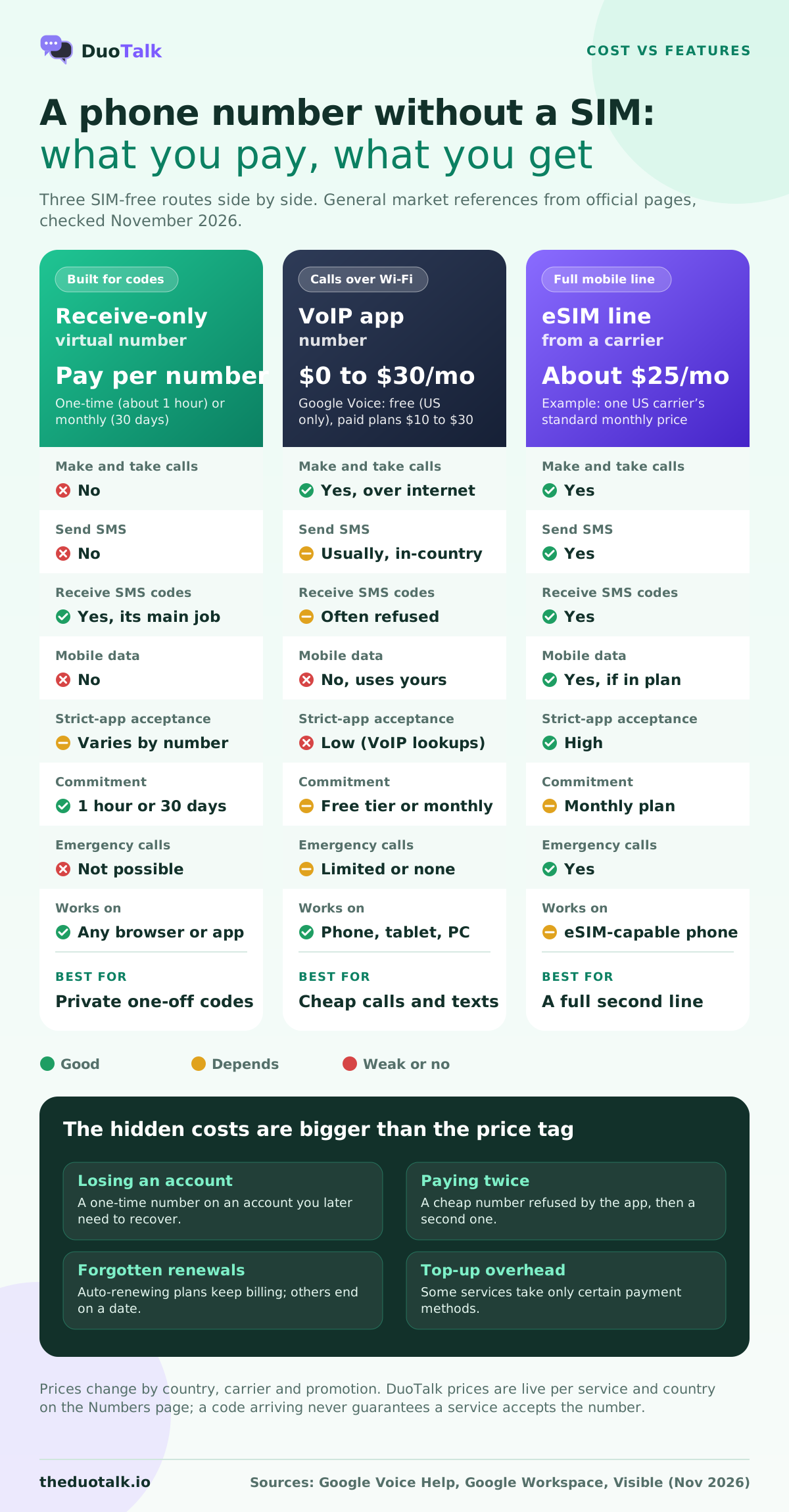
Prices range from free to the cost of a full mobile plan, and the right comparison is cost per job, not cost per month. A free VoIP number that fails verification is more expensive than a paid number that works. The figures below are general market references from official pages, checked in November 2026.
| Option | Typical cost | What you get for it | Source or note |
|---|---|---|---|
| Receive-only number, one-time | Pay per number; from well under $1 in many countries | One service, about an hour, SMS only | Prices vary by service and country; check live prices on the Numbers page |
| Receive-only number, monthly | Pay per 30 days, more than a one-time number | SMS from any service for 30 days, renew to keep | Prices vary by country and stock |
| Google Voice personal | $0 | US number, calls and texts in the US, no 911 | Google Voice subscription types, US only |
| Google Voice paid plans | $10, $20 or $30 per user per month | Business calling features | Google Voice pricing |
| US carrier eSIM line (example) | About $25 per month standard price | Calls, texts, data, a mobile number | Visible plans, taxes and fees included |
| Travel data eSIM | Varies by data amount | Data only, usually no phone number | Read plan details before buying |
Some honest notes on the numbers:
- Carrier prices move. The $25 example is one US carrier's standard monthly price at the time of writing; promotions, other carriers and other countries will differ. The point is the order of magnitude: a second carrier line is a monthly bill, not a one-off.
- Free VoIP is free only if it works. Many apps that check line type will refuse a VoIP number, so the real cost of "free" can be a failed sign-up and a second purchase.
- DuoTalk prices are live. DuoTalk short-term numbers start from well under $1 in many countries, but prices change with service and country, so check live prices on the Numbers page rather than trusting any figure in an article.
The hidden costs of a SIM-free number
The price tag is rarely the expensive part:
- Losing an account. The biggest cost of the wrong choice. If you use a one-time number on an account you later need to recover, and the service asks for a code at that number again, you may be locked out.
- Paying twice. A cheap number refused by the app, then a second number of a better type.
- Renewals you forget. Plans that auto-renew keep charging; plans that do not auto-renew end on a date you need to remember.
- Top-up overhead. Some services take payment only in certain ways. DuoTalk, for example, accepts balance top-ups in crypto only (USDT on TRC20 or BEP20, TRX, LTC, BTC, ETH), with the balance added once the network confirms.
For a fuller breakdown of what drives the price of a verification number, read how much SMS verification costs.
How to set up a number without a SIM card, step by step
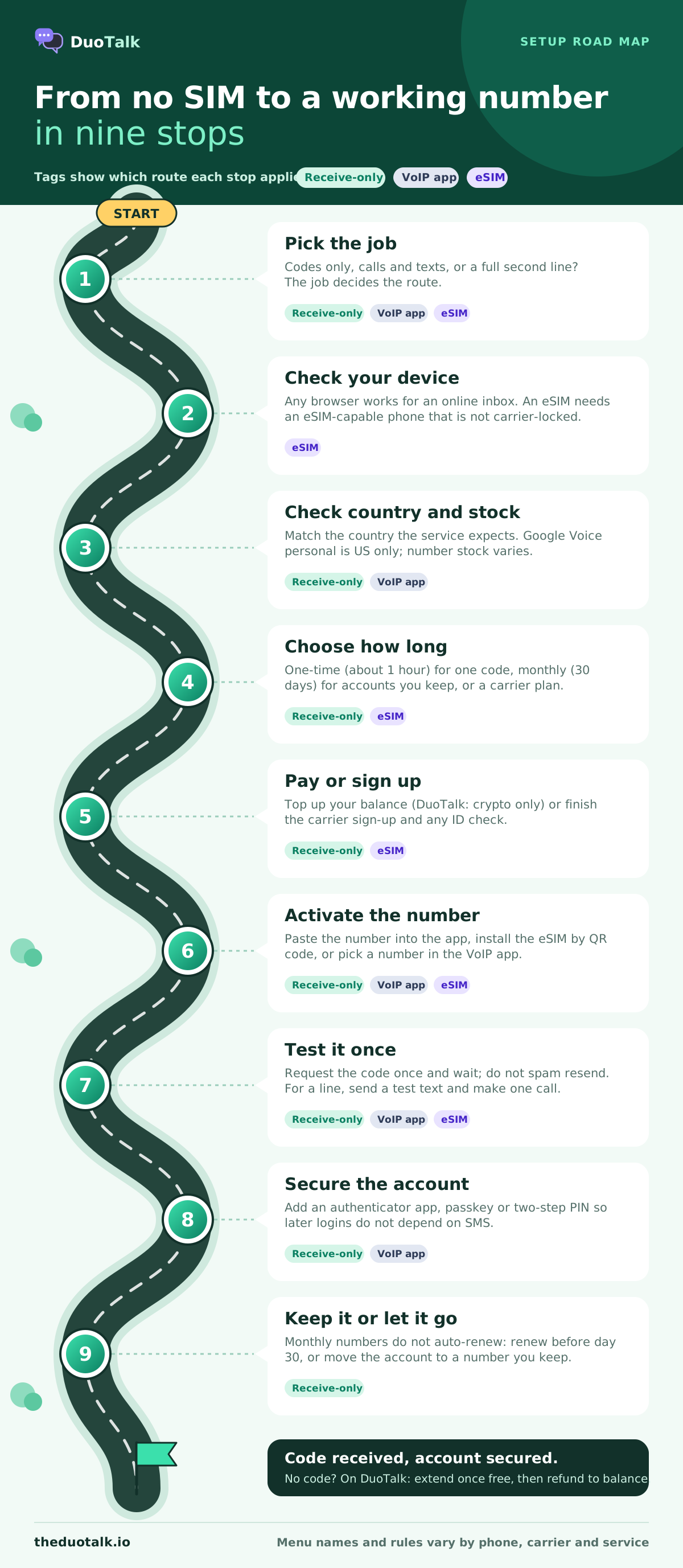
Setup takes a few minutes for each option. Pick the section for the route you chose; the steps are in the order you will meet them.
Option 1: a receive-only virtual number for SMS codes
This is the quickest route when all you need is a code. The example uses DuoTalk (theduotalk.io), a web app that gives you a private virtual number to receive SMS online, but the flow is similar on any private-inbox service.
- Create an account and add balance. Sign up on the web app (it can also be installed on a phone). Top up in crypto; the balance appears once the network confirms the payment.
- Choose the service. Pick the app or website that will send the code, for example Telegram or Google. A one-time temporary phone number receives SMS only from the service you choose at purchase.
- Choose the country. Match the country the service expects for your account. Stock and price are shown live for each service and country.
- Choose one-time or monthly. One-time for a single sign-up you will not need to verify again; monthly if you will log in again or might need recovery codes.
- Copy the number into the app. Paste it in full international format and request the code.
- Read the code in your inbox. On tested routes codes usually arrive within seconds. Enter it in the app.
- Finish the account's security settings. Add an authenticator app or passkey where the service offers one, so future logins do not depend on SMS.
How timing works on DuoTalk: a short-term number works for 60 minutes after purchase, and when the first code arrives it stays open 7 more minutes in case the service sends a second code. If no code arrives, you can extend once for free for another hour on the same number; if it still fails, report it and the money goes back to your DuoTalk balance. A monthly number lasts 30 days and receives SMS from any service. Nothing renews automatically: renew from your numbers list before the 30 days end. If a monthly number never receives an SMS, you can ask for a refund within 48 hours. The number lifecycle page shows each stage.
Option 2: an eSIM line on your phone
Use this when you want a full second line: calls, texts and data on a mobile number, with the highest acceptance by apps.
- Check your phone supports eSIM. Most recent iPhones, Pixels and Samsung Galaxy phones do. US iPhone 14 and later models have no physical SIM tray at all.
- Check the phone is not carrier-locked if the new line comes from a different carrier.
- Choose a plan that includes a phone number. Confirm it has voice and SMS, not data only.
- Complete the carrier's sign-up, including any identity check required in your country.
- Install the eSIM. Carriers use a QR code, their own app, or direct activation. On iPhone go to Settings, then Cellular (Mobile Data in some regions), then Add eSIM. On a Pixel, Settings, then Network and internet, then SIMs, then add a SIM and choose to download one. On Samsung Galaxy, Settings, then Connections, then SIM manager, then Add eSIM. Menu wording varies by model and software version.
- Label the lines and set defaults. Name them (for example "Personal" and "Work") and pick which line is used for calls, messages and data.
- Test it. Send a text to the new number from another phone and make one call before relying on it.
Option 3: a VoIP app number
Use this when you want cheap calling and texting on a separate number and do not need high acceptance for verification codes.
- Check availability. Google Voice personal accounts, for example, are US only and need an existing US phone number that can receive a verification code during setup.
- Install the app on your phone, tablet or computer, and sign in.
- Pick a number. In the US, Google Voice lets you search by city or area code.
- Verify with your existing number if the service asks. This is common, and it means the "SIM-free" number usually starts from a SIM line.
- Set notifications and forwarding, so calls and texts reach you on the devices you use.
- Test both directions: a call in, a call out, a text in, a text out.
Which option fits you: decision rules and worked examples
Match the number to the job, not to the price. These rules cover most cases:
- Use a one-time receive-only number if you need one code for one sign-up you will not need to verify again, and you do not want your real number on file.
- Use a monthly receive-only number if you will log in to the account again, the service may ask for codes later, or you want time to move the account to a permanent number.
- Use an eSIM line if you need calls, texts and data on a second number, you need it for months or years, or the service is strict about line type (banking, payments, government).
- Use a VoIP app if you want a cheap number for calling and texting people, and verification is not the main reason.
- Use your own SIM if the account controls money, identity or other accounts, and the service expects a number you will hold for years. For payment and finance services, follow their identity rules and use a number you can keep.
Worked example 1: a one-off sign-up on a shopping app
Mia wants a discount code from a shopping app she will probably use once. She does not want marketing texts on her personal number. A one-time receive-only number fits: she picks the app and her country, pastes the number, the code arrives, and the number expires after its window. If the app later asks her to re-verify, she can add her own number then.
Worked example 2: a Telegram account she will keep
Mia also wants a separate Telegram account for a community she runs, without sharing her personal number. Telegram may ask for a code again when she logs in on a new device. A monthly virtual number for Telegram is the better choice, and she should turn on Telegram's two-step verification password once she is in. Our pillar guide on how to receive SMS online covers which number type suits which kind of account.
Worked example 3: a work line for calls
Dan freelances and wants clients to call a separate number. A receive-only number cannot take calls, so it is out. If he wants calls on his existing phone with full acceptance, an eSIM line is the clean answer. If he mostly works from a laptop and wants it cheap, a VoIP app number is enough, with the caveat that some apps will refuse it for codes.
Worked example 4: a tablet with no SIM slot
Ana's Wi-Fi-only tablet cannot take an eSIM, but a receive-only number works because the inbox is a web page. If you want every method of getting a code with no SIM laid out side by side, see how to receive OTP without a SIM card.
Troubleshooting a number without a SIM card
Most failures come from three things: the app refused the number type, the message never reached the provider, or the window ran out. Work through these in order.
| Symptom | Likely cause | What to do |
|---|---|---|
| App says the number is invalid or not supported (wording varies) | Line-type check, country mismatch or number reputation | Try a mobile-type number in the country the app expects; avoid free VoIP numbers for strict apps |
| No code arrives after a minute or two | Route problem, app throttling, or the app silently skipped sending | Request once more, wait, then try another number; on DuoTalk extend once free, then report for a refund to balance |
| Code arrives but app still refuses | The service rejected the number after sending | Use a different number type; for strict services, use a carrier line |
| eSIM will not install | Phone locked to another carrier, QR code already used, or no data connection | Ask your carrier to remove the lock, ask the carrier for a new eSIM, connect to Wi-Fi |
| VoIP app will not give you a number | Country not supported, or your verification number is ineligible | Check the app's availability rules; some refuse VoIP numbers for setup |
| Lost access later | The one-time number expired | Change the account's phone number to one you keep before that happens |
Two habits prevent most of these. Request the code only once you have the number open and ready, and never press "resend" over and over: many services slow or block repeat requests. The help page on what to do when no SMS arrives covers the steps on DuoTalk's side.
Getting a SIM-free number for verification on DuoTalk
DuoTalk is built for the narrowest of the three jobs: receiving SMS verification codes on a private virtual number, read in an inbox only you can see. It does not give you calls, data or the ability to send texts, and it does not try to. What it does give you is a choice of country and service, a one-time number for a single code or a monthly number for accounts you will come back to, and clear rules when something goes wrong.
Use it alongside a carrier line, not instead of one: keep your SIM or eSIM number for calls, banking and identity, and use DuoTalk numbers to keep that line off sign-up forms. It is also the better pick when an app refuses free VoIP numbers, and it works on any device with a browser.
The honest limit: getting a code never guarantees the service will accept the number, because services change their rules. If a one-time number receives nothing, extend once for free, then report it and the money returns to your balance. You can see live numbers by service and country before you top up.
Questions people also ask
Can I have a phone number without a SIM card?
Yes. A phone number is a database entry, not something stored on the SIM, so it can live on a provider's servers instead. A receive-only virtual number gets SMS in an online inbox; a VoIP app number lets you call and text over the internet; an eSIM line gives you a normal mobile number on a built-in digital SIM. Which one fits depends on whether you need calls, data or only verification codes.
Can I receive SMS without a SIM card?
Yes, through a virtual number or a VoIP app. Texts sent to a virtual number are delivered to the provider, which shows them in a web inbox or app, so you can read them on a tablet or laptop with no SIM. A phone with no SIM cannot receive ordinary SMS on its own: it needs an active carrier line, physical or eSIM, for that. Some apps refuse VoIP numbers, so check acceptance first.
Is an eSIM the same as a virtual number?
No. An eSIM is a digital SIM card built into the phone, and the number on it is a regular mobile number from a carrier. A virtual number has no SIM of any kind: it lives on a provider's platform and you reach it through an app or browser. eSIM lines have calls, texts and data and are widely accepted by apps; virtual numbers are cheaper and more flexible but do less.
Does an eSIM come with a phone number?
Only if the plan includes one. A carrier eSIM plan with voice and SMS gives you a mobile number, just like a physical SIM. Many travel eSIMs sold online are data-only: they connect you to the internet abroad but have no phone number, so they cannot receive SMS codes. Check the plan description for "voice", "SMS" or "phone number" before buying an eSIM for verification.
Can I use a virtual number for WhatsApp without a SIM?
Often, yes. WhatsApp sends its code by SMS or call, and a private virtual number that receives SMS can get it if WhatsApp accepts that number. Acceptance varies by number and country and can change, so a code arriving is not a guarantee. For an account you will keep, use a number you can hold long term and turn on WhatsApp's two-step verification.
Can a phone number without a SIM be traced?
Yes, to the provider. A virtual number is not anonymous: the provider knows the account and payment behind it and can respond to lawful requests in its jurisdiction. What a virtual number does is keep your personal SIM number, and the identity attached to it, out of the databases of the apps you sign up for. That reduces spam, data-broker exposure and the damage from a leak.
Is a phone number without a SIM card cheaper?
For verification codes, usually yes. A one-time receive-only number is paid once and often costs well under the price of a month on any mobile plan. For calls and data, a carrier eSIM line is a monthly bill similar to a physical SIM plan. Free VoIP numbers cost nothing up front but are refused by many apps, which can mean paying for a second number anyway.
Sources
- ITU-T Recommendation E.164, the international public telecommunication numbering plan
- GSMA, eSIM overview
- Apple Support, About eSIM on iPhone
- Google Voice Help, Identify Google Voice subscription types
- Google Workspace, Google Voice plans and pricing
- FCC, VoIP and 911 Service
- FCC, Rules to protect consumers from SIM-swap and port-out fraud (November 2023)
- Visible, plan prices (example US carrier eSIM pricing, checked November 2026)
Last reviewed: November 2026