Virtual Number for Facebook Verification
A virtual number for Facebook verification lets you receive Facebook's SMS confirmation code in a private online inbox instead of on your personal SIM. This page shows which number type fits your account, how to confirm it in minutes, and how to keep the account recoverable afterwards.
Live prices and stock
Prices and stock on DuoTalk are live. They change during the day by country and service, so the number picker on this page loads the current price and the numbers in stock when the page opens in your browser. Choose or change the country and the service, check the live price, then press Get a Facebook Number.
The short answer: A virtual number for Facebook verification is a private phone number you rent online that receives Facebook's SMS confirmation code in a web inbox, so your personal number stays off the account. Use a one-time number if you only need to confirm a number once, and a monthly number if you want codes again later for logins or recovery. Either way, add an email and an authentication app so you never depend on the number alone.
Get a Virtual Number for Facebook Verification
You can get a virtual number for Facebook verification in about two minutes: choose a country in the live picker at the top of this page, keep "Facebook" as the service, press "Get Number", and type the number into Facebook. The confirmation code appears in your DuoTalk inbox, usually within seconds on tested routes.
DuoTalk (theduotalk.io) is a web app that rents private virtual phone numbers for receiving SMS verification codes, so you can verify accounts without handing out your real number. Each number is private while active: unlike free public "receive SMS" websites, nobody else can read the inbox.
Why people want a separate number for Facebook:
- Privacy. Facebook says it uses the contact details on your account for recovery, security alerts, "providing and improving ads" and suggesting your profile to people who have your number, although you can limit that last one in settings. A separate number keeps your personal SIM out of those systems.
- Separating identities. A Page admin or small seller can confirm their one account without exposing the family phone number.
- Travel and spam protection. If your SIM is abroad or switched off, you can finish confirmation from a laptop, and a number used only for Facebook limits the damage of any leak.
What you get on DuoTalk:
| Feature | Short-term (one-time) number | Monthly number |
|---|---|---|
| How long it works | 60 minutes from purchase | 30 days, renewable before it ends |
| Which services it receives from | Only Facebook (the service chosen at purchase) | Any service |
| After the first code | Stays open 7 more minutes for a second code | Keeps receiving for the full 30 days |
| If no code arrives | Extend once for free (one more hour), then report it and the money returns to your DuoTalk balance | Refund on request within 48 hours if it never receives an SMS |
| Best for | Confirming a number once | An account you will log in to and recover later |
Numbers on DuoTalk receive SMS only. They cannot send texts or take calls, so any "call me instead" option or shortcut that needs you to send a text will not work with them. Choose the SMS option every time.
If you want the full picture of how private inboxes compare with other ways to receive SMS online, the receive SMS online page is the hub for every country and service, and our guide on how to receive SMS online explains the privacy risks of each method.
How Facebook Phone Verification Works with a Virtual Number
Facebook phone verification sends a one-time code by SMS to the number you enter, and you prove you control that number by typing the code back. With a virtual number, the code lands in your DuoTalk inbox instead of on a SIM, and the rest of the flow is identical.
Facebook asks for a phone number at four moments, and each one has different stakes:
| When Facebook asks | What the code does | What happens if you lose the number later |
|---|---|---|
| Sign-up confirmation | Confirms you own the email or mobile number you signed up with | Little, if you also confirmed an email |
| Adding a number in Accounts Centre | Links the number to your account as a contact point | You lose that recovery route; add another |
| Two-factor authentication by SMS | Sends a 6-digit security code at each login from an unrecognised device or browser | You can get locked out unless you have another method |
| Password reset or security check | Proves the account is yours | Recovery becomes much harder |
Meta's Help Centre states that you "need to confirm that you own the email address or mobile phone number" used to sign up, that you "may not be able to use your account until you confirm", and that unconfirmed accounts "may be deleted after one year of inactivity". For two-factor authentication, Facebook says SMS security codes "are always six digits long".
Step by step: confirm a number on Facebook with DuoTalk
- Top up your DuoTalk balance. Top-ups are crypto only (USDT on TRC20 or BEP20, TRX, LTC, BTC or ETH), with a $15 minimum, and credit automatically once the network confirms.
- Pick the number. In the live picker at the top of this page, Facebook is preselected. Choose a country, check the live price and stock, and choose short-term or monthly.
- Copy the full number in international format, including the country code.
- Open Facebook. For a new account, enter the number on the sign-up form. For an existing account, go to your profile picture, then Settings and privacy, Settings, Accounts Centre, Profiles and personal details, Contact info, Add new contact, Add mobile number. Meta notes some people now see "Meta Account" settings instead of Accounts Centre.
- Select the country in Facebook's dropdown so it matches the number's country code, then request the code by SMS.
- Watch your DuoTalk inbox. The code usually appears within seconds. Type it into Facebook exactly as shown.
- Secure the account straight away (see the security section below) before you close the tab.
Does Facebook accept virtual numbers?
Facebook does not publish a list of accepted number types, so nobody can promise acceptance. In practice, services that rely on SMS often run a line-type lookup, and numbers registered as fixed VoIP lines are refused more often than numbers registered as mobile. That is why a non-VoIP number for Facebook has a better chance, and why some app-based numbers never receive Facebook's short-code texts at all. Our guide on why a virtual number is not accepted explains line types, reuse and rate limits in detail.
Receiving a code never guarantees Facebook will accept the number. Facebook can send a code and still ask for a different number, or ask you to confirm your identity later. Refunds cover numbers that never receive a code, so if no code arrives on a short-term number, extend it once for free, then report it for a refund to your balance.
Best Countries for Facebook SMS Verification Numbers
The best country for a Facebook verification number is usually the one that matches where you actually live and log in, because a number, a network location and a language setting that agree look normal. After that, choose by live stock and price in the picker.
Facebook does not publish acceptance rates per country, so use these decision rules:
| Your situation | Country to try first | Why |
|---|---|---|
| You live in the US or use the account mostly from the US | United States (+1) | Matches your location; see USA virtual phone number |
| You live in the UK | United Kingdom (+44) | Matches your location; see UK virtual phone number |
| You live in Canada | Canada (+1) | Same +1 format as the US, local to you |
| You travel often and keep one home country | Your home country | Keeps the account's history consistent |
| Your first choice is out of stock | The nearest country in stock | Stock changes daily in the picker |
A USA number for Facebook verification or a UK number for Facebook verification is simply a +1 or +44 number. Select the matching country in Facebook's dropdown, because a US number typed under the UK flag fails before any SMS is sent. Stock is live: The country list on DuoTalk changes with supply. Check the live stock count next to each country rather than relying on a fixed list. You can browse every country on the Numbers page.
One-Time vs Monthly Numbers for Facebook
Use a one-time (short-term) number when you only need to pass a single confirmation and will secure the account with an email and an authentication app. Use a monthly number when you want Facebook to keep sending you codes for logins, security checks or recovery.
The difference matters more on Facebook than on most apps, because Facebook uses the number for account recovery. A short-term number lasts 60 minutes. If Facebook later sends a reset code to it, you will not be able to read it.
| Question | One-time number | Monthly number |
|---|---|---|
| Can I confirm my account? | Yes, within 60 minutes | Yes |
| Can I get a login code next week? | No | Yes, while the rental is active |
| Can I use it for SMS two-factor? | Not recommended | Possible, but an authentication app is safer |
| Does it renew? | Only for another paid hour, before it ends | Not automatically; renew from your numbers list before day 30 |
| Can other apps use it? | No, Facebook only | Yes, any service |
Decision rule: if losing the account would hurt (a Page you run, Marketplace history, years of photos), use a monthly number or your own long-term number, and add an authentication app on day one. If you only need to pass one confirmation step and the account has an email and an authentication app as backup, a one-time number is enough.
Before a monthly number ends, either renew it or remove it from Facebook (Accounts Centre, Contact info, select the number, Delete number). A number you no longer control should never stay on an account as a recovery route.
For a longer comparison of the two models across many services, read one-time vs monthly virtual numbers. If you want to rent a number for Facebook verification for longer than a month, renew the same monthly number each cycle so the account keeps one stable contact point.
Secure Your Facebook Account: 2FA, Recovery Codes and Account Recovery
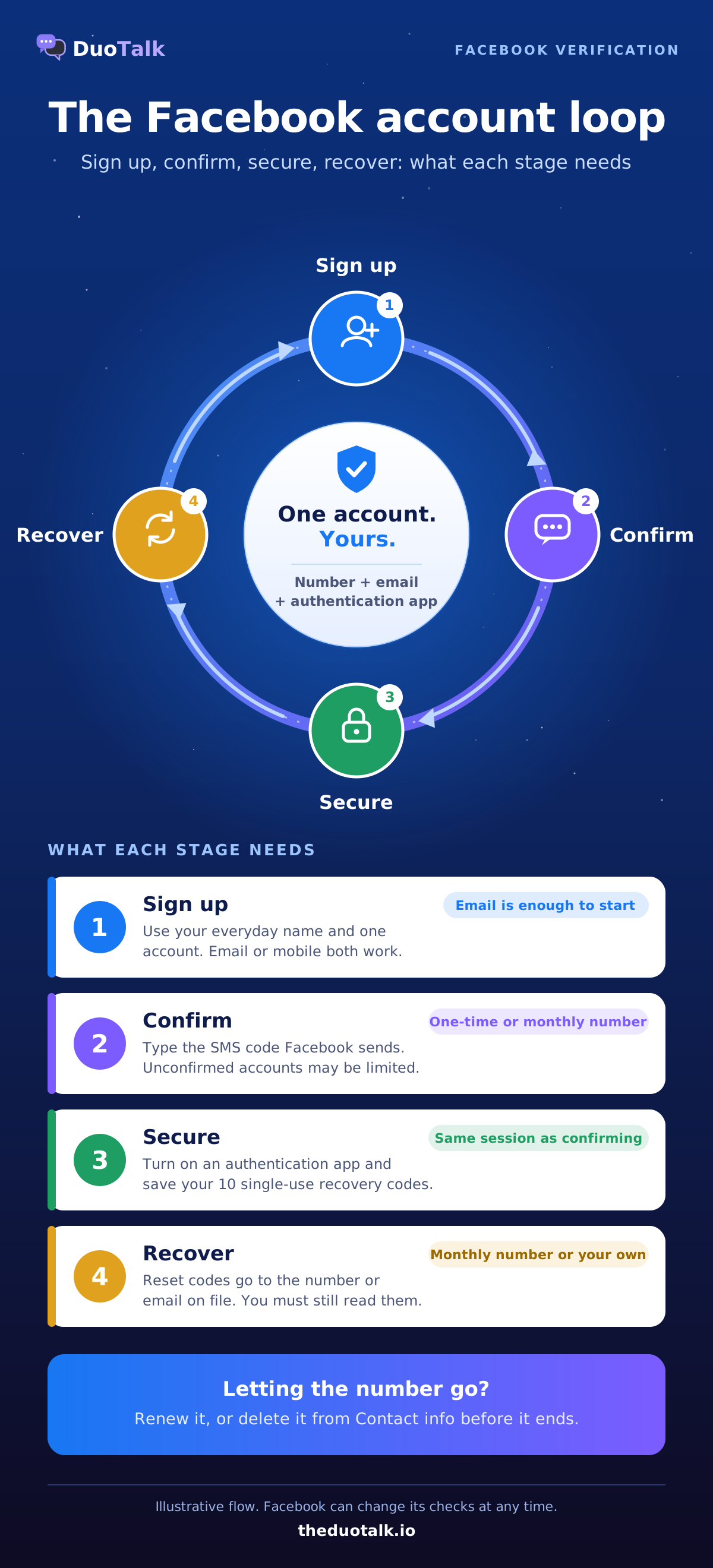
The safest Facebook setup is a confirmed email, an authentication app for two-factor, and ten saved recovery codes, with the phone number as one extra contact point rather than the only key. Set this up in the same session you confirm the number.
Turn on Facebook two-factor authentication with an app
Facebook offers three main two-factor methods: text message codes, an authentication app and a physical security key. An authentication app (such as Google Authenticator or Duo Mobile) generates codes on your own device, so it keeps working even if a phone number expires.
- Install an authentication app, ideally on the device you use most.
- In Facebook, open Settings, then Accounts Centre, then Password and security, then Two-factor authentication.
- Select your account and choose "Authentication app".
- Scan the QR code or enter the setup key, then type the code the app shows.
Facebook's own SMS page also advises setting up "a second security feature" in case your phone is lost, stolen or hacked.
Save your Facebook recovery codes
Facebook gives you ten recovery codes, and "you'll only be able to use each code once." Get them in Accounts Centre, Password and security, Two-factor authentication, your account, Additional methods, Recovery codes, "Get new codes". Store them in a password manager or print them; do not keep them only inside Facebook.
A security key (a U2F or FIDO2 hardware key) is the third option; keep a backup method with it, because a lost key without a backup is another lockout.
Recovery: what happens if you lose access
If you cannot get a code, Facebook's troubleshooting page lists these routes, roughly in this order:
- Wait a few minutes, because texts can be delayed.
- Approve the login from a device where you are already logged in.
- Enter one of your saved recovery codes.
- Choose "Need another way to authenticate?" and pick another method.
- Confirm your identity, which may involve uploading an ID; Facebook says it typically reviews these requests within 1 to 2 working days.
If you can no longer reach the email or number on the account, Meta tells you to go to facebook.com/login/identify on a device you have logged in with before, choose "No longer have access to these?", and follow the prompts. Any new contact you add there must not have been used on your account before.
Never share a Facebook code with anyone. Facebook will not ask you for it by chat or phone. A message asking for "the code we just sent you" is a takeover attempt, whatever name it uses.
Facebook Number Pricing and Availability
The live price for a Facebook number is shown in the live picker at the top of this page, next to each country with its current stock. Prices change with country, demand and number type, so DuoTalk shows them live rather than printing a list here.
What moves the price:
| Factor | Effect |
|---|---|
| Country | Each country has its own supply and cost |
| Number type | One-time and monthly numbers are priced separately; a monthly number is yours for 30 days and receives from any service |
| Demand for Facebook | Popular services draw down stock faster |
| Stock level | Low stock can shift the price; the picker shows the live count |
What you do not pay:
- No fees or tax at checkout. The price you see is taken from your DuoTalk balance.
- A refund route for a code that never comes. On a short-term number you can extend once for free, then report it; after review, the money goes back to your balance. Read the refund rules for details.
- No automatic renewals. Monthly numbers only renew when you press renew.
Unlike a free public inbox, a private number means nobody else can read your confirmation or reset code, and unlike a second phone number on a SIM, it needs no hardware or contract.
If you are new to buying numbers, the buy virtual phone number page explains filters (country, number type, rental length and price), and the guide on how to buy a virtual phone number walks through checkout with a crypto top-up.
Troubleshooting Facebook Confirmation Codes
Most "Facebook not sending code to phone" problems come from a wrong country code, too many requests in a row, or a number type that cannot receive Facebook's texts. Work through the checks below before you buy a second number.

| Symptom | Likely cause | Fix |
|---|---|---|
| Error straight after you press "Send" | Wrong country selected or number typed with an extra 0 | Re-select the country, paste the number in international format |
| "Send SMS again" does nothing | Too many requests | Meta says that after several requests you should "wait a day before trying again" |
| Code never arrives on a DuoTalk number | Route or number not accepted by Facebook at that moment | Extend once for free on the same number, then report it for a refund to balance and try another country |
| Code arrives but Facebook refuses it | Code expired or a newer code was sent | Use only the latest code, request a fresh one if needed |
| Code accepted, number rejected | Facebook's checks on the number | Report it if eligible, then try a different number or country |
| Facebook keeps asking for a phone number | A security check on the account | Complete it with a number you will keep, and add an authentication app afterwards |
| You chose "Call me" | DuoTalk numbers cannot take calls | Go back and choose SMS |
A few more checks that help:
- Do not spam the resend button. Wait at least a minute between requests, and use your usual device and network.
- Confirm by email instead. Facebook lets you confirm a new account with an email address or a mobile number, so if SMS keeps failing, add an email and confirm with that (menu wording varies). That is also the honest answer to "can I create a Facebook account without a phone number?": yes, an email works for sign-up, although Facebook can ask for a phone number later in a security check.
- App-based VoIP numbers often cannot receive short-code texts, which is why people report that an app-based number for Facebook is not receiving SMS at all.
Our full guide to verification codes not arriving covers carrier blocks, filters and rate limits across many apps, and the help article on what to do when no SMS arrives explains the extend and report buttons step by step.
What a Virtual Number Will Not Do on Facebook
A virtual number gives you privacy for your own account; it does not change Facebook's rules. Meta's Terms of Service say to "only create one account (your own) and use it for personal purposes", to "provide accurate information about yourself", and that if Meta has disabled your account for violations, you agree "not to create another account without our permission".
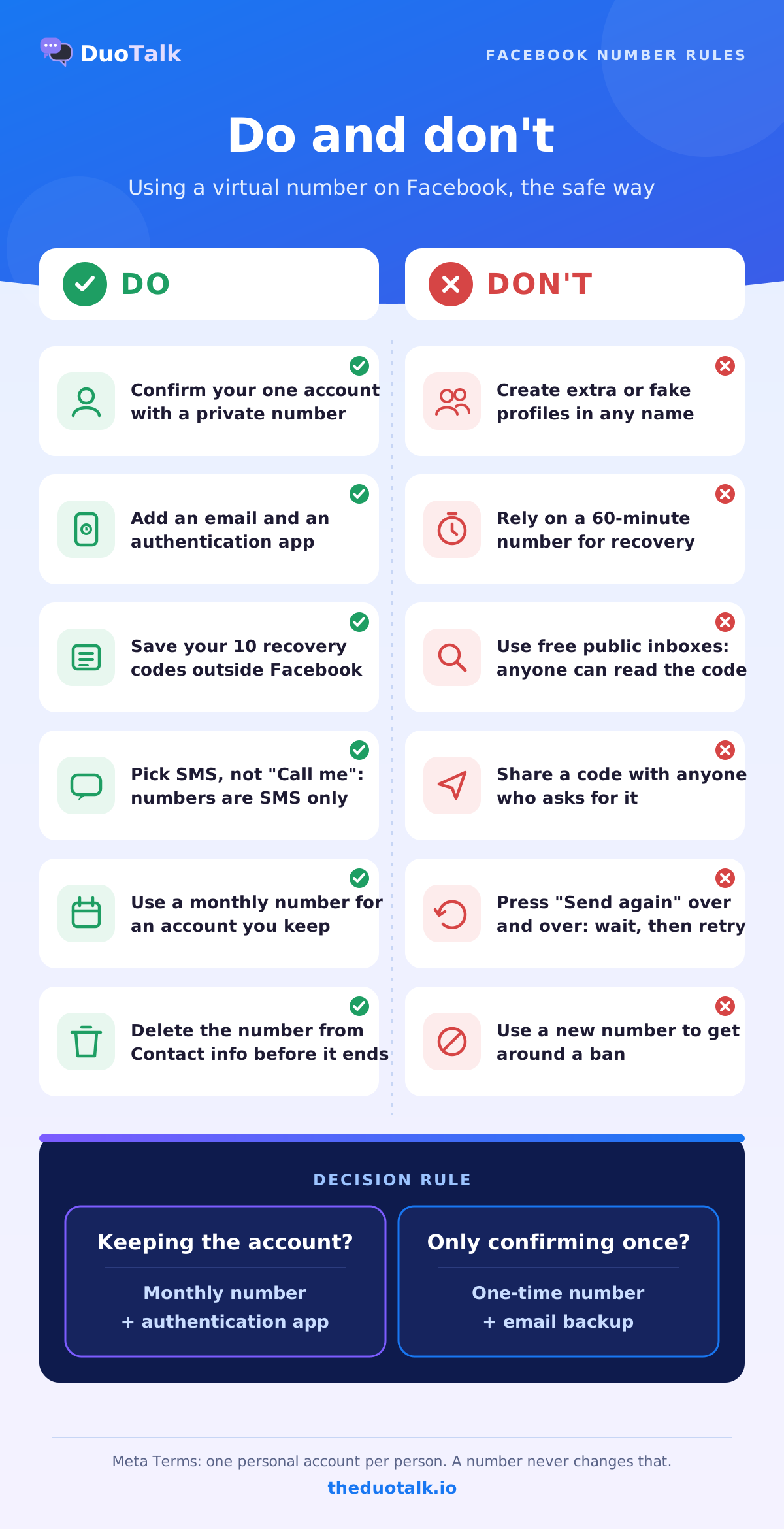
So DuoTalk numbers are for:
- confirming your one personal account without exposing your SIM;
- adding a separate contact point to an account you already own;
- keeping a work or Page-admin identity apart from a family phone number, inside Facebook's rules;
- testing your own app's "Log in with Facebook" flow with your own account.
They are not for, and this page will not help with:
- creating extra or fake profiles, or accounts in someone else's name;
- getting around a disabled account, a ban or a restriction (use Meta's own review and appeal process instead);
- buying, selling or sharing Facebook accounts or login codes;
- skipping an identity check Facebook asks you to complete.
If your account was disabled, a new number will not fix it; follow the instructions Meta shows you on the disabled-account screen. If you think you were hacked, use Meta's account recovery flow from a device you have used before.
Other services follow the same principle. If you also need a code for a messaging app, see our virtual number for WhatsApp page, and for Instagram (which shares Accounts Centre with Facebook) see the Instagram verification phone number page. For general one-off codes, the temporary phone number page and the SMS verification service page explain the other number options. For a deeper look at keeping codes private across all your accounts, read how to choose a private SMS verification number.
Sources
- Meta Terms of Service, section 3.1 "Who can use Facebook"
- Facebook Help Centre: Finish creating your Facebook account and confirm your email address or mobile number
- Facebook Help Centre: How Facebook uses the email or mobile phone number on your profile
- Facebook Help Centre: Use text messages (SMS) for two-factor authentication on Facebook
- Facebook Help Centre: Using an app for two-factor authentication on Facebook
- Facebook Help Centre: Set up Facebook login recovery codes
- Facebook Help Centre: Troubleshoot login with two-factor authentication on Facebook
- Facebook Help Centre: When confirmation codes take longer to arrive
Last reviewed: November 2026
Frequently asked questions
Can I use a virtual number for Facebook verification?
Yes, you can enter a virtual number anywhere Facebook asks for a mobile number, and the SMS code arrives in an online inbox instead of on a SIM. Acceptance is not guaranteed, because Facebook runs its own checks on each number and does not publish a list of accepted types. Private numbers registered as mobile lines are refused less often than free shared ones. Use it for your own single account, and add an email and an authentication app so the number is never your only way back in.
Why is Facebook not sending a code to my phone number?
The usual causes are a wrong country code, too many code requests in a short time, message filtering on your phone or carrier plan, or a number type that cannot receive Facebook's short-code texts. Meta advises checking blocked messages, contacting your network provider about plan limits, and waiting a day if you already requested several codes. You can also confirm with your email address instead. On DuoTalk, extend the number once for free, then report it for a refund to balance.
Can I create a Facebook account without a phone number?
Yes. Facebook lets you sign up with an email address and confirm the account with a code sent to your inbox. Facebook may still ask for a phone number later, for example in a security check or before some features, and you may not be able to use an unconfirmed account at all. If you want a number on the account without using your personal SIM, a private monthly number is the safer choice because Facebook can send recovery codes to it later.
Is a temporary number safe for Facebook?
A private temporary number is safe for the confirmation step itself, because only you can read the code. The risk comes afterwards: a 60-minute number cannot receive a password reset next month. Treat a temporary number for Facebook as a one-time confirmation only, then add your email, an authentication app and saved recovery codes. Never use free public inbox websites for Facebook, since anyone can read those codes and use the number to request a reset on your account.
How do I recover my Facebook account without my phone number?
Go to facebook.com/login/identify on a device you have used to log in before, search for your account, and choose "No longer have access to these?" or "Forgotten account?". Facebook may ask for a new email or number that was never used on your account, then guide you through security checks. If two-factor is blocking you, try a saved recovery code or approve the login from another logged-in device. Facebook says identity reviews typically take 1 to 2 working days.
What is the best two-factor method for Facebook?
An authentication app or a security key is stronger than SMS codes, because neither depends on a phone number that can be lost, recycled or intercepted. Facebook supports all three methods and also gives you ten single-use recovery codes. A good setup is an authentication app as your main method, recovery codes stored in a password manager, and a phone number you control as a backup contact. If you use SMS two-factor with a virtual number, it must be a monthly number you keep renewing.
Can I use one virtual number for several Facebook accounts?
No, and you should not try. Meta's Terms ask each person to create only one personal account, and a phone number is meant to identify one owner. Facebook may also refuse a number that is already linked to another account. If you manage a business, use one personal account and create Pages or a Business portfolio from it instead of extra profiles. A virtual number is a privacy tool for your own account, not a way to run more accounts.